1269
Today’s kids don’t have to worry about turning off your PC before you can unplug your mouse or keyboard
(lemmy.world)

1. Be civil
No trolling, bigotry or other insulting / annoying behaviour
2. No politics
This is non-politics community. For political memes please go to !politicalmemes@lemmy.world
3. No recent reposts
Check for reposts when posting a meme, you can only repost after 1 month
4. No bots
No bots without the express approval of the mods or the admins
5. No Spam/Ads/AI Slop
No advertisements or spam. This is an instance rule and the only way to live. We also consider AI slop to be spam in this community and is subject to removal.
A collection of some classic Lemmy memes for your enjoyment
We used to have time to eat serial, but now everything has to catch the bus.
All devices now have chips that do a handshake with the charger, exchanging information about supported standards and charging using the best common option. So I charge my prohe with a 90W laptop charger, even when it is unable to use the whole wattage
The point is that it is unclear which USB C can do what.
What's the solution here though? I am 100% unwilling to go back to non-compatible and separate chargers for electronics where not completely necessary. It's awesome taking only my laptop charger with me and being able to charge all devices optimally with it.
I think the complaint is more about the ports on computers, and the answer is for manufacturers to label the ports and for users to read them.
That last part is admittedly hard for a lot of people (myself includes at times).
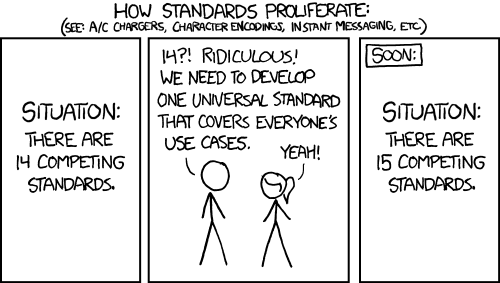
there are too many standards.
for most part, rather than all that mess, maybe just stamp the cable/port with max wattage and max speed. So rather than worry about what standard am I using, I just know what I have and what goes where.
At least thunderbolt you usually get an icon plus number. Though most devices don’t label the ports.
All the other USB standards are confusing as shit.
It also doesn't actually matter at all. You just plug it in and it works. How well it works really doesn't matter in 99% of cases.
And as time goes on the absolute minimum you will come across only goes up and never doesn't work.
So unless your casing the absolute newest feature set where you absolute need say thunderbolt 4 not 3 or 2. Then it doesn't matter.
For wattage you can just read the brick. Its required by law to have that information right on it. For the cable if it doesn't work go but a new cable and retire your old one. Iv had two replace my main USB c to c cable once ever because it wouldn't handle the wattage i needed it to.
Its just a seriously non fucking problem for 99.99% of people.
The minimum feature and watt spec of every cheap piece of shit is well past the point normal people care.
Half the cables I have will charge a phone, but will not pass data. There's no visual clue, so when I want to use a usb mic for example, I have to try cables until I find one that works.
On the other hand, I have a USB-C charged laptop, but it only accepts one specific spec of 45w, and one specific spec for 60w. This means that 90% of usb-c chargers don't work for it, including chargers that support 45w or 60w charging. This means that even if you buy a charger with the right wattage, its effectively random whether it will work or not.
Hooray for standards!

I hated DVI more than I hated VGA, somehow a pin will eventually bend.
You haven't known hate for a display connector until you have experienced the DMS-59:
https://en.wikipedia.org/wiki/DMS-59
Same size as a DVI connector, double the ammount of pins, with twice or thrice the weight hanging off the end
Then you have the graphics connector that I absolutely hate.
DMS-59
Look at the DVI-D Dual Link, that has 24 pins and a blade. DMS-59 uses the same size for the connector, but removes the blade and fits 59 tiny pins in the same space.
It then uses a heavy and bulky splitter cable that puts strain on the connector. The splitter is then connected to two DVI or VGA connectors, adding even more weight and strain on the DMS-59 connector.
It is an idiotic standard and made my love for DP grow strong. Especially once I learned about MST.
I spent two hours today explaining the difference between USBC plugs meaning USB 3 — USB 3.1, USB 3.2, and thunderbolt 4,and the differences between all of that, and how they would affect the performance when my buddy was shopping for an external drive bay enclosure. (You bought a server with TB4 ports, get that TB4 enclosure! Those drives are set up in parallel, so let’s eat that speed!)
I literally had to explain the differences to him for two hours. Not because he was stupid, but because it’s absurdly complicated.
Tell me about it. I've been trying, unsuccessfully for over a month to find a proper USB-C adapter that will give me both USB-A 2.0 and a 4K 120Hz output from my phone via HDMI. (It has to be USB 2 because 3.0 and up ports steal bandwidth from the HDMI port on the adapter). You'd think it would be a simple task, but even the adapters that claim to support 4K @ 144Hz still drop the connection down to 30Hz every time I increase the resolution beyond 1440p. Hell, at this, point, I'd just be happy with 60hz.
All I need is a simple adapter that will allow me to use my phone as a PC at a decent refresh rate, until I finally find the time and patience to sit down and figure out why the hell my PC won't POST after I replaced the CMOS battery. Yet this has proven to be an impossible task.
So this one's like fast, yeah?
lol
He came at me with “are 40 people gonna be watching the same 4K movie at once?”
I honestly had to say “probably not”
But… Still… One can never be too prepared. He paid for all that bandwidth. It’s a shame not to take advantage of it
And, really, what’s the point in even having a set up like this if I can’t transfer a 30 TB file from one drive to another in a few seconds? It’s 2026, goddamnit, how dare you make me wait!
My favorite fucked-up thing from the past was the Macintosh circa 1990. The disk drive on this thing had no eject button -- to eject a disk, you just did the oh-so-fucking-intuitive thing of dragging the disk icon over the trash can icon. But they did very conveniently place the big knobby power button for the whole computer (which looked exactly like an eject button) right above the disk drive. I spent a year constantly powering off the computer every time I wanted to just eject the disk.
At the university I went to in the 90s, there was a bank of 5 Macs. Each one had a printed label next to the power button instructing users that it wasn't the disk eject button.
Today's kids can't afford a PC so it doesn't matter either way.
But things were simpler then, you may think it was bad having so many different ports but you'd be surprised.
Dont forget the stupid DATA-ONLY usb C ports that dont work for your docking station monitors
USB, the jack of all connectors, master of none.
Blame the standards group. There are so many things USB is excellent at but they have been horrifically butchering the implementation.
They need to mandate compliance. Each accessory should support a basic level of features. Packaging and listings should include a facts table which shows the support for the various features. You shouldn't have to guess.
But let's talk about the features. Oh. My. God. Let's talk about it.
USB-PD is great. But they don't have to support it. Or they can have their own implementation which is also compliant. Or their own implementation which isn't.
Oh, but you can connect your headphones into the USB port and play music! Well, only if the device, cable, and headphones support analog audio. Or if the device, cable, and headphones support digital audio. But if it supports digital audio, both devices must support synchronous audio. Or asynchronous. Or adaptive. And none of these are cross-compatible.
Well, that's annoying. At least video isn't bad. You can use it to connect directly to your monitor! Just make sure it's DP. Or HDMI. Or VGA. Or MHL. Or VirtualLink. Only DP and HDMI are cross-compatible.
They also can support Ethernet. Or they might not. They could support ThunderBolt. Or they won't.
They have to be at least USB 3.0. Sorry, 3.1 Gen 1. Wait, 3.2 Gen 1x1. Oh, I mean SuperSpeed USB 5Gbps. Ah, fuck, never mind they changed the standard again - USB1/2 are fine.
But at least manufacturers are happy to put the specs on their packaging and listings, right? I'm sure there isn't any natural incentive to hide this information so they can sell inferior products.
Toslink is not dead yet. It still is the standard for sound systems. And IMO that's not even a bad thing as it just. always. works.
If you plug in the wrong one of these, you can kill any drives attached.
EDIT: Ask me how I know. Seriously, the plugs on each end should define the pin-outs. If it fits, it should not be possible for it to destroy anything, fail gracefully at most. That used to be one of the major reasons for different plug types.

I remember having to "park" the hard drive before shutting down. I also remember the excitement when our school got PC's with a 386 chip and an orange monochrome monitor when everyone else was stuck with green.
USB A 3.0

As with all standards, cheap manufacturing and poor labeling has ruined its perception.
Honestly, were it not for Hanlon's Razor, I'd think tech companies are trying to sandbag open standards compliance so that standards fail and they can fall back to proprietary.
Not entirely sure I don't think that anyway.
I remember getting a USB 2.0 PCMCIA card for my laptop to use my enormous external DVD drive. The only DVDs I had at the time were X-Men, Star Wars Episode 1, and Nothing But Trouble.


Seems to be missing some ports I distinctly remember, like USB B, IR, mini Toslink, dual PS/2, dual e-SATA/USB A, powered USB A, mini coax, BNC, and a few others. Not to mention proprietary crap like HP LifeDrives.
Edit: Mini and Micro HDMI also missing.
You could always unplug your keyboard or mouse without rebooting. Plugging it back in though...
Remember having to park your hard drive before turning off the computer?
Wait... when did you ever need to turn off your PC before you can unplug your mouse or keyboard? Did people genuinely used to need to do this? When? Why?
Yes, PS/2 devices can't be hotplugged.
They very often could be, in the later years. Except when they couldn't.
A common prank in school when I was there was to unplug someone's keyboard and/or mouse then plug it back in.
It wouldn't work again until the computer was rebooted.
Hotswapping wasnt always a thing. It was a feature before it was just generally expected
It's a solid rebuttal, especially when talking about cables (even certified cables are often bullshit), BUT USB-C testers are cheap and you can quickly assess which standards are available for a given cable/port combo.
Still the fact that both USB and HDMI boards thought the current situation was appropriate pisses me off.