techsupport

3104 readers
3 users here now

The Lemmy community will help you with your tech problems and questions about anything here. Do not be shy, we will try to help you.

If something works or if you find a solution to your problem let us know it will be greatly apreciated.

Rules: instance rules + stay on topic

Partnered communities:

You Should Know

Reddit

Software gore

Recommendations

founded 2 years ago
MODERATORS
1


I bought an LG C3 in 2023 and since then, I never updated it. I decide to updated it like 2 weeks ago, and, after the update, I noticed that, if I set HDMI Deep Color to 4k, almost all the clarity settings are grayed out, including the TrueMotion I'm interested in (I like it on Cinematic Movement).

Before the update there wasn't this issue. What can I do?

I tried:

  • changing the cable
  • change the input type to streaming box or Blu-ray player
  • reset the TV

Info:

  • I'm using the TV connect to a pc (with Linux if that matters);
  • OS version: 33.22.95
2


Yesterday I noticed that one of my drives was acting up, it responded very slowly. It isn't my main drive and there was very little data on there, so I wasn't immediately worried, but I did copy some of the most important data to a different drive, just in case. I saved 2 folders and was copying a third, and that was when it stopped responding entirely.

I ran lsblk and it listed the device (/dev/sda), but no partitions (used to be sda1) and also no available space on the drive. That was when I figured I was in trouble and shut off the pc. I haven't turned it back on yet, will probably disconnect it physically first.

There is still some data on there that I would like to recover, but it's not really worth paying for professional recovery. Is there anything I can do? Even if it's a single-shot rescue mission and I trash the drive afterwards.

3


I am admittedly low on the learning curve for my understanding of all things IT related. Ive built machines for emulating tho. And depending on what the hardware is, ive downloaded shadder caches for certain cases to improve performance. My very loose understanding of it is they are universal when certain things match like emulator and version. Are they being included in some roms/emulators and i just didnt realize or is there a more technical reason they arent included?

4


I am on Windows 10 pro and have debloated and stripped as much tracking junk as I could from the OS, so Copilot had been long gone... until two days ago, when it reappeared on my start menu. I assumed it was sneakily reinstalled after an update so I uninstalled it.

Less than 30 minutes later, it was back. I uninstalled it again, and again it reinstalled after about an hour.

I've tried registry edits, I've tried changing the group policy, but it does nothing - Copilot keeps reinstalling itself in the time span of 20 minutes to an hour.

I know being on Lemmy I'm going to get a bunch of "Replace it with Linux!" replies so I'd like to preempt this by promising you that yes, that will happen eventually - there's just some compatibility issues with a couple of my daily driver programs that are pending a resolution.

For now I must stay on Windows, but Microslops incredibly aggressive Copilot reinstalls are pissing me off and I was just wondering if there are any other means in which I can get rid of this program, or at least hide the stupid ugly thing from my sight?

Edit: I suppose it's important to note that I am not nearly as tech-savvy as a lot of people here, but I try to get by. Please keep this in mind if I ask stupid questions.

5


https://youtu.be/6LYqOmmMKnY

https://youtu.be/sXIbOk2CjWM

I did the memtest. Figured out 1 out of 4 ram sticks are bad and sent it out on an RMA. Took the whole rig to a local shop and he load tested the PSU. It failed twice. He recommended I replace the PSU then the motherboard if I still had issues. So I replaced the PSU with a new unit, still the exact same issues. So I replaced the motherboard with a used one. Still the exact same issues. I updated the BIOS. Same issues but a new, more red Asus logo (yay).

I still cannot, for the love of AntiChrist, boot the thing. At. All. Not even from a usb. Attempting to fresh install windows and i have zero input from any devices.

I am at my wits end and I need my PC back up and running.

Linux bros blocked immediately.

6


I'm buying a new laptop, and i need to compare some based on gpu. I heard a lot of the mainstream ones are biased, but i also need the big databases that the big ones provide, as im comparing some quite obscure gpus. thanks

7


I reset the BIOS. I reset the CMOS. I replaced the CMOS. No IDE option in my bios. Thing gets stuck on automatic repair - ill leave it on for hours and nothing.

I removed all additional HDDs and SSDs. I pulled the C drive and backed up the important data. Pulled the GPU and checked it real good. All of the ram as well.

I had gotten a BSOD with the "PNP Driver Watchdog" error. Google is unhelpful as anyone with this BSOD never received nor confirmed a working remedy or solution.

Now, after days of trying I am very rarely able to get to the Windows Install window from my USB. But none of my mice or keyboards work. They'll work briefly for a few seconds and then stop. Nothing works to get them going again forcing me to shut down yet again.

Only thing I can think of is an unplanned and unannounced power shut off while I was out. Less than a week later my PC is pulling this shit. Refusing to boot.

Im ready to take it to a stupid pc repair shop... which im very hesitant on doing as I built this thing. Not to mention I dont like the thought of transporting this huge and heavy thing.

8


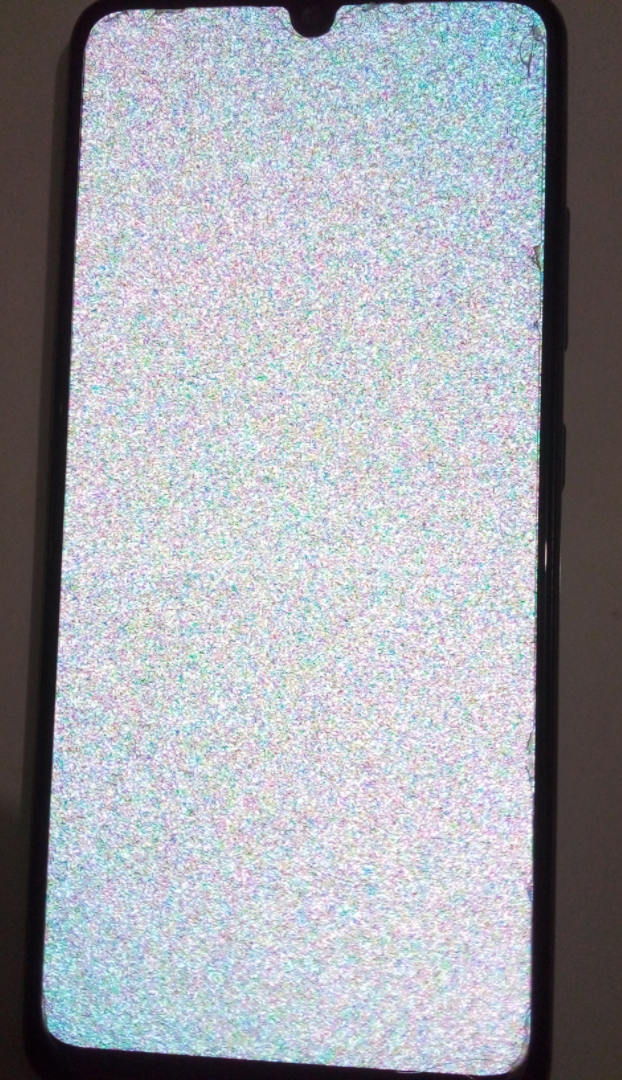
This phone started to show some static noise in the screen like in the posted image. At first, it happened sometimes, and would come back to normal after turning off for a long time and turning on again, but then became like that all the time. The phone apparently works, but nothing appears on the screen, even in recovery mode.

I thought about replacing the screen, but it's expensive and I'm afraid of it being another issue, like with the gpu or something not related to the screen. Has someone seen a similar problem? What do you think is happening in here?

Thanks in advance
9


Hi all,

Ive got a reoccurring issue that has been effecting a couple of dedicated machines that operate remotely. Users are reporting that their systems are unable to turn on. Walking them through the troubleshooting, there is no issues with the monitor. Power is being applied, the system lights turn on. We can confirm the network activity lights on the LAN port and the router has negotiated a link speed. But if we log into the router, we see no packets coming from the PC.

Now, the weird part. When the computer is shipped back, it magically starts working again. Ive tried running a memtest to see if maybe its bad ram, but it always comes back passed. I believe the issue is due to a multiport pci serial card. Sometimes if the cable is removed that connects to that pci, the system will boot. Other times, it completely kills the pc. Until of course it gets shipped back, then it will work again.

Ive really hit a dead end with this issue. Im not sure how to diagnose a no post situation without physically being there. At the very least, I wish I could replicate the issue in person. Unfortunately, the issue is occurring with multiple computers and pci cards. Doubtful its a one off bad piece of hardware.

If anyone has any experience troubleshooting a no post situation remotely or has had issues with pci cards, I'd really appreciate it!

10


Problem

  1. [Day 0] Windows and macOS error "Reboot and Select proper Boot device or Insert Boot Media in selected Boot device and press a key"
  2. [Day 1] Windows didn't boot. It boots to Linux Disk.
  3. [Day 1] Was able to see files in Windows disk from linux.
  4. [Day 2] [Maybe SSD Controller Fail or Corrupt firmware ]
    1. [Since reverting to older BIOS and using Linux Disks App to 'Check filesystem']
    2. Windows SSD shows as "Sandisk Milpitas SSD" not usual "WDC randomnumbers" and Linux is showing it as 16 KB (it's 240GB) and SMART is not supported.

What I tried

[Day 2] [To Fix Windows] these command from windows USB installation shows

"Total identified Windows installations: 0"

bootrec /fixmbr
bootrec /fixboot
bootrec /rebuildbcd

diskpart is not listing the SSD

[Day 3] [To Fix SSD] leaving SSD plugedin in BIOS without SATA data for an hour

Zeroing Out

  1. BIOS setting isn't the problem: BIOS can see my disks (CMS not UEFI). Tried RESETing my BIOS.
  2. It's not SATA Cable: Tried switching SATA (data) cable used for linux disk windows disk.
  3. I tried boot select key to make sure I am boot to windows, also tried unplugging all other disks.

What Happened

  1. Windows 11 FROZE so I force shutdown it.
  2. Without retying to reboot I went to UEFI and I INCREASED RAM SPEED to 2666 (below XMP).
  3. Recent Error - For a week I had to force shutdown via powerbutton and windows took forever to shutdown.

SSD health

Now after switching to old bios (day 2 of error)

:~$ sudo smartctl -a /dev/sda
[sudo] password for lucas:         
Sorry, try again.
[sudo] password for lucas:         
smartctl 7.4 2023-08-01 r5530 [x86_64-linux-6.17.0-14-generic] (local build)
Copyright (C) 2002-23, Bruce Allen, Christian Franke, www.smartmontools.org

=== START OF INFORMATION SECTION ===
Device Model:     Sandisk Milpitas SSD
Serial Number:    [No Information Found]
Firmware Version: 0.00
User Capacity:    16,384 bytes [16.3 KB]
Sector Size:      512 bytes logical/physical
Device is:        Not in smartctl database 7.3/5528
ATA Version is:   ATA/ATAPI-6 T13/1410D revision 1
Local Time is:    Tue Mar 10 12:43:42 2026 IST
SMART support is: Unavailable - device lacks SMART capability.

A mandatory SMART command failed: exiting. To continue, add one or more '-T permissive' options.

Day 1 of error, files were viable from Linux)

Linux 'Disks App' was showing Windows' disk as "DISK IS LIKELY TO FAIL SOON" but not for macOS Disk.

# Not able to boot windows USB installation (Fixed switching to Old BIOS)

~~I was able to boot old Windows version maybe 24H2 now it just keeps loading via ventoy~~

~~25H2 via ventoy shows "Windows failed to start. A recent hardware or software change might be the cause. To fix the problem: 1. Insert you Windows installation...."~~

~~dd command is not suported for windows `sudo dd if=/path/to/windows.iso of=/dev/sdX bs=4M status=progress`~~

Observation

  1. [Sometimes] Setting BIOS to UEFI only, BIOS Doesn't See Windows and macOS DISKS , even though all disks are GPT.

Recent Changes

  1. Updated to Windows 11 25H2 (https://www.tomshardware.com/pc-components/ssds/new-report-blames-phisons-pre-release-firmware-for-ssd-failures-not-microsofts-august-patch-for-windows). I have been using factory firmware.
  2. [I have switched back] About-a-week back updated BIOS, it's beta. It worked normally for 4-5 days.
  3. Update Motherboard chipset driver.

Setup

  1. I have 3 separate disks for Windows 11, Linux, macOS.
  2. Hardware B450, R5 3600, 16GB 3000Mhz.

BIOS Settings

reset UEFI to default and

  1. Turn on SATA hotplug.
  2. Turn XMP and RAM speed to 2400.
  3. Switch from UEFI to CMS (I know I should use UEFI only but earlier my Linux was MBR).
  4. Turn off TPM.
11


Just started today. Was able to let it automatic repair and boot up. Was on for like 10 hours, shut down and tried to boot up some hours later. Now its completely stuck on automatic repair. Have unplugged all additional hdd's and then all unnesscarry USB's. Still doing this. Also removed my ethernet card. Still the same.

I cannot lose my data. I have several SSD's and HDD's with important files across several of them.

12
1
submitted 1 month ago* (last edited 1 month ago) by emotional_soup_88@programming.dev to c/techsupport@lemmy.world


Description: video of a plug in power meter, showing the wattage increase from circa 65 watts to circa 80 watts when the sound of a space key on a keyboard is violently pressed

It cut the video short because of file size limitations, but the power draw is quite consistent between multiple ons and offs.

I am streaming music from Tidal on my desktop, sending it to a Tascam sound card Description: picture of a https://tascam.com/us/product/us-1x2hr/ in an active state

And into a mixer, which in turn sends it to active Adam speakers Description: picture of a https://www.soundcraft.com/en/products/notepad-8fx and a https://www.adam-audio.com/en/ax-series/a5x/

Is the increased power draw what it costs the CPU to stream and decode, or what it costs the Tascam to do it's work, or both, or something else?

Edit: I have no idea why the sound was removes from the upload...

13


I keep getting this error and have tried numerous things to sort it but no joy can anyone help? Anti-bot verification failed. VPNs may cause this Retrying…

14


I've got an iPhone for work. I need to use two factor to approve myself from my phone to access secure things from the same phone. Once I open the authenticator I can't get back to the page I was at, and there's no "open windows" square button like Android has, so how do I get back to it so I can enter the 2fa?

Any help is appreciated.

15


I have a Logitech K860 keyboard that I use with a work Windows laptop and a personal M4 MacBook Air, both via bluetooth. I'm constantly switching between the two devices during the day, and the bluetooth switching buttons are great for that. Switching to the Windows machine is instant, but when switching to the MacBook there's always a 2 or 3 second delay before it connects. Is there anything I can do to improve the device switching speed to the Mac?

16


Hey,
so I've been noticing for a while that when I try to archive a link on these sites, I get the all-clear for the main page, js and images. And then it starts again from the start, scraping the stuff in an endless loop.

Thought it might have something to do with VPN, but even without it doesn't seem to work.

Here's an example I try to archive:

https://archive.ph/https://www.reuters.com/world/us/new-mexico-reopens-investigation-epstein-ranch-2026-02-19/

Any ideas? Thank you!

17
1
submitted 1 month ago* (last edited 1 month ago) by imetators@lemmy.dbzer0.com to c/techsupport@lemmy.world


I run proxy through RPi3b+ that is installed in another country. I want to open a port on RPi that is being used by qbittorent on main machine which is 6881. Is there any way to do it?

I have used ufw enable 6881/tcp but it seems not to work. And I tried miniupnp but it fails to ind IGD which must be there cause router does have UPnP tailscale port open automatically. Am I doing something wrong?

18


This is probably simple to solve but I cant understand it at all

19


Hey,

I'm looking for a tablet to put linux on and use it for nothing but writing and drawing. And I don't mean running linux/bsd on top of whatever OS the tablet ships with, I mean completely replacing it.

I'm sure this has been done before, and there should be resources for specific devices, but search engines don't really wanna spit those out at me :(

So I just want to find the smallest and cheapest where the process is doable and somewhat decently documented.

Thank you for any and all help!

20


Hi,

So, after doing all kinds of research I figured qobuz is the least evil streaming service and the only one I'd be willing to use.

However, after trying it, I realised that they don't allow VPNs. Often it doesn't recognize the IPs as a VPN, but for some servers it does.

So, since I could get locked out at any time, this isn't a long-term solution for me.

I'm thinking of self-hosting. But then there's no recommendations. And if I hear anything I like, I need to find the stuff as well, which is gonna be tricky the more obscure it is. I can't afford to buy more than maybe two albums a month. And often it's just individual songs I want.

Do I need to drop the luxury of recommendation radio and easy access to nearly every song I like?

21


I'm trying to get my Gamesir T4n Lite controller to work on the PCSX2 emulator to no avail. It works with Steam just fine, but all it says I'm connected to is a keyboard and mouse. It has it's own dongle for Bluetooth, my system doesn't have Bluetooth built in. I'm using Ubuntu 24. I have downloaded xpad and xpadneo drivers, I've done the joystick test, everything. The computer seems fine, all looks well. It's just that the PCSX2 emulator won't pick it up for some reason. If anyone has any way to fix this, it'd be greatly appreciated.

22


first im not good at linux i chose mint cuz i just want it to work
on my main machine the mic produces just random noise
while on my secondary one the mic works no problem
basically every detail on my device is available on the linux mint forum
altho i posted this due to it being almost 3 months and a thousand views without comments so i decided to comment it here

after recent testing it seems like it is a hardware issue and not a os, bios, dependency, ect issue

where the mic doesnt pick up anything and produces usb noise

(the mic isnt the problem as it works on my phone and my secondary machine)

23


If I have a dlcument in word or any other office application, I often want to export that to pdf and share it with someone. When I "export as pdf" the file, it works almost instantly, but it takes several minutes before the pdf becomes visible in ly filesystem. Why does it take so long for the pdf to show up, eventhougj it has been created sucvesfully.

The process of creating the pdf even ends with the pdf being opened in my pdfviewer.

I know microsoft sucks, but I'm bound to it for reasons. So I'd like to understand why it su ks this time.

24


cross-posted from: https://lemmy.world/post/42963416

With the recent news about discord asking for face or ID scan, what other alternatives are there that we can recommend to our less tech-savvy friends?

25


Need some advice.

I've been consistently upgrading my old desktop for a long time now; knowing full well that someday it would just not be uppgradable anymore and it wouuld hit it's upper limit.

I'm hoping it's not doing it now, right when computer memory is getting ridiculous. And I don't have the money for a new one.

A couple of days back, My mouse (any mouse) would move in fits and starts. It takes a split second to start moving, and when it does, it's already on the other side of the screen.

This SEEMS to be related to oncee every second, my CPU is "Spiking"; jumping from 40 to 50% to 0-5% ever second like clockwork. I don't know if one is causing the other, just that they correlate to each other. Typing is similar effected; it'll hiccup every second or so.

System Monitor shows nothing unsual. The majority of the resource usage is from Wayland (I'm on Manjaro), with nothing else taking up resources.

Any advvice on what kind of reports I can run to get a sense of what'ss happening, hardware wise?

I've rolled back the most recent update to no effect. I booted up a USB stick version, and had the same problem. So I'm sure it's a hardware issue. I tried various mice and keyboarrds, various dongles, etc... I suspect a power supply issue, but I don't want to spend the money on a new 750 watt PSU without confirming it. And the only other PSU I have in my house right now isn't powerful enough to boot all the hardware I've got installed.

Help please. This desktop is where most oof my work is accomplished (video editing, graphic dessign and 3D modelling) which is completely impossibel with a jerky mouse.

view more: next ›