Electronics

2792 readers
2 users here now

Projects, pictures, industry discussions and news about electronic engineering & component-level electronic circuits.

Rules

1: Be nice.

2: Be on-topic (eg: Electronic, not electrical).

3: No commercial stuff, buying, selling or valuations.

4: No circuit design or repair, tools or component questions.

5: No excessively promoting your own sites, social media, videos etc.


Ask questions in https://discuss.tchncs.de/c/askelectronics


founded 2 years ago
MODERATORS
1


In the laundry room where I live, there is this machine.

The fan in the back blows air onto the heating elements that heat up the air, which in turn hits the laundry, speeding up the evaporation of the water.

I have no formal education on electricity, I'm just extremely interested and eager to learn. I think I understand that the rods heat up because enough current is "pushed" with enough voltage through this material that has enough resistance for it to heat up.

If these are the hot and neutral rods next to each other (which I visually believe I confirmed) with no insulator in between, why is there no arcing?

What are prerequisites for arcing? I guess, if arcing occurred so easily, then we would have a lot more ground faults and short circuits all over electrical installations?

2
3


What Are Computer Cables and Why Are They Essential for Everyday Computing? Computer cables serve as the essential nervous system for all technological systems, and an advanced workstation cannot operate without specialized equipment. The cords perform two main functions: delivering electrical power to power supplies and efficiently transporting large data streams through server racks.

Whether it is display cables keeping pixels crisp for a frantic gamer or networking lines preventing a total office meltdown, quality is the name of the game. Using a cheap, mystery-meat cable is basically playing Russian roulette with expensive hardware, as proper shielding and gauge determine if a system screams or just smokes.

What Are the Different Types of Computer Cables You Should Know About? Understanding computer cables is essential for building a reliable, high-performance setup. The right connection choice directly impacts power safety, data speed, visual clarity, and overall system stability.

Power cables (IEC, NEMA, C13, C14, C19, etc.) Power cables are the lifeblood of any hardware, and choosing the wrong one is a fast track to a literal burnout. NEMA connectors are the standard for wall power, while IEC variants like C13 and C14 are the bread and butter of desktop PCs.

In the heavy-duty world of data centers, the C19 and C20 connectors handle the high-current demands of rack-mounted servers and PDUs without issue.

Data cables (USB-A, USB-C, Micro USB) Data cables function as digital couriers that transmit files. Still, a weak data cable is inefficient because it handles data transmission like a cocktail straw handles removing water from a swimming pool.

USB-A is the old, reliable connector we’ve all tried to plug in upside down three times, while USB-C is the modern, reversible hero that handles everything from data to charging. Micro USB still haunts the junk drawers of those using legacy peripherals or older testing gear.

Purpose and Use Cases: The cables transmit video and audio from the GPU to the display. The DisplayPort 1.4 and 2.1 standards enable 4K gaming and multi-monitor support via daisy-chaining, while HDMI 2.1 is the most reliable connection for 4K workstations and high-end projectors.

Networking cables (Cat5e, Cat6, Cat6a, Cat7, Cat8 Ethernet cables) Networking cables are the backbone of any stable infrastructure, and this guide to computer cables wouldn't be complete without a warning against cheap Ethernet cables. Cat6 is fine for your home office, but Cat6a and Cat7 provide the shielding needed to prevent electromagnetic interference from degrading throughput in a crowded rack.

For those living on the bleeding edge, Cat8 is the monster designed for short-distance, 40Gbps bursts in high-performance data centers.

Purpose and Use Cases: These provide hardwired internet and local network connectivity. Use Cat6a for 10-Gigabit backbone runs in the office and Cat8 for switch-to-switch connections in a high-traffic data center environment to ensure zero lag.

Audio cables The meeting presentation requires audio cables and specialized peripheral cords to prevent you from sounding as if you are trapped in a wind tunnel. The process of obtaining a clean signal from a 3.5mm jack and optical Toslink cables delivers professional audio, in contrast to the annoying static that disrupts sound.

Data Transfer Speed Requirements The invisible tragedy of modern computing is the failure to account for data transfer speed requirements and display resolution support. Trying to push a 4K, 144Hz signal through a bargain-bin HDMI cord is a fool's errand that results in flickering screens and crushed dreams.

High-end GPUs and enterprise switches demand cables that meet their specifications; otherwise, that expensive bandwidth is spinning its wheels while your performance hits a brick wall.

Closing Lines Treating your expensive hardware like a disposal bin by using mystery cords is a crime against technology that ends in tears and toasted motherboards. This guide to computer cables has hopefully hammered home that ignoring specs, quality, and compatibility is a one-way ticket to a localized electrical fire.

Making informed, future-proof purchases is the only way to keep those high-speed data packets from hitting a brick wall. A dedicated computer cable buying guide serves as a vital shield against the nightmare of intermittent power and flickering displays.

Source Article :- https://www.sfcable.com/blog/smart-buyers-guide-to-computer-cables

4


My main project has been paused while I waited for a shipment of components. Who knew I would need an XNOR gate IC?

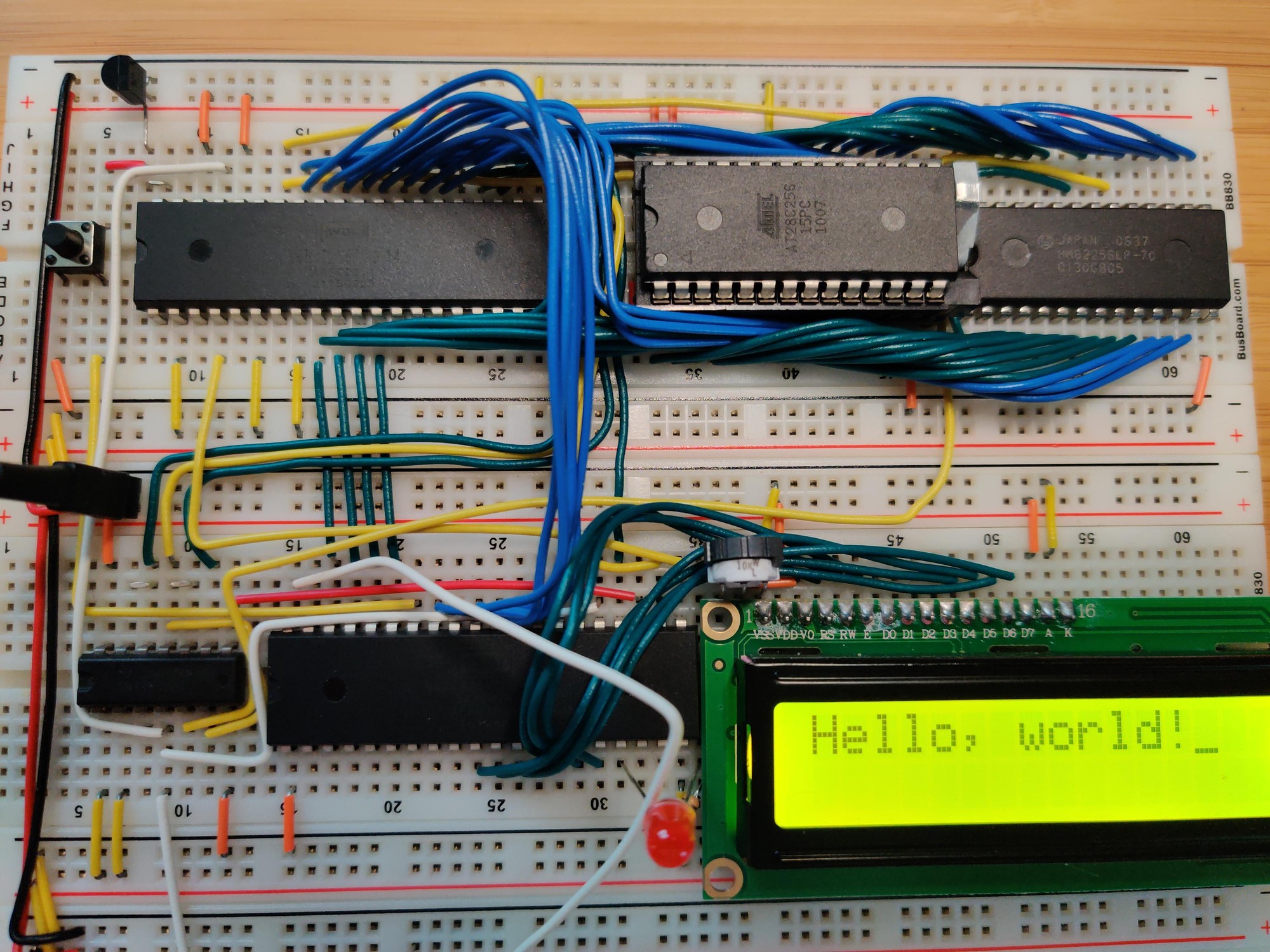
In the meantime I switched back to working through Ben Eater's videos on the 6502. I'm up to the ones on implementing the PS/2 keyboard interface. Before getting too far into it, I decided it was finally time to clean up the layout of the computer's components. Ben's layout, while compact, is also pretty messy. The address and data buses wind all over the place, making them difficult to understand and access for diagnostics or expansion. Also when I first built it I hadn't bothered to take any power rails off of the boards before connecting them together, so my power rails were doubled up:

2qmhr9dONxZwnFA.jpg

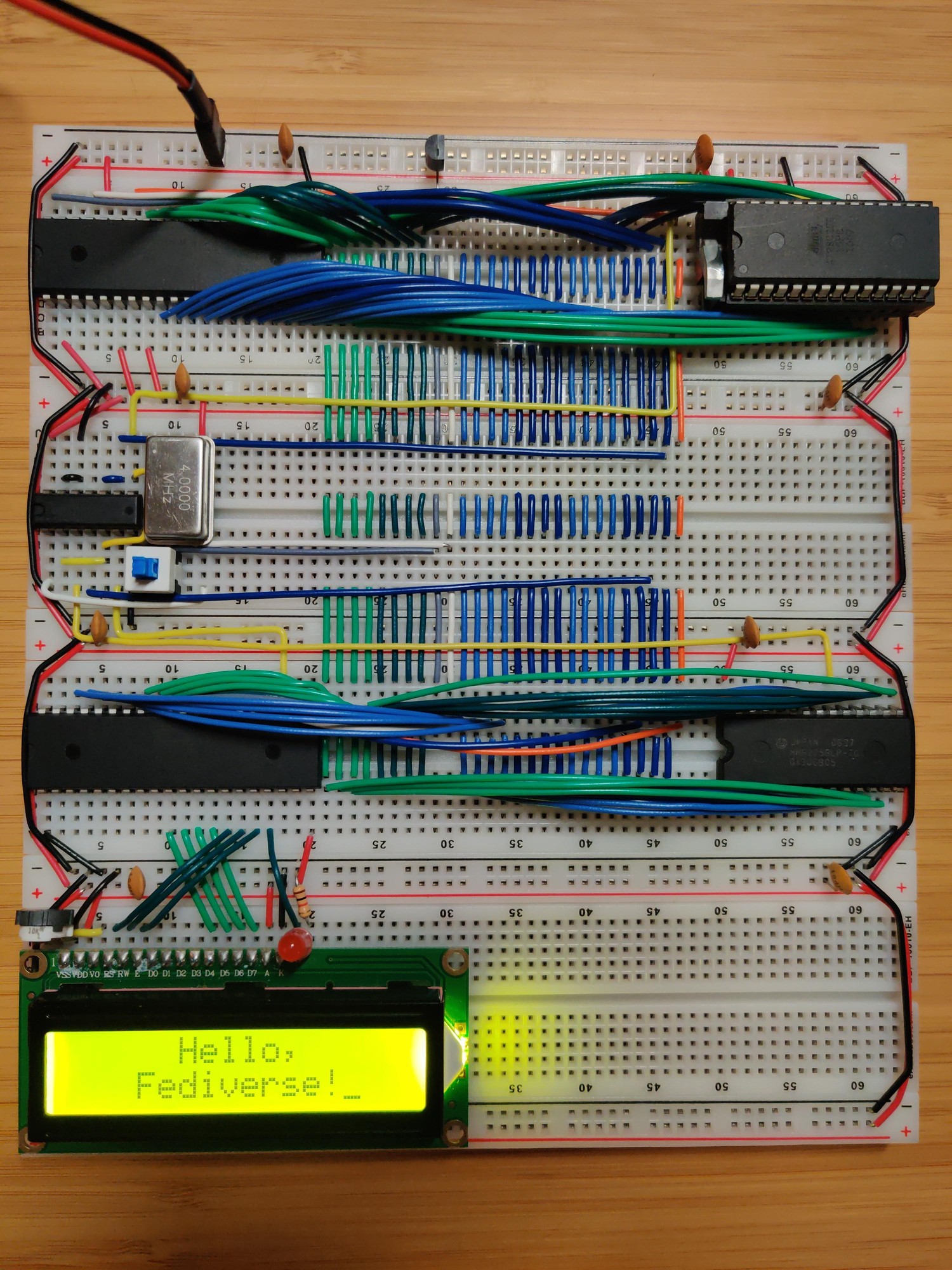
Inspired by some layouts that I'd seen on r/beneater, I went with a layout that has all the bus lines running vertically through the center of each board. Components are placed on the sides and connect to the bus lines instead of directly to each other. There are 27 bus lines:

  • 8 data lines (light green for the low nibble, dark green for high)
  • Reset (gray)
  • Clock (white)
  • 16 address lines (alternating light and dark blue for each nibble)
  • CPU read/write signal (orange)

There's just enough room on the left side for the DIP40 ICs. The DIP28s go on the right, with a few columns to spare. Since the data bus starts at column 21, it aligns nicely with the numeric labels on the breadboard. The 1st data line is at column 21, 2nd line is at 22, 3rd at 23, and so on. I put the reset and clock lines in between the data and address busses in order to maintain this pattern for the address lines: 1st at 31, up to 16th at 46. I guess I could have gotten 0-based indexing instead of 1-based if I had put the DIP40s on the right side, but the 6502 really wants to be on the left side due to its pin layout.

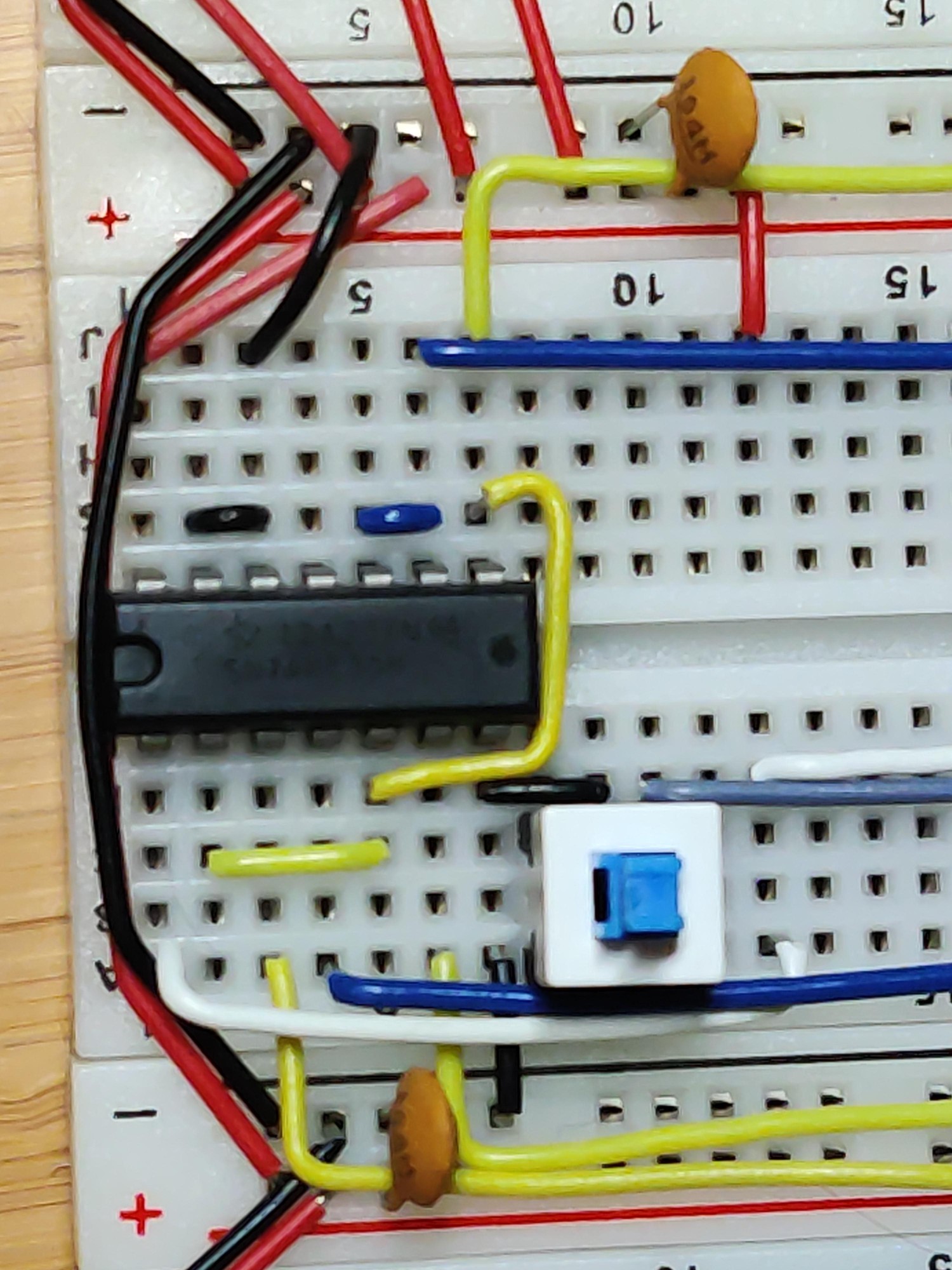
I also did some creative wiring in order to fit the reset button below the oscillator so that it wouldn't take up any extra real estate:

A681824S5Law1RY.jpg

The center pins of the button share a column with the GND pin of the oscillator. The left pins are in the unusable space between the oscillator and the NAND IC. The right pins are in an otherwise unused column that runs underneath the oscillator. Since the reset button doesn't take up any extra space, there's room for an additional DIP14 next to the oscillator, and another two DIP14s or DIP16s to the right of the bus on that board.

5


HI

I'm looking to write a programming guide for general line cortex-M0 TI MSPM0G1106.. For C, covering the main peripherals, SPI, DMA etc..

Using the sphinx book structure.

I'm choosing to write this because, though there are good beginner books for STM32, there's none for TI..

I'm semi experienced in the field.

But I've written article series on other microcontrollers in the past in my blog. Anyone willing to critique them?

Many thanks :)

Here's a risc-v one: https://simplycreate.online/tags/ch592

6


Rescuing vintage microcontrollers from their decades-long purgatory in a drawer.

PS: not my blog.

7


DIY rebuild project for the Tektronix PS503A dual tracking power supply.

The constructed power supply: https://www.paulvdiyblogs.net/2026/03/diy-ps503a-construction.html

PS: not my blog.

8
1
submitted 1 month ago* (last edited 1 month ago) by emotional_soup_88@programming.dev to c/electronics@discuss.tchncs.de


I barely know anything about electricity. With that said:

I bought this decoration containing a bunch of what looks like LEDs (henceforth "lamp") at a thrift store

It needs 4.5 volts to function, according to the writing on a little etiquette. I wanted to ditch the AAA battery power supply and power it with a DC adapter, so I stripped the DC adapters end and cut off the lamp's cord that goes to the battery case/on off button in order to connect them like so

I even tried to attach the stripped DC wires to the original battery box, thinking that maybe there some circuitry magic going on in the little PCB.

The LEDs do not light up.

Questions:

  1. aren't this wiring of the LEDs weird? It touches itself all the way, which to my very limited knowledge means shorting itself. Unless LEDs work differently?
  2. the wiring of the LEDs seems to be of other material than copper. Is that relevant here?
  3. why isn't this working?

In any case, I'll just rip out the LEDs and put in my own LEDs with wiring that's encased in some insulator, I guess.

Edit: I needed to remove the insulating coating from the LED wiring ends. I did it by burning it off. Thank you all!

9


Do you need 16 bytes of ROM that you can program with a soldering iron? Well, you're in luck!

I'm working on a larger project that I'll hopefully be sharing here soon, and needed something to display hexadecimal digits on a 7-segment LED display. The non-obsolete ICs that I found could only do binary coded decimal, but I need to be able to display A-F as well. An EEPROM truth table can be used for this, but I also wanted to avoid any programmable ICs. I decided to take an old-school approach and create a diode ROM board.

Diode ROM parts

Diode ROM assembled

Diode ROM in use

10


Got fascinated and wanted to share. Found at a local thrift store. I can't stop salivating at the fact that the terminals are exposed. Pure simplicity. Just a - probably - high resistance chunk of metal and some electricity.

Not very customer safe. Unless there was a protective housing for the terminals that perhaps fell off at some point. Some pictures from a reverse image search do suggest that.

11


Hello, first time poster (and also no significant EE background, so bear with me).

After receiving a batch of bad USB C PD trigger boards, I decided that it would be better if I made some myself. The design is taken from the CH224K datasheet. However, I am not sure if

  1. the schematic is correct
  2. the PCB is well laid out (I really struggled to fit everything)

Here is the schematic, and here is the PCB. Both are in a Codeberg repo.

12


I've been working on Ben Eater's breadboard 6502 computer project for a little while. The pins on the EEPROM sometimes get bent when I pry it out of the breadboard to reprogram it. I was afraid that they'd break eventually, so I looked into getting a Zero Insertion Force (ZIF) socket to put on the board, which should be gentler on the EEPROM's pins. Ran into a few problems though:

  • The pins on ZIF sockets are too short to seat properly on a breadboard. They're designed to be soldered into a printed circuit board.
  • I found a few designs for adapter PCBs that allow a ZIF socket to be used on a breadboard. They're all sized for the common green ZIF sockets, which take up a lot of extra space compared to the chip that they hold.
  • Aries Electronics makes low-profile ZIF sockets that are very compact, but I couldn't find any adapters designed for them.

I eventually decided to solve that last one myself, and I figured I'd share the design in case anyone else might find it useful:

13


An audio amplifier was once a fairly simple analogue device, but in recent decades a typical home entertainment amplifier will have expanded to include many digital functions. When these break they are often proprietary and not easy to repair, as was the case with a broken Pioneer surround-sound device given to [Boz]. It sat on the shelf for a few years until he had the idea of a jukebox for his ripped CDs, and his returning it to life with a new main board is something to behold.

Internally it’s a surprisingly modular design, meaning that the front panel with its VFD display and driver were intact and working, as were the class AB amplifier and its power supply. He had the service manual so reverse engineering was straightforward, thus out came the main board in favor of a replacement. He took the original connectors and a few other components, then designed a PCB to take them and a Raspberry Pi Pico and DAC. With appropriate MMBASIC firmware it looks as though it was originally made this way, a sense heightened by a look at the motherboard inside (ignoring a couple of bodges).

14


[Kerry Wong] points out that the Uni-T MSO oscilloscopes have a logic analyzer built in — that’s the MSO, or Mixed Signal Oscilloscope, part — but you have to add the probes. He shows you how it works in a recent video below.

He’s looked at the scope’s analog capabilities before and was not unimpressed. The probes aren’t inexpensive, but they do unlock the mixed signal capabilities of the instrument.

Although simple logic analyzers are very affordable today, having the capability integrated with your scope has several advantages, including integrated triggering and the simple convenience of being able to switch measurement modes with no problem.

15
16


Breadboards are great, but as the world moves more and more to having SMD as a standard, prototyping straight PCBs is becoming more common. If you’re mailing off to China for your PCBs, it’s shockingly quick for what it is, but a one-week turnaround is not “rapid prototyping”. [Stephen Hawes] has been on a quest on his YouTube channel for the ideal rapid-prototyping PCB solution, and he thinks he’s finally got it.

Now, if you’re only doing single-layer PCBs, this is a solved problem. You can mechanically mill, or laser cut, or chemically etch your way to PCB perfection, far faster than the Chinese fabs can get you a part. If you want a double-sided board, however, vias are both a pain in the keister to do yourself, and a rate-limiting step.

17


Hi all!

I thought y'all might be interested in my weekend project: Using an ESP32 to read the value from my 121GW DMM and send it to my MQTT broker via Bluetooth and WiFi. This workflow is much better for me compared to logging to microSD cards. The code is an ESPHome config that can straightforwardly be flashed onto most ESP32 variants.

The config and some documentation is available here: https://github.com/tjhowse/121gw-esphome

A brief video explainer is here: https://youtu.be/GLtkTARH1eo

At the moment I'm only unpacking the main value, range and sign from the Bluetooth packet. It would be nice to read out the rest of the values, but I haven't felt the need yet. Note that the DMM briefly blanks the display when changing ranges. This results in a value of zero being sent on the MQTT link. All of my testing has been in volts mode, other modes may contain dragons! Please test thoroughly before relying on this for anything important.

Cheers, tjhowse

18


I built two circuits as similarly as possible 1) quad ua741 and dual NE5532. FFT on my Rigol scope showing peaks at 1k and 15k as set/expected (2 channels from Seesil generator are mixed with 1k signal at 80% of 15k signal amplitude) with this I believe I created a tool to do AM with my cheap Seesil generator and can also mix two audio signals.

That said, I have no clue what I am doing. I based my testing procedure off an Elenco radio kit.

So I guess I actually have two questions or areas where I am trying to understand better:

  1. What makes one op-amp better than another? I am talking about the IC itself, I believe. Why is NE5532 better than ua741, I see and hear the difference, now why?

  2. What should I be testing and/or what data should I be collecting to better understand and characterized?

Thank you for your time and consideration. I am 100% self-taught savage from the wilderness and stumbled into your camp, but we are not so different, I promise, just had to walk down different road in life. Thanks again.

19


Hobbyist/DIY guy in a garage. I use Linux. I have briefly tested Eagle and a couple circuit design apps but didn't like anything about any of them, did not spend sufficient time with them either, though. Eagle is going away? Any recommended apps for designing pcb and/or services? I am also open to more artisinal methods. What direction should I point my momentum? Not afraid to try things out but also not wanting to waste time. I have been breadboarding for a minute, learned to solder, benn making some pcb gadgets and think I am ready. Thank you. (Pic is audio mixer with two NE5532 and LM386)

20
21


Source: https://lcsc.com/product-detail/Vibration-Motors_Lian-Xin-Technology-XDMD-YB200-08_C47118014.html

Applying current changes the vertical position. You would glue a lens onto this and place it above your camera sensor.

Machine-translated page from the datasheet:

22


I am looking for a PMIC to power an ESP8266 with photovoltaic with a small solar cell ca. 2-5V. I had CJMCU-2557 in mind, but it is quite costly. Are there any other suggestions or experiences?
@electronics
#diy #elctronics

23
24
25


This is an update to this post about the typical applications of the first op-amp by philbrick: https://www.reddit.com/r/electronics/comments/1l1whsq/in_the_50s_george_philbrick_introduced_and/

I paid for this to be vectorized, so people could have it printed in any size and form they'd like.

Here's the vector graphic: https://8volt.at/poster-8volt.pdf

I've set up a spreadshirt store to be able to directly order it as a poster/shirt/sticker/mug/... with and without the 8Volt logo: https://8volt.at/store#!/all

view more: next ›