this post was submitted on 31 Jul 2026
357 points (97.9% liked)

Selfhosted

61086 readers
1249 users here now

A place to share alternatives to popular online services that can be self-hosted without giving up privacy or locking you into a service you don't control.

Rules:

Detailed Rules Post

  1. Be civil.

  2. No spam.

  3. Posts are to be related to self-hosting.

  4. Don't duplicate the full text of your blog or readme if you're providing a link.

  5. Submission headline should match the article title.

  6. No trolling.

  7. Promotion posts require active participation, with an account that is at least 30 days old. F/LOSS without a paywall has exceptions, with requirements. See the rules link for details. Tags [CBH] or [AIP] are required, see the links in Rule 8 for details.

  8. AI-related discussions and AI-involved promotional posts have additional requirements for tagging, as noted in Rule 7 and the AI & Promotional Post Expanded Rules post, and find example disclosures here.

Resources:

Any issues on the community? Report it using the report flag.

Questions? DM the mods!

founded 3 years ago
MODERATORS
 

After years of breaking things, I think I'm finally at a point where I'm genuinely proud of my setup -so naturally, I have to share it with you all.

This is my single-server do-everything box. The whole point was to kick as many big-tech cloud services out of my life as possible. Photos, passwords, code, chat, even ML -all running in my closet/corner.

The guts:

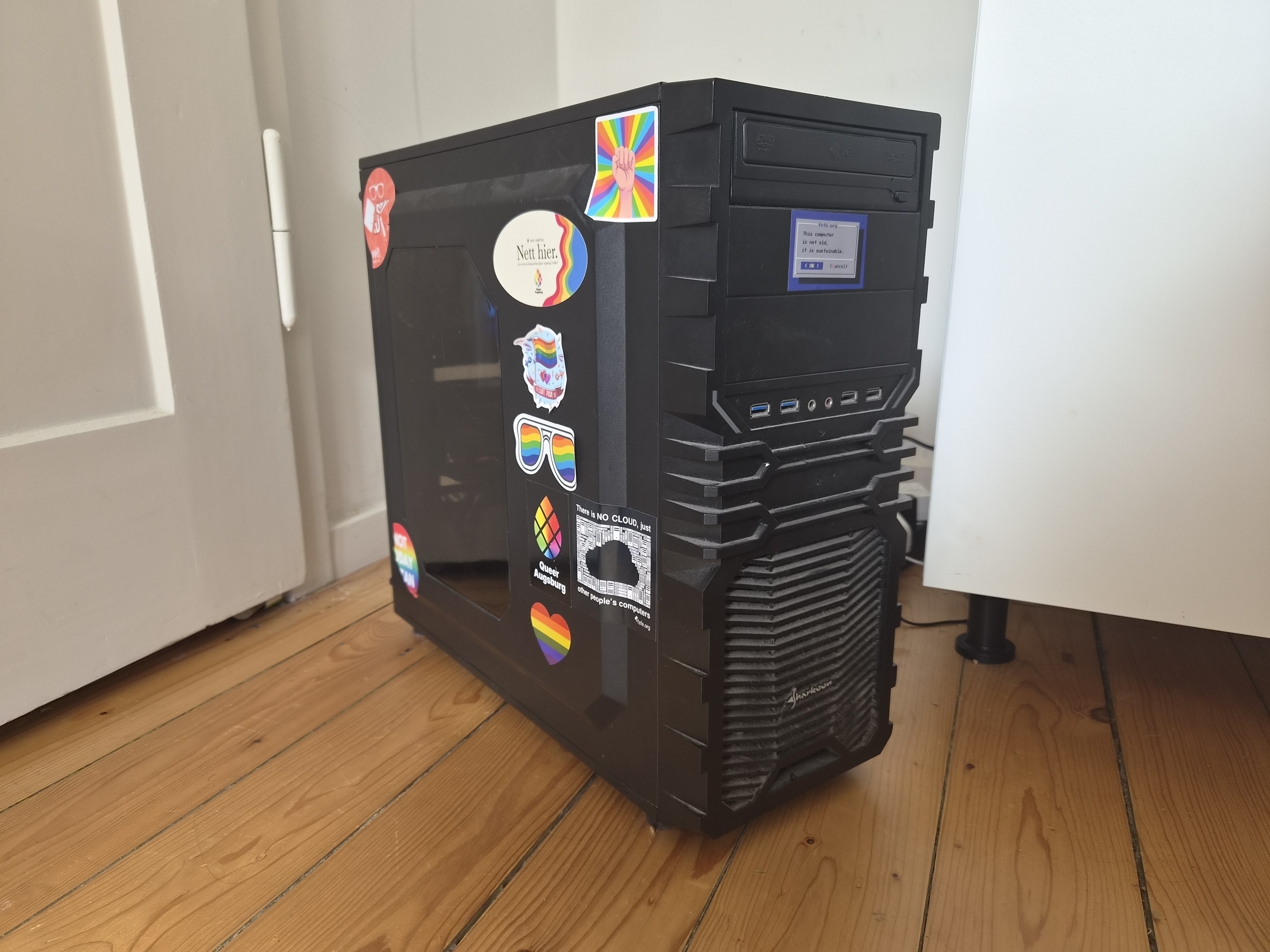
  • Ryzen 7 3800X (8 cores, 16 threads)
  • 48GB of RAM (Channel A: 16GB+8GB, Channel B: 16GB+8GB | still dual channel with stock timings and clocks.)
  • RTX 3050 8GB (handles GPU-accelerated processing with GPU passthrough to said LXC's)
  • A couple of storage pools (Fast-Thin-LVM (Nvme) for stuff that needs speed, TB-Thin (Sata) for the bulk)
  • Proxmox 9.2.5, kernel 7.0.14

Nothing crazy by today's standards, but honestly? It handles everything I throw at it without breaking a sweat.

The services:

Everything runs in LXC containers. If a service needs Docker, I run Docker inside the LXC - so each service gets its own dedicated container with its own Docker install. A couple of other things (like OpenWrt and DSM) live in VMs instead.

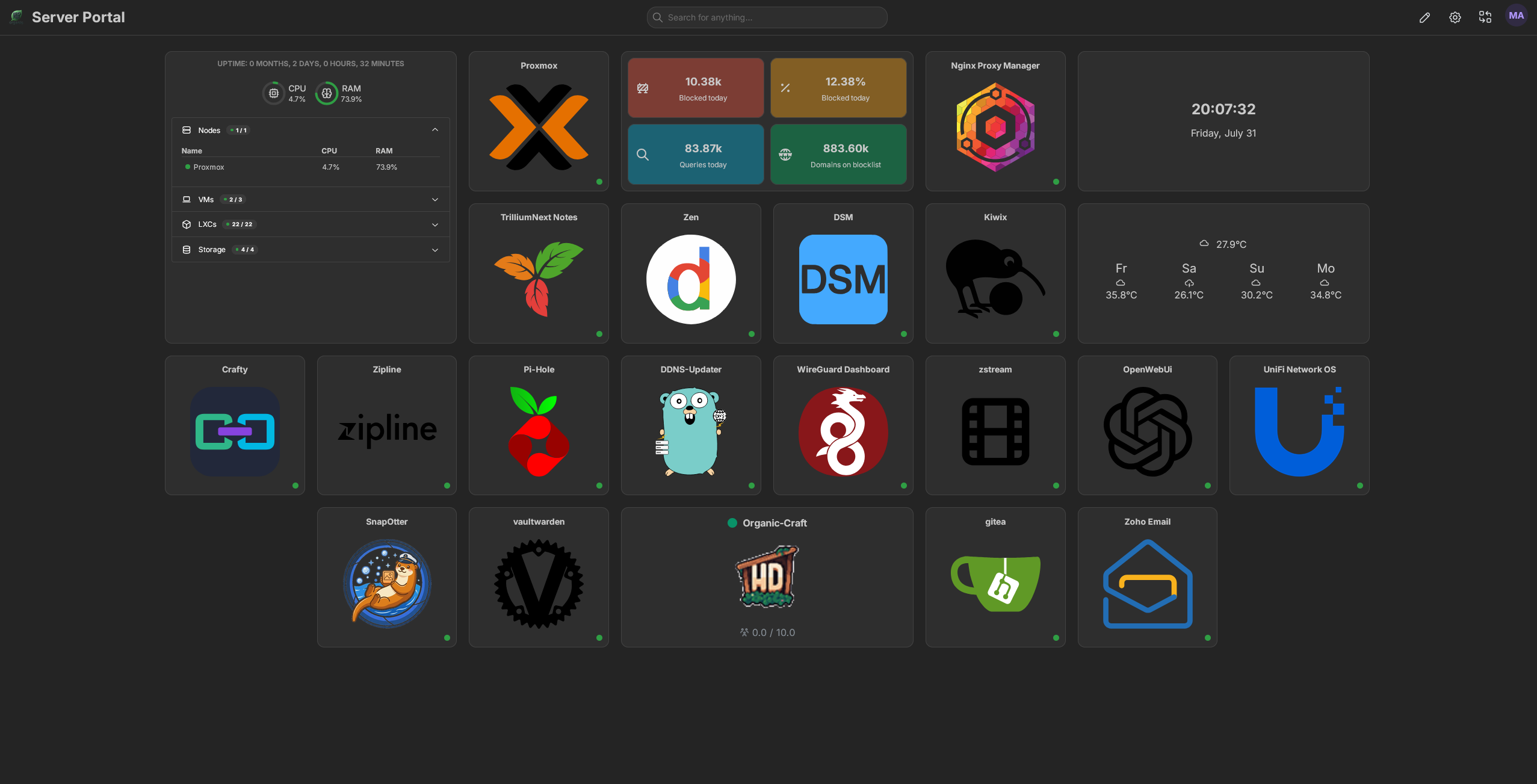
I've got the usual suspects - Immich for photos (goodbye Google Photos), Vaultwarden for passwords, and Matrix Synapse for chat. Networking side is Nginx Proxy Manager, WireGuard, Pi-hole, and OpenWrt routing traffic as well as DDNS-Updater to keep my domain up to date. Also running Gitea for my little coding projects, Kiwix for offline Wikipedia (because why not), Trilium for my scattered notes, homarr as the dashboard and of course lemmy, your reading this on it haha.

On the heavier side, I've got Ollama + Open WebUI running locally with GPU acceleration - the 3050 gets the job done.

Snapotter is in there too - it's an open-source, self-hosted file toolkit with 200+ tools for images, video, audio, PDF, and document processing. I use it so I don't have to rely on sketchy file conversion sites anymore. Convert, compress, OCR, strip metadata - all happens on my own hardware, files never leave my network. The GPU helps with some of the heavier image tasks too.

And yes - I'm running DSM (Arc Loader) in a VM with PCIe passthrough for the NAS. It's a bit overkill, but I wanted proper storage virtualization with direct hardware access.

I also will not lie- the GPU sits idle most of the time, but it's nice to have the acceleration.

Why LXC + Docker instead of just Docker?

I just like having each service in its own isolated container with its own Docker daemon. It makes backups and snapshots stupidly easy in Proxmox - when I inevitably screw something up at 1 AM (and I will), rolling back takes two clicks. Plus, it keeps dependency hell contained.

Dive into the Details

If you're curious about the configs, the philosophy, or just want to see the messy reality behind the setup, head over to organic-server.org. You'll find some more of my ramblings there.

Or, if you have a specific question, I'm always happy to chat here.
top 50 comments
sorted by: hot top controversial new old
[–] TheLorax@sh.itjust.works 1 points 2 hours ago

I've always heard that mixing ram kits is bad, I'm curious about the 16 + 8 channels. Does that give better performance?

[–] DementedSociety@lemmy.world 1 points 3 hours ago

Nice! I have a similar build! I recently discovered proxmox and now have my home assistant, Plex server, and a full arr stack up on it. I should look into automated backing up of photos πŸ€”. Turns out, hording all my old gaming PC hardware was the right call. With component prices these day it feels like a small fortune having extra hardware, drives, and ram laying around! (The wife finally agrees lol 🀣)

[–] diaphragmwp@discuss.tchncs.de 5 points 15 hours ago* (last edited 15 hours ago)

Ah yes, an appimage packaged into a Flatpak packaged around Docker packaged into a proot+bubblewrap script which is packaged back into a Docker container (but a newer version) running under a Snap packaging of LXC under Flatpak Snap.

The app is running Java of course.

[–] sculptor0725@sh.itjust.works 1 points 12 hours ago

How do you orchestrate all those lxc containers and vms?

[–] dmalteseknight@programming.dev 10 points 21 hours ago

Your homelab looks gay

[–] magnue@lemmy.world 5 points 21 hours ago

Getting some cameras and running frigate+ is a good way to utilise the GPU. My 2060 6gb runs 10-30% usage with 3 cameras. Can do cool things like send me a notification using ntfy if a person is seen between 2300-0500 something like that.

I did have ollama set up for local models but I've found anything that will run on 6gb isn't worth using anyway.

[–] dust_accelerator@discuss.tchncs.de 34 points 1 day ago (4 children)

Nice setup! Might check out some services I didn't know about yet.

But I might add one thing, because I am/was in the same boat: Friends Don't Let Friends Use Ollama

[–] vogi@piefed.social 10 points 1 day ago

Great article, they always gave of that energy tbh. But I did not bother and also didn't use it enough that it would matter. Good to have a write up about it. Thanks for sharing.

[–] statelesz@slrpnk.net 3 points 1 day ago

Woah, thanks for the article!

load more comments (2 replies)
[–] gnufuu@lemmy.ca 21 points 1 day ago* (last edited 1 day ago) (1 children)

Nice specs, nice setup. You might want to add another rainbow sticker or two, just in case :p

[–] yaroto98@lemmy.world 16 points 1 day ago (2 children)

Wait, we're putting stickers in the case now?

[–] Valmond@lemmy.dbzer0.com 2 points 11 hours ago

Low emission leds!

[–] organicpu@lemmy.organic-server.org 8 points 1 day ago* (last edited 1 day ago) (3 children)

where are they in the case???? hahaha (edit: i am still getting used to lemmy comments, so i thought you said I had stickers in my case- I didn't see you replied to someone haha)

[–] yaroto98@lemmy.world 8 points 1 day ago

I believe by replying to my comment, per Lemmy rules, totally not mine. You've contractually agreed to putting at least 5, but no more than 100 rainbow stickers on the inside of your case.

Yes, you may call them "RGB".

Yes, they make your NAS go faster.

Yes, they improve airflow, but only when oriented correctly.

No, they don't make you less straight. They're "closeted" officially.

load more comments (2 replies)
[–] frongt@lemmy.zip 7 points 1 day ago

What's your backup strategy?

[–] lyralycan@sh.itjust.works 3 points 1 day ago* (last edited 1 day ago)

Nice that's similar to my setup! As for a website hub yours looks neat, mine is plain as hell unless you're a family member, thanks to Authelia -- but making public info is on my todo list -- I tried custom-building a website many years back and adapted that. (If anyone discovers security flaws please lmk, but I'm preeetty sure I did good)

Gonna share mine :3

  • i3 6100 (2 cores, 4 threads), iGPU passthrough to a LibreELEC VM so I could finally replace the Google CCwGTV 4K*)
  • 24GB of RAM (16GB+8GB, mobo is ITX so that's it)
  • RTX 3060 12GB (handles GPU-accelerated processing with GPU passthrough to Emby and LLM LXC's)
  • 256GB Samsung 850 Evo SATA SSD for everything but media
  • SATA HDDs for media:
  1. Shucked Barracuda Pro 10TB
  2. Ironwolf Pro 20TB
  3. Ironwolf Pro 24TB
  • Proxmox 9.2.3, kernel 7.0.6-2 (not quite sure why it's not using .14)

*I conspire that it was being updated to become weaker. Reasons:

  1. Menu got laggier;
  2. WiFi got real glitchy and wouldn't connect on wake and I had to either:
  • d/c and r/c,
  • power cycle,
  • or forget the WiFi and reenter details in order to make it work

And as the months went on reconnecting stopped working, power cycling stopped working and it stopped giving me a keyboard, instead prompting to "enter on your remote device" so my last remaining technique was to install the Google Home app, set everything up and use my phone keyboard to enter the WiFi creds.

I conspired that as it was fine until recently and it went downhill so rapidly, that it must have been forced obsolescence and they'll probably release a replacement device. Surprise -- one month after I replaced it with Kodi, Google released the "Google TV Streamer 4K".

Once I can upgrade my 2017 flagship to a 2027 midrange I'll be transferring the i7-7700K and the other half of the 2x16 RAM, and I'm in dire need of more storage so a 30TB Ironwolf is in my sights (but fuck, it's 2x its pre AI-pocalypse price (aka Sep 2025).

[–] Decronym@lemmy.decronym.xyz 7 points 1 day ago* (last edited 1 hour ago)

Acronyms, initialisms, abbreviations, contractions, and other phrases which expand to something larger, that I've seen in this thread:

Fewer Letters More Letters
LXC Linux Containers
NAS Network-Attached Storage
PCIe Peripheral Component Interconnect Express
Plex Brand of media server package
SATA Serial AT Attachment interface for mass storage
SSD Solid State Drive mass storage

[Thread #68 for this comm, first seen 31st Jul 2026, 18:30] [FAQ] [Full list] [Contact] [Source code]

I see 'nett hier' sticker, i vote up.

[–] ndupont@lemmy.blahaj.zone 4 points 1 day ago (5 children)

I run docker within LXC too, but I have just a pair of docker instances with a collection of compose stacks on each. I really need stickers.

[–] krashmo@lemmy.world 2 points 1 day ago

Same. When I first started down that path I kept finding posts about how it was impossible to set up and maintain but it's been pretty painless for me. I basically had no clue what I was doing and I figured it out just fine.

load more comments (4 replies)
[–] FlexibleToast@lemmy.world 5 points 1 day ago (3 children)

You have each "docker" container in there own lxc running docker? That's a silly way to do it if I'm understanding correctly. You're adding overhead to containers for little to no benefit. You could put them all in the same lxc or Proxmox supports OCI containers natively now.

[–] organicpu@lemmy.organic-server.org 9 points 1 day ago* (last edited 1 day ago) (1 children)

I think the misunderstanding is that I'm running every single service as Docker inside its own LXC. That's not actually what I'm doing.

I split things by service boundary. For example, Pi-hole + Unbound has its own LXC, Lemmy has its own LXC, Immich has its own LXC, etc. Most of those run natively in LXC without Docker at all.

Docker is only there where the application actually expects/benefits from it. I'm not adding a Docker layer everywhere just for the sake of it.

The reason I prefer this over one giant LXC with everything docker- inside. is the management side.

Yes, there is some overhead. But LXC containers are much lighter than VMs. They share the host kernel and use Linux namespaces/cgroups for isolation, so you're not paying the cost of a full virtualized OS. The extra memory/CPU overhead is minimal compared to the management benefits I get from separating services.

The Docker overhead only exists on the services that actually need Docker. A lot of my services run directly in their own LXC without Docker at all.

Could I put everything into one LXC and run Docker Compose? Sure. It would probably work fine. But for my homelab, ease of maintenance and recovery is just as important as raw resource efficiency.

[–] FlexibleToast@lemmy.world 4 points 1 day ago

How does that make it easier for maintenance?

[–] curbstickle@anarchist.nexus 6 points 1 day ago (1 children)

Proxmox supports OCI containers natively now

As of 9.1, and kind of. To be clear what its doing is not a drop-in replacement for docker, but using that image as a basis for an lxc - so you're not just pulling a new image to update, more like re-deploying, so keep your stored data elsewhere, outside of the lxc. So what was handled by pulling an image or a change to a compose is done manually in proxmox now, but it does make things like backups/snapshots much more consistent and proxmox-native.

[–] FlexibleToast@lemmy.world 2 points 1 day ago (1 children)

Yeah, but if you were doing lxc + docker per container you might as well use this oci as lxc method. I think both methods are silly, but that's just my opinion.

[–] curbstickle@anarchist.nexus 1 points 11 hours ago

If its a single image, I'd agree. If its a compose with multiple images though, better off combining into a single lxc or VM.

load more comments (1 replies)

Love the front sticker

[–] BlueEther@no.lastname.nz 2 points 1 day ago* (last edited 1 day ago)

And yes - I’m running DSM (Arc Loader) in a VM with PCIe passthrough for the NAS. It’s a bit overkill, but I wanted proper storage virtualization with direct hardware access.

Whats this like, I'm running TrueNAS (the BSD version) with PCIe pass-through for my HBA and a couple of SATA ports - all in a VM on the latest proxmox

[–] Egonallanon@feddit.uk 4 points 1 day ago

Dope little setup. Love the BIOS sticker.

[–] arschflugkoerper@feddit.org 3 points 1 day ago (1 children)

Damn that case takes me back

[–] irmadlad@lemmy.world 3 points 1 day ago* (last edited 1 day ago) (3 children)

I really like those big cases. Lots of room for expansion and cooling I've got an old CoolerMaster Cosmos II.

spoiler

I took the bottom rails and retrofitted casters on it. It's huge and hard to move around. Stands about 30" tall.

load more comments (3 replies)
[–] irmadlad@lemmy.world 4 points 1 day ago

Ahhh....yes. The PronMaster 6000

[–] slazer2au@lemmy.world 4 points 1 day ago (2 children)

Nextstep is Homepage with all your services on it.

[–] organicpu@lemmy.organic-server.org 5 points 1 day ago* (last edited 1 day ago) (1 children)

I mean, I kinda do- for public services on my website. but I don't why I would do a dedicated one- when almost all need services authentication.

but I do use homarr for as an internal "homepage"/dashboard. Great idea though.

I spent an entire weekend doing this and then just sat there staring at it like the Wolverine looking at a picture meme.

load more comments
view more: next β€Ί