If you’re afraid of the terminal, you won’t get far in self hosting. You should learn to use the terminal. It’s not as scary as people make it sound.
this post was submitted on 28 Apr 2025
17 points (90.5% liked)
Selfhosted
62379 readers
482 users here now
A place to share alternatives to popular online services that can be self-hosted without giving up privacy or locking you into a service you don't control.
Rules:
-
Be civil.
-
No spam.
-
Posts are to be related to self-hosting.
-
Don't duplicate the full text of your blog or readme if you're providing a link.
-
Submission headline should match the article title.
-
No trolling.
-
Promotion posts require active participation, with an account that is at least 30 days old. F/LOSS without a paywall has exceptions, with requirements. See the rules link for details. Tags [CBH] or [AIP] are required, see the links in Rule 8 for details.
-
AI-related discussions and AI-involved promotional posts have additional requirements for tagging, as noted in Rule 7 and the AI & Promotional Post Expanded Rules post, and find example disclosures here.
Resources:
- selfh.st Newsletter and index of selfhosted software and apps
- awesome-selfhosted software
- awesome-sysadmin resources
- Self-Hosted Podcast from Jupiter Broadcasting
Any issues on the community? Report it using the report flag.
Questions? DM the mods!
founded 3 years ago
MODERATORS
Could you recommend a source for learning how to use the command line? In the past I struggled with understanding the basic commands and the various flags. I've found it difficult to find good documentation, but I would like to learn
I highly recommend O'Reilly's Learning the Bash Shell in paperback form: https://www.oreilly.com/library/view/learning-the-bash/0596009658/.
The other responses you've received so far don't offer much insight into the historical background and underlying mechanics of the shell, which are crucial to understanding the "Why?"s of command-line quirkiness.
Thanks for your reply. I agree the 'why' is important, for me that usually makes things more intuitive
load more comments
(8 replies)
It’s been a long time since I learned, so I don’t remember exactly what I used, but at a cursory glance, this one looks good:
https://www.terminaltutor.com/
Also, learning to read man pages will help a lot. Here’s an article on that:
https://itsfoss.com/linux-man-page-guide/
I do remember using “terminal cheat sheets” like this:
https://phoenixnap.com/kb/wp-content/uploads/2023/11/linux-commands-cheat-sheet-pdf.pdf
Thanks for the very practical resources!
load more comments
(1 replies)
It’s not as scary as people make it sound.
It is not "scary". It is complicated and requires special knowlege.
I wouldn’t call it complicated, but yeah, it’s special knowledge. So is all of self hosting.
load more comments
(4 replies)
load more comments
(22 replies)
The command line is an exceptionally useful tool, you may want to spend a little time getting familiar with it and common command line tools that would probably make self hosting almost anything easier.
It's like wanting to learn to play guitar but not learning how to restring and tune it, sure it's not necessary but you're going to be overly dependent on others to do something you could learn for yourself with a little time and patience, and it will probably broaden your perspective on what you can do once you do get familiar with how to pipe commands together and combine basic tools into something more sophisticated and complex.
I misread that as "self-loathing" and the answer was obvious.
Unraid is great for beginners.
Beginner here (to Linux and networking anyways), running Unraid for about 18 months now. Fully agree, it's been great for actually getting up and doing useful things quickly and relatively pain free.
Eventually I would like to try working backwards and getting things running on a more "traditional" server environment, but Unraid has been a great learning tool for me personally.
It's like... Maybe some folks learned to overhaul an engine before they got their driver's license, but lots of people just need to a car to get to work and back today, and they can learn to change their oil and do a brake job when the time comes.
load more comments
(5 replies)
I am very much a Windows user and my journey went like this:
Raspberry Pi with OMV -> SSH on OMV -> Mostly Terminal on OMV -> Docker + Portainer to deploy containers -> Transition to docker-compose -> Setup my own VM with Debian completely in the CLI (excluding the first setup of the VM)
I use Linux (primarily Debian because of Raspberry as I don't like what I hear about Ubuntu) primarily for VMs and servers and Windows as the client OS
I love the command line. A terminal window is always open on whatever computer I'm using at the moment, even when I was running Windows.
But I also like having a dashboard to see what's going on, all right in front of me. I have ADHD, and if I can't see it, then I will forget it exists. I use command line to handle more granular tasks, and have various UIs to help me handle other things, like Proxmox (obvious), Dockge (docker stacks), OMV (NAS), Cockpit (all of my computers have this, really good for remote control), and a few other things I'm forgetting.
Generally, Linux Servers are best administered from a command line. At least in the beginning to set everything up. In turn they are faster on lower hardware as they dont even have a graphical desktop at all so need less resources. You could of course install a windows server OS. They can be fully administered through Remote Desktop and a GUI.
There are multiple projects to make self hosting more accessible (like casaOS). They automate many steps of the setup and then offer you a webUI for further steps. Maybe have a look here https://github.com/awesome-selfhosted/awesome-selfhosted?tab=readme-ov-file#self-hosting-solutions
For what it's worth given the age of this thread and disagreement going on in it, I would recommend Unraid.
Easy for a beginner, with enough to take you up to intermediate level: a web GUI for pretty much all the required terminal commands. It's been around for years, is not going away, but instead getting updated. Works on any old eBay hardware and most of all, the community there are very supportive of beginners. There's also lots of YouTube tutorials.
It ticks all the boxes for easy self hosting. It's just not for Linux protocol purists.
EDIT: I'm learning a lot from this thread, and it's interesting to see how tolerant people are for self hosting. I would add in my vote for Unraid: it allows me to be dynamic with the time I have for self hosting. I'm sometimes extremely busy and don't have the time to keep my self hosting updated, so the web GUI is essential for basic maintenance. Then there are times when I do want to waste an afternoon trying something in terminal and learning more, and that's when Unraid again comes to the rescue. I couldn't self host with 100% terminal, and neither would I want to with 100% GUI. The best self hosting platform is one that can mix them up efficiently and effectively. I am keen to try some others mentioned here, as some look quite interesting. However NAS is a massive element of what I need for my homelab, so Unraid will stay for now.
yunohost
i tried CasaOS for a quick minute. its decent and just has the basics like setting up any disks and then has an app store. its really just a front end for docker and you can manually input the details of any docker containers that arent in the store
ive mostly been running docker stuff on my Synology nas. cant think of the model number now, 218+ i think, but any of the "plus" models will let you run docker. its very similar to Casa, no messing around with command line stuff. ive been self hosting for 10 years now and never touched the command line so i dont know what people are on about here saying you will have trouble
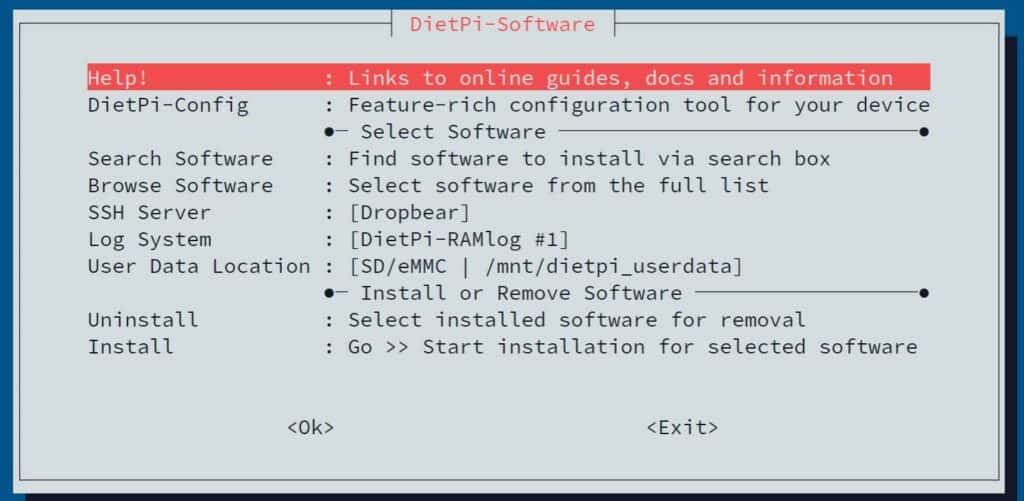
dietpi is another thing ive used on a few devices, mainly small SBCs and raspberry pi's, but i think they might have a version that you can install on anything. its basically just debian, and it has a sort of a wizard that helps set up various things like set up disks and install apps. its headless though so no GUI unless you install one, and the wizard is run from the terminal but youre not having to type any commands at least
Almost all of selfhosting is editing config files, setting permissions and starting/stopping services.
Setting it up so you can administer a server by desktop is probably as hard as learning how to edit config files from a terminal. Maybe harder.
Yep my thoughts. New selfhosters think the hard part of selfhosting is command line but that's "kinda" like thinking that the hard part of math is writing numbers on paper. Terminal is just the medium, not the complex part. Navigating filesystem and editing files is easier on the desktop but changing permissions and managing services would be be extremely difficult for a newbie without using the terminal because (almost) every online tutorial uses terminal. OP would have to learn how to translate the terminal command to its desktop counterpart at which point they might as well use the terminal.
OP also has an XY problem. They asked for a system which does not require terminal usage but they should have actually asked for an easy to set up system. People are recommending things like Yunohost though, so it's fine in the end.
load more comments
(1 replies)
YUNOHost iso is basically just Debian, but the one-click-install for various self-hosted things is it's primary purpose. All done through web interface.
I guess you could install cockpit (via Terminal, sorry, but it's pretty straightforward and there are good guides). After that, you could use the cockpit web interface to deploy docker/podman containers. It's a bit clunky sometimes, but it does the job purely in UI.
You can also manage updates, backups, etc via cockpit if you install the required modules.
As base, I'd use any stable Linux distro that's reccomended for server use.
YUNOhost is designed for this. You can do almost everything graphically via the webadmin. Mine has been running for a couple of years and I'm very happy with it. I have email, XMPP (both of which were installed out of the box), a website, file sharing and a few other things. There are a tonne of apps available, including Fediverse instances, Nextcloud. It's a very cool thing to have available for making self-hosting more accessible.
YUNOhost
Early on sometime, I deployed Yunohost. At the time there were apps, but the catalog was sparse. I happened upon it again in a search for something else about a week or so ago. Wow! The devs have been really developing it at a cyclical rate. I was impressed. For someone just starting out and trying to get their toes wet, I could see Yunohost being a good starting point.
Half of the apps aren't functional but yes, there are a lot.
view more: next ›