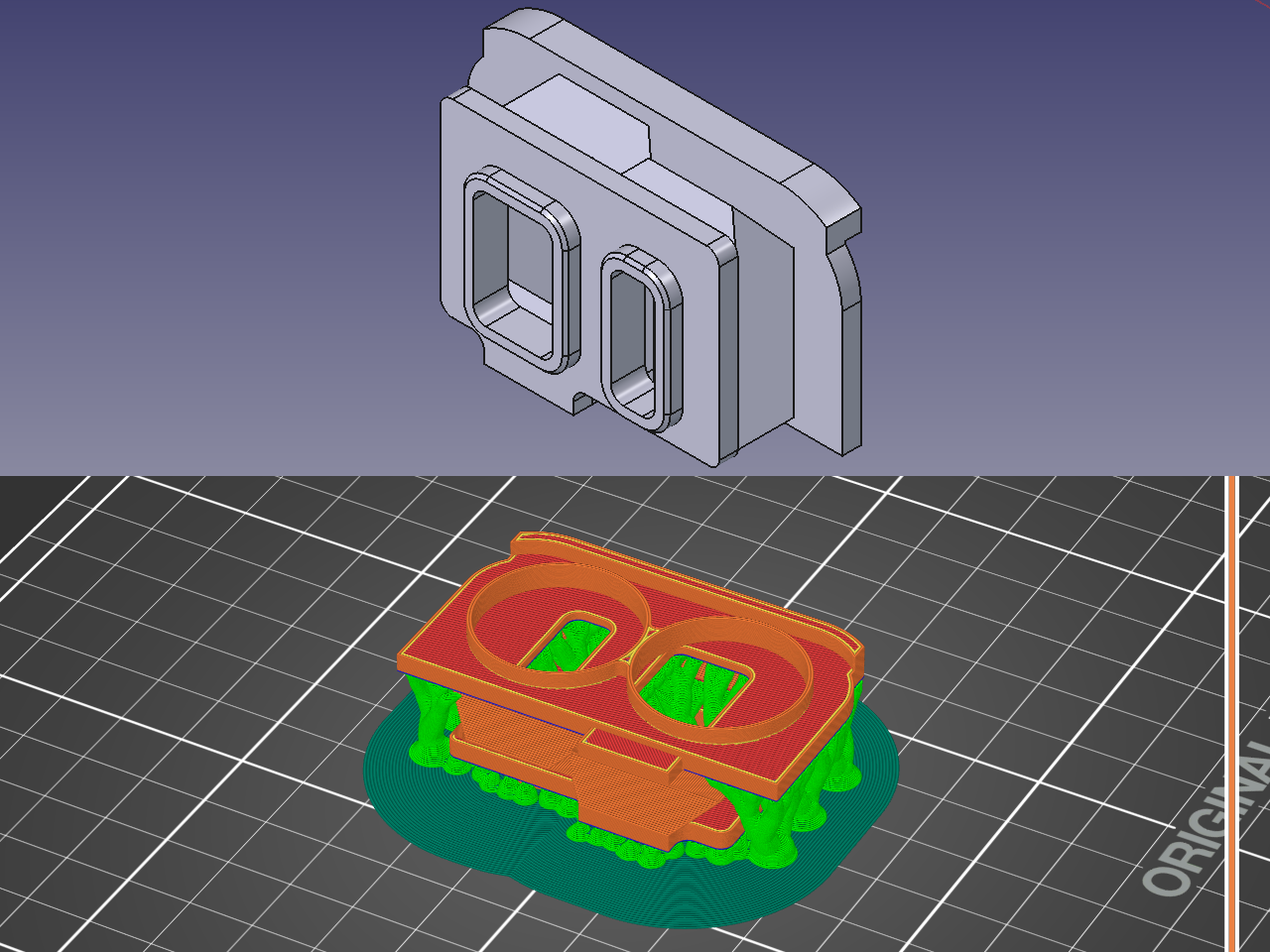
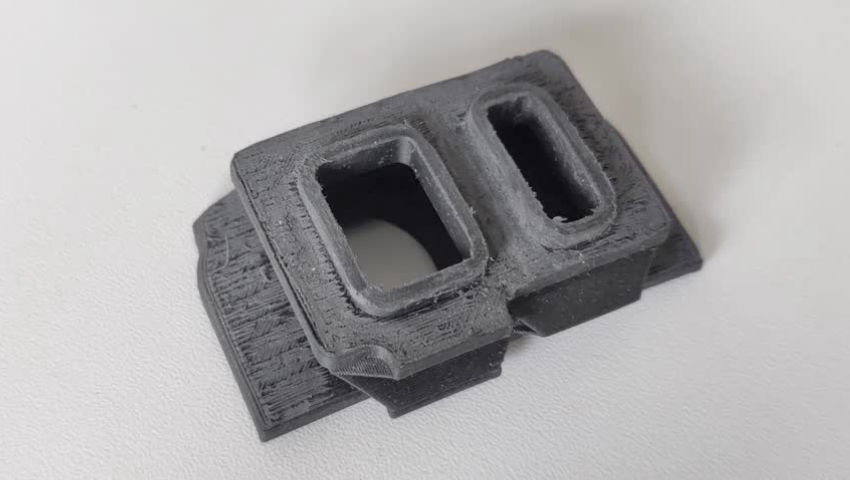
If you think it shakes the part loose when moving print plate back and forth, try reducing accelerations and max speed of your Y-axis
3DPrinting
3DPrinting is a place where makers of all skill levels and walks of life can learn about and discuss 3D printing and development of 3D printed parts and devices.
The r/functionalprint community is now located at: or !functionalprint@fedia.io
There are CAD communities available at: !cad@lemmy.world or !freecad@lemmy.ml
Rules
-
No bigotry - including racism, sexism, ableism, homophobia, transphobia, or xenophobia. Code of Conduct.
-
Be respectful, especially when disagreeing. Everyone should feel welcome here.
-
No porn (NSFW prints are acceptable but must be marked NSFW)
-
No Ads / Spamming / Guerrilla Marketing
-
Do not create links to reddit
-
If you see an issue please flag it
-
No guns
-
No injury gore posts
If you need an easy way to host pictures, https://catbox.moe/ may be an option. Be ethical about what you post and donate if you are able or use this a lot. It is just an individual hosting content, not a company. The image embedding syntax for Lemmy is 
Moderation policy: Light, mostly invisible
Thanks.
I tried lowering the speed (I can't see any settings to limit it in only one axis though) but from what I read is safest for TPU / TPE, it turns a 2-hour print into a 2-day affair. Not an option for a printer that's used by everybody in the company all the time.
In addition to everyone’s suggestions, have you tried rotating the part so it is at a 45 on the bed? This will keep the printer from accelerating as much in the Y direction since it is not a straight motion, I used to have to do that for tall prints on my Mk3 sometimes.
Also, if I were printing that part I would flip it over unless there is some reason you can’t. You might also get more rigidity using normal supports for the large surface facing the bed, might print faster too, tree supports for large areas take a while for me usually.
Have you tried adding "legs" in your model and cutting them off?
I added a giant brim all around the part (connected to the part). The whole thing - part, brim and all - simply comes unstuck.
I applied some glue to the sheet and it didn't increase the adhesion by much, but it increased it enough and the print went through okay:
However, now I have another problem: I tried to print another one with the same material and the head started to make clicking noises mid-print and stopped flowing 😢 I'm not sure what's going on with this now. Maybe I need to raise the temperature or something.
Jam or clog. Time to back the filament out and disassemble your extruder to service it.
It's not clogged: I fished out the mangled piece of TPU and printed something else with it straightaway - several times. Not sure why it starts clicking like that with that filament. Worse: it seems to do it almost always at the same point in that print.
Did you losen the idler tension screws? TPE requires that the tension is very very light otherwise it tends to buckle around the gear before entering the nozzle tube. Reducing retractions to a minimum is also always a good idea, as well as limiting the max flow rate.
You were right: after some trial and error, I backed off both idler tensioning screws 2 full turns and then the print went without a hitch. It looks cleaner too. And I don't know if it's related (now sure how it would be, but who knows...) the part didn't warp. First time I get a complete straight TPU part.
Thanks for the tip!
I wasn't aware. I'll look into this tomorrow. Thanks!
So I don't actually have a 3D printer, but from my humble perspective, why don't you just flip the print and print it on a separate orientation. So the top heavy part is now on the bottom or add extra struts for support to increase the mass of the unstable portion if you are not able to rotate the orientation of the print
It's heavy on both sides. Also, I need to keep this thin wall facing up because otherwise it would be essentially impossible to remove from the support. And I need the bits facing up to be very clean, while I can afford some nastiness on the bit that faces down after I'm done removing and cleaning the supports.
What have you done to clean the bed? From the link to the textured sheet, you should be cleaning it between every print - after it cools - with 90% IPA, and if you still have adhesion issues, you should clean it with warm water and a couple drops of dish soap.
Has the TPU been dried? I don’t normally print with TPU but my understanding is that it needs to be lower humidity than PLA; I use dryboxes for PLA and target a humidity of 15% or lower and don’t use them if they raise above 20%. The recommendation I saw for TPU was to dry it for 7 hours at 70 degrees Celsius, to target 10% humidity (or at least under 20%) and to print directly from a drybox. Note that compared to other filaments, TPU can’t recover as well from having absorbed moisture - if the filament has gotten too wet, it’ll become too brittle if you dry it out as much as is needed. At that point you would need to start with a fresh roll, which would ideally go into a dryer and then drybox immediately.
You should be able to set different settings for the initial layer to avoid stringing, i.e., slower speeds and longer retraction distance. It’s a bit more complicated but you can also configure the speed for a specific range of layers to be slower - i.e., setting it to slow down again once you get to the top of the print. For an example of that, see https://forum.prusa3d.com/forum/prusaslicer/bed-flinger-slower-y-movement-as-function-of-z/
What’s the max speed you’re printing at? My understanding is that everything other than travel should all be the same speed at a given layer, and no higher than 25 mm/s. And with a bed slinger I wouldn’t recommend a much higher travel, either.
In addition to a brim, have you tried adding supports?
What have you done to clean the bed?
I cleaned it with water and dish soap. There's nothing like it for adhesion. Even IPA doesn't quite get the same results.
Has the TPU been dried?
I left it in the dryer at 55C for 3 days. The internal hygrometer says 13%, I tried drying it hotter than that, but then it seems to have trouble travelling through the silicone tube - like friction or something.
What’s the max speed you’re printing at?
Whatever the default is for the Prusa-supplied preset for this very filament brand and make. I just lowered the nozzle temperature to prevent stringing and material "balling up" on the surface, and I raised the bed temperature to increase adhesion a bit.
In addition to a brim, have you tried adding supports?
There is a ton of support for that part: it's organic support and it's growing inside and outside the part without ever touching the part itself. The reason being, it's basically a thin bellows that's two layers thick, so I don't want anything supporting the bellows, or any support growing from the bellows, because it's super-fragile and it won't survive removing the support. That's one of the reasons why we ordered a Prusa XL with 2 heads: one will extrude the part in TPU while the other will extrude the support in PLA, which should fall right off.
So since I told the slicer to avoid touching the bellows with the support trees, there's a lot of it going around it on the outside. And indeed the bits of parts that I managed to print so far seem quite stiff and nicely supported. But the problem is, the entire thing simply comes unstuck and flies off the bed when it becomes too heavy.