this post was submitted on 19 Jan 2026
1 points (100.0% liked)
Linux Gaming
22762 readers
2 users here now
Gaming on the GNU/Linux operating system.
Recommended news sources:
Related chat:
Related Communities:
Please be nice to other members. Anyone not being nice will be banned. Keep it fun, respectful and just be awesome to each other.
founded 6 years ago
MODERATORS
you are viewing a single comment's thread
view the rest of the comments
view the rest of the comments
Cachyos is very user friendly. I moved from popos and love it.
100% of endeavor is using command line pacman for all your application installs and updates. They are like base arch with a wizard for installing. I installed them once in a work system and tried them for half a day before saying to myself “this isn’t worth it.”
Both are using arch, but cachyos has a much better curated set of bins for gaming for people who don’t want to pick and choose what things do what and really dig deep into custom repos and modules.
Cachyos has been rock solid for me too. Highly recommend limine for a bootloader with a btrfs partition so you can have btrfs snapshots that are easily recoverable (other loaders work, limine is just what I see recommended the most for it for some reason, I think I use systemd-boot for mine.)
Cachyos has a wiki with an install guide as well as a gaming section I highly recommend following.
Pop os bins are so out of date, I gained substantial performance and all the games I really had to fuck with to get working on pop 22/24 just fucking worked- no joke- on cachy. You don’t need to constantly update your proton versions either, cachyos keeps their one up to date as part of the distro and it’s already there in steam as an option if you install the gaming packages they have prepared with gamemode and other things.
You can’t just copy your home folder over. Arch does things differently than pop/ubuntu. You can however move over stuff to your new user folder bit by bit. My Firefox config went over and even kept my signed in sessions.
Anywho, your call on which to go with.
Thanks for the reply! I always nuke the main drive whenever reinstalling anyway so the home folder is not a problem. I guess since you did the same switch as I'm thinking of (and yes, PopOS gave me some headaches I never imagined I'd have in this day and age) I'll probably follow your recommendation.
This is not accurate by the way. It ships with its own Discovery app store too. I primarily use pacman/yay but some apps I use from Discovery that are installed as flatpaks. You could likely flip that and install most everything that way, it's just not my preference.
Interesting, they don't list it under package management.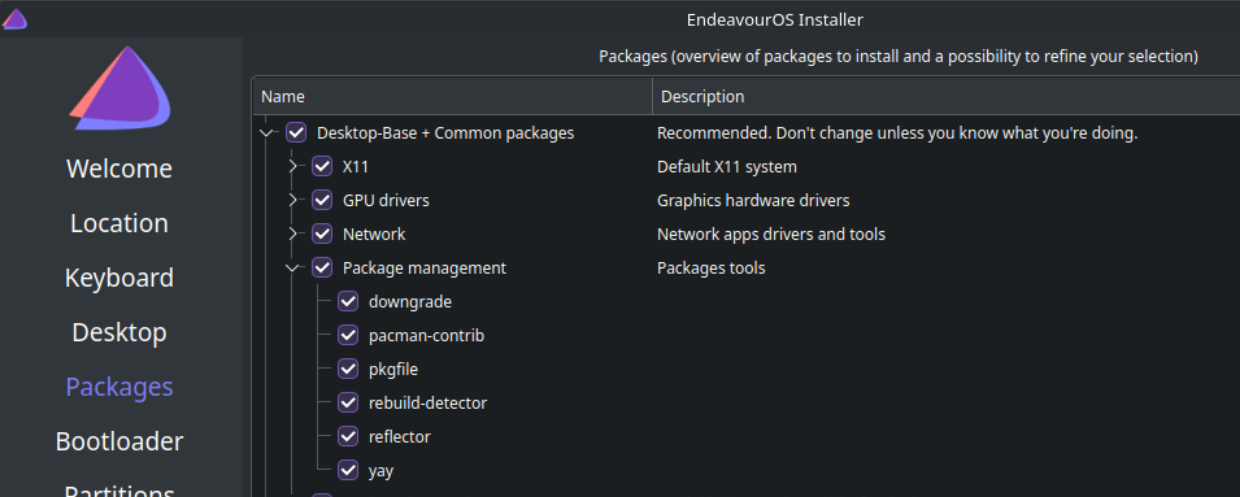
Reinstalling with xfce this time to see how it looks. I swore all I had was pacman / yay.
I'm not sure, but they might be talking about Discover, the Plasma software installer. It doesn't manage arch packages but can be used for flatpaks.
Yeah, I got my vm up and running to try it out. Because i'm on xfce I don't even have that by default. For a second I thought I was crazy though lol.
They could install octopi or that one other alternative for a pacman gui, same as cachy has preinstalled. It's fairly barebones though.
CachyOS has cachy-update which is still a terminal window for updates but has a tray config and will be there to let you know when stuff changes. I don't remember where I saw it though, the updater tray wasn't default.
eos-update seems similar on the surface and they have eos-update-notifier for a tray update notifier. After installing the thing though it's anything but the same. It's very user-unfriendly compared to cachy-update. I shouldn't have to dig for a man page to configure an application with a gui presence (tray icon) imo but i'm being nitpicky.