OpenWRT Firmware

253 readers
1 users here now

WIP

Community for OpenWRT & generally related networking.

Feel free to post questions or offer support.

Website: https://openwrt.org/

founded 2 years ago
MODERATORS
1


cross-posted from: https://lemmy.zip/post/61407838

Made this post on forum.mikrotik.com and it's awaiting approval from moderation, figured I'd try here...

Hey everyone!

Been running into an issue the last few weeks with trying to setup a VLAN on my home network.

Hardware/OS/IP:

Router (R) = GL.iNet GL-MT6000 (Flint 2), OpenWrt 25.12.1, 10.1.10.1
Office switch (O) = CRS310-8G+2S+, MikroTik SwOS 2.18, 10.1.10.2
Living room switch (LR) = CSS610-8G-2S+, MikroTik SwOS Lite 2.21, 10.1.10.3

Followed a few different guides on the OpenWrt side of the house, primarily this one

During my multiple attempts I have wiped all devices and started fresh a few times and I always end up in the same situation…

VLAN appears to be working on the LR switch (CSS610)

VLANs tab
    Port 1 is my trunk and a member of all 4 of my VLANs
        10 = LAN (Used for network devices and maintenance)
        20 = IoT
        30 = Guest (not configured on the switch, only for WIFI)
        40 = Main (Primary VLAN for my network)
        50 = Servers
    Ports 2-5 are members of VLAN 40
    Port 6 is a member of VLAN 10
VLAN tab
    Port 1 = Strict, Only tagged, Default ID 1
    Port 2 -5 = Strict, Only untagged, Default ID 40
    Port 6 = Strict, Only untagged, Default ID 10

This seems to work great, devices will get 10.1.40.x IP addresses and I can connect to port 6 and get 10.1.10.x IP address. Confirmed that my firewall rules also seems to work (although I’ll probably want to run this past OpenWrt forum as well).

But when I go to look at the O switch (CRS310), I’ll mirror this configuration, I’ll get DHCP and DNS, but I can’t reach the WAN or ping any other devices apart from the network equipment. Most recently I tried just VLAN 10 because I figured it would be using the LAN firewall rules and work correctly, but I get the same issue… correct IP address but no traffic.

Note: These screenshots are from last attempt to get something to work, when I mirror the CSS610 setup, I get the same results.

I had to follow these steps to get the SwOS boot to work on the CRS310

Curious if either…

  • Have I configured the CRS310 incorrectly and something needs to be different vs the CSS610 which seems to work?
  • Is there is a known VLAN related bug with the CRS310 & SwOS?

Any advice and guidance would be appreciated, feel like I am going in circles at this point.

Happy to share any outputs or screenshots from my OpenWrt router if it’ll help, but the issues do seem to be related directly to this CRS310 switch.

2


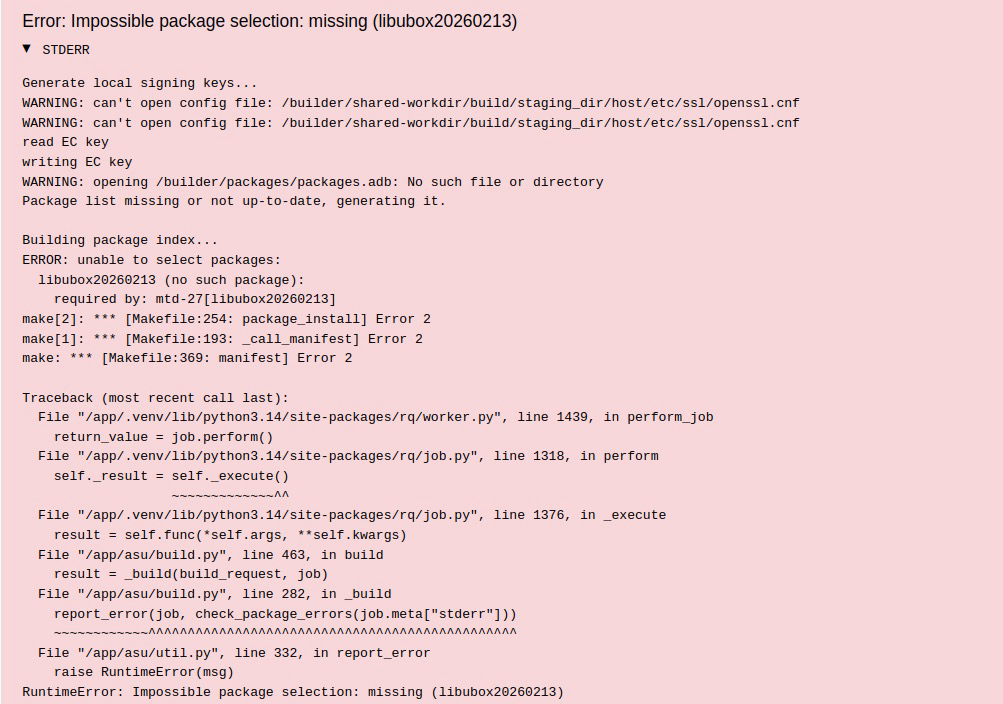
Looks like OpenWRT 25.12.0 has a bug while trying to generate a custom image. Same issue while trying for two different routers.

'libubox20260213' does not exist, there's 'libubox20260313'

#OpenWRT @openwrt

3


The OpenWrt community is proud to announce the newest stable release of the OpenWrt 24.10 stable series.

4
5


Hey everyone!

I just ordered a Flint 2 to replace a TP-Link AX3000 (keeping as a backup) primarily for the faster WG VPN, to try an open source OS and try to segment my network for security and to manage devices easier. But I’m feeling a tad overwhelmed trying to do research. I’ve got a background in IT, so I’m not concerned with flashing firmware or SSH. But networking concepts always take a minute to sink in.

Current situation

  • AX3000 is connected to 1G Fios
  • Unmanaged 1G Netgear switch at entertainment center (TV, PS5, Apple TV, Hue Hub)
  • Poorly daisy chained unmanaged Cisco 1G switch at my desk with my server (Proxmox on old Mac Mini), PiHole Pi and Mac Studio
  • 5Ghz and 2.4Ghz with Hue bulbs, iPhones, Steam Deck etc
  • Slow WG VPN on AX3000

The dream

  • OpenWRT (open source OS router) which hopefully the Flint 2 works out
  • 1G managed switch at entertainment center
  • 2.5G (or 10G supposedly because I can’t find prosumer 2.5G options) managed switch at my desk
  • Build a NAS (Node 304) to replace the Mac Mini hardware, make sure it has a 2.5G/10G NIC so my Studio to NAS connection is fast
  • VLAN and Firewall rules to separate IoT, servers, personal devices and ensure everything is secure but also ensure the correct devices can talk to each other (phone turn on lights, HomePod accessible from iPad)
  • WG VPN where I can access all of these VLANs and manage my services (something I can’t seem to figure out on the AX3000)
  • Also fix my wiring to my bedroom so the switches aren’t daisy chained, it’s a tiny rented NYC apartment

Questions

  • Any recommendations for articles, videos or forums/communities with tutorials for OpenWRT VLAN/Firewall setup similar to my goals? Anything specific to the Flint 2?
  • Tips or guidance on how to divide my network appropriately and still allow communication between devices?
  • Switch suggestions that you know will work well with the Flint 2? Also thoughts on the 2.5G vs 10G situation, spent ages looking at expensive switches and got window shopping fatigue
  • What am I missing or forgetting about?

Finally, if this is not the appropriate place to post this, please provide suggested communities. I went back to the community that shall not be named because I was struggling to find comparable Lemmy communities. Oh boy was that a depressing experience and I really want to build out what I used to have on Reddit in Lemmy, but I can’t find active alternatives.

Thank you in advance to anyone that read this far 😊

6


I have read the documentation and googled extensively but, when I try to initiate WPS, I always receive a response of "FAIL". Nobody else seems to have this issue, so what am I doing wrong?

I only want to enable this temporarily as it is the only way I know to connect a doorbell camera that I obtained for free and need to "hack".

> uci show wireless | grep wps
wireless.wifinet6.wps_pushbutton='1'

> hostapd_cli wps_pbc
Selected interface 'phy1-ap3'
FAIL

I have tried on both a Turris Omnia (OpenWRT 23.05.3) and TP-Link Archer C7 (OpenWRT 23.05.2). On each, and per the instructions, I installed hostapd-utils and replaced the stock wpad-basic-mbedtls with the full-featured version (I tried both wpad and wpad-mbedtls).

I have 4 WLANs on each radio. I tried configuring the single WLAN of interest with the option wps_pushbutton '1' as well as setting it on all WLANs on that radio (per a suggestion I found), but same result.

I've tried adding other wps_… options, rebooting, and everything in between, but same result. I don't see anything relevant in the syslog, and can't find a way to increase verbosity for hostapd. I've even looked at the source code for hostapd_cli which didn't really help.

Any thoughts?

7


For example, privacy violating linksys or netgear, or devices with components running improper firmware with a 14 year old vulnerability?

The reason that I ask, although I don't want this to impact the quality of answers, is that I'm shopping for a new router that is secure and private but rather than paying commercial and industrial prices I would rather get a consumer router and overwrite it's software.

8


How many times I can change IMEI without harm to device via AT command? For example if I will change IMEI 3 times a day (sometimes) and 7 times (most commonly) a week (1 per day) via AT command won’t it harm device?

I need extra lawyer of security as I will go to dictatorship country for 1 week as reporter n. This is extremely critical.

Please ask the highest level of your engineer team.

P.S: I am using Mudi v2 with blue-merle

9


cross-posted to: https://sh.itjust.works/post/13445728


I can see all the devices connected over WiFi, but their security choice seems to be unlisted. For example, if the WiFi interface has both WPA2, and WPA3 available, I would like to see what devices are using which.

10
11
12
13


Backup binaries:

cp /usr/sbin/tailscale backup_tailscale
cp /usr/sbin/tailscaled backup_tailscaled

Update (https://pkgs.tailscale.com/stable/#static):

service tailscale stop

wget https://pkgs.tailscale.com/stable/tailscale_1.50.1_mips.tgz

service tailscale stop
tar zxvf tailscale_1.50.1_mips.tgz

cp /root/tailscale_1.50.1_mips/tailscale* /usr/sbin/
service tailscale start
tailscale version