Logseq

821 readers
1 users here now

Logseq is a knowledge management and collaboration platform. It focuses on privacy, longevity, and user control. It is Free Libre Open Source Software (AGPL-licensed).

Logseq offers a range of powerful tools for knowledge management, collaboration, PDF annotation, and task management with support for multiple file formats, including Markdown and Org-mode, and various features for organizing and structuring your notes.

Logseq's Whiteboard feature lets you organize your knowledge and ideas using a spatial canvas with shapes, drawings, website embeds, and connectors. You can visually group and link your notes and external media (such as videos and images), enabling visual thinkers to compose, remix, annotate, and connect content from their knowledge base and emerging thoughts in a new way.

In addition to its core features, Logseq has a growing ecosystem of plugins and themes that enable a wide range of workflows and customization options. Mobile apps are also available, providing access to most of the features of the desktop application. Whether you're a student, a professional, or anyone who values a clear and organized approach to managing your ideas and notes, Logseq is an excellent choice for anyone looking to improve their productivity and streamline their workflow.

founded 3 years ago
MODERATORS
1
1
Logseq (logseq.com)
submitted 2 years ago by disrooter@lemmy.ml to c/logseq@lemmy.ml
2


Logseq DB Unofficial FAQ

https://discuss.logseq.com/t/logseq-db-unofficial-faq/32508

WARNING: Logseq DB is still in alpha. Use only at own risk of losing data. This post is for people who have questions about the new database (DB) version of Logseq. For the official announcement about the database version, see this post from April...

#logseq #pkm !logseq@lemmy.ml @logseq@lemmy.ml

3


I've been using Logseq for quite a while now and love it, however I'm kind of stuck on something in my process. When I work on something at my job, I'm often working on it for multiple days. How does anyone here capture that?

Do you do something like this?

[[figure out how to create x]]  
  - item 1  
    - subitem 1  
    - subitem 2  
  - item 2  
[[change out every y in all of the zs]]  
  - action 1  
  - action 2  

The thing is, I can then go to each one of those as a page and see everything, but I can't add to it for that day. I can just start the next day with an entry of [[figure out how to create x]], but I won't be able to see the whole thing while I'm doing it. I also won't be able to add something in context, like this without removing it from the day I'm working on it:

[[figure out how to create x]]  
  - item 1  
    - subitem 1  
      - subsubitem 1  
    - subitem 2  
  - item 2  

I see that you can copy and paste block refs, but that largely is the same thing as a page.

Do any of you deal with this? Should I not be so concerned about keeping my edits for the day?

4


I've used many "notes" apps for keeping thoughts, projects, lists in the past. Some have been simple others complex, yet they all left me wanting something more. Diving into #foss has brought me to @logseq and it fills my needs. Love the fact it's built aound a daily note.
#debigtech #degoogle

5
1
submitted 10 months ago* (last edited 10 months ago) by jarro@social.vivaldi.net to c/logseq@lemmy.ml


started using #Logseq for my work notes. loving it πŸ“’ @logseq

6
1
submitted 10 months ago* (last edited 10 months ago) by Cyber@feddit.uk to c/logseq@lemmy.ml


I'm 99% happy with Logseq.

The one thing that I struggle with is keepng an eye on ToDos.

Is there a better way of looking at them without looking at a ToDo page or an advanced query slowing down my journal template?

Is there another application that can parse the logseq .md files so that I'm not getting behind on my work?

7
8


The difference between [[page links]], #tags, and properties::

https://discuss.logseq.com/t/the-difference-between-page-links-tags-and-properties/8393

Originally published: Page Links vs Tags in Logseq | Aryan Sawhney If you’re anything like most people who first come to [[Logseq]], you may be wondering what’s the difference between a [[page link]] and a #tag Truth be told, the difference is...

#logseq #pkm !logseq@lemmy.ml @logseq@lemmy.ml

9


How to Set Up an Automated Daily Template in Logseq

https://blog.logseq.com/how-to-set-up-an-automated-daily-template-in-logseq/

The Journals page in Logseq is the best place to run your day from. But instead of improvising, why not set up a template?

#logseq #pkm !logseq@lemmy.ml @logseq@lemmy.ml

10


How to Get Started With Networked Thinking and Logseq

https://blog.logseq.com/how-to-get-started-with-networked-thinking-and-logseq/

Logseq does things differently. Free your thoughts using Logseq's flexible outline format and connect your notes to spark creativity.

#logseq #pkm !logseq@lemmy.ml @logseq@lemmy.ml

11


Logseq raises $4.1M to Accelerate Growth of the New World Knowledge Graph

https://blog.logseq.com/logseq-raises-4-1m-to-accelerate-growth-of-the-new-world-knowledge-graph/

Logseq raises $4.1M to accelerate growth of the open source neuron-inspired knowledge management system to build a new World Knowledge Graph.

#logseq #pkm !logseq@lemmy.ml @logseq@lemmy.ml

12


Logseq and the Rise of the Integrated Thinking Environment

https://blog.logseq.com/logseq-and-the-rise-of-the-integrated-thinking-environment/

Every knowledge worker should have an Integrated Thinking Environment. Learn how Logseq can help you become more creative using outlines and links.

#logseq #pkm !logseq@lemmy.ml @logseq@lemmy.ml

13


Logseq DB - Changelog

https://discuss.logseq.com/t/logseq-db-changelog/30013

Changelog from: 2024-10-27 to: 2024-11-16 Enhancements Plugin Enhancements Enhanced block properties related APIs for plugins. [897d18f52] UI Enhancements Polish to select component [3da57d0ee], block control arrow [a4df98903], and classic...

#logseq #pkm !logseq@lemmy.ml @logseq@lemmy.ml

14


Logseq DB Version Release Schedule?

https://discuss.logseq.com/t/logseq-db-version-release-schedule/29668

Is it possible to know even an approximate schedule for when the Logseq DB version will be released as an installable version not web version? With a major feature overhaul progressing, it seems challenging to recommend the current version to...

#logseq #pkm !logseq@lemmy.ml @logseq@lemmy.ml

15


I feel kind of betrayed, haha. I had so many things that fell of my radar at work, especially after the holiday break.

Per the link, if you edit your config.edn around line 222, you can up that limit. I set mine to 9999 just now, and suddenly 45 items appeared.

16


What if I you had to move to Obsidian?

https://discuss.logseq.com/t/what-if-i-you-had-to-move-to-obsidian/20733

I recently asked myself how easy it would be to migrate to Obsidian if I had to stop using Logseq for some reason? I’m happy with Logseq, but like to know that I could switch if I had to - it gives me peace of mind about my data. The question is...

#logseq #pkm !logseq@lemmy.ml @logseq@lemmy.ml

17


Just submitted a #Gruvbox theme to @logseq 😬😁

https://github.com/logseq/marketplace/pull/590

18


I think I'm (sadly) done with @logseq. It corrupted some data again and when I went to pull the stuff from git I figured it corrupted the .git/config even earlier than that. So now I have to pull the correct content from an old windows backup, ffs. What if I didn't have a full disk backup?

I like the idea of block references, I love the query engine and the simple UI. But data safety comes first, really. Logseq is a forever beta at this point.

I really like the concepts behind the logseq db version but @obsidian doesn't fuck with my data and you can see good iterative progress of its development. Yeah, it's not opensource. It's open data format, though, something logseq db will have to figure out eventually anyway.

19


I have a page for people working in a specific field (like QA) and some peoople under that (like QA/Max and QA/Lena). All these people also have aliases like Max SecondName nad Lena Schmidt. All these aliases show up as seperate nodes in the graph view... Does someone know how to fix this?

20
1
submitted 2 years ago* (last edited 2 years ago) by Smorty@lemmy.blahaj.zone to c/logseq@lemmy.ml


image descriptionA screenshot of the right sidebar of Logseq showing the contents tab. The tab contains some links to certain websites, like a ticketing system, Teams, some homepage, a switch and a link called Kollegium which is german and means Colleagues (I should probably change that to be English aswell). There are also links to almost all the task pages and a query which shows the currently running NOW tasks. The picture is meant to show how much this smol sidebar can do. I like it, and I would like to see more of it in the program!

END IMAGE DESCRIPTION

At first I used Logseq only for personal use. It's great for quickly noting something obviously, but that networking effect people talk about really got into full force once I started working with it for my admin job.

I only just started using that sidebar and some more plugins (vim shortcuts and some of the awesome plugins) and those make the experience that much better. Also that pdf printer plugin is cool, even though I wish it was just a Logseq feature by default to be able to print stuff. I know that a pdf converter is coming!

I am very much not an advanced user, but these simple tools alone make me feel like organizing things became like three times easier. It also introduced me to markdown and now I miss it whenever I don't have it, or I have to use some fake version with different syntax for basic highlighting and links.

Thank you dear Logseq team and contributers for creating such useful and not bloated software.

21


Hi, I just started using Logseq via the Mac desktop app. My Mouse is a Logi M720 Triathlon with thumb buttons set to default settings with Forward (Forward button) and Back (Back button). Those work just fine everywhere. IDEs, text editors, Obsidian, browsers etc. But in Logseq, the buttons do nothing and it kinda breaks my flow because I have to switch to keyboard for weird shortcuts or have to klick the back button manually. Is there a way ti fix this? I could not find a working fix yet.

22


Hello all, I am donating to Logseq since some time to support the development. However I am not actively using it and are still stuck with Obsidian and/or Notion since I am missing a good structure to organize my books and quotes.

I really want to switch but I can't figure this out. For storing books that's fine. I can create a page per book and give it some metadata that I can then use to filter and search. Like that:
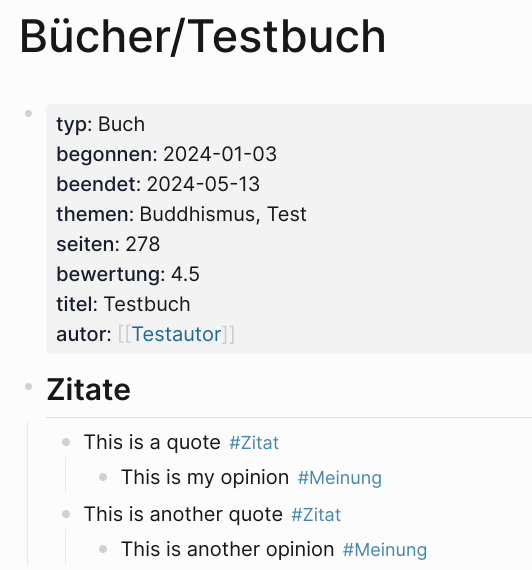
Now however as you can see I'm writing quotes (Zitate in German) and my opinion on them (Meinung in German) in the book's page.

And here comes the tricky part:

  • I want a general overview of all quotes that I can search
  • I want an overview of quotes per author (the author is in the page properties so it has to basically do something like "select all pages of typ = book where autor = author and collect all quotes on them (page reference #Zitate)"

In Notion I currently have a general database of quotes:
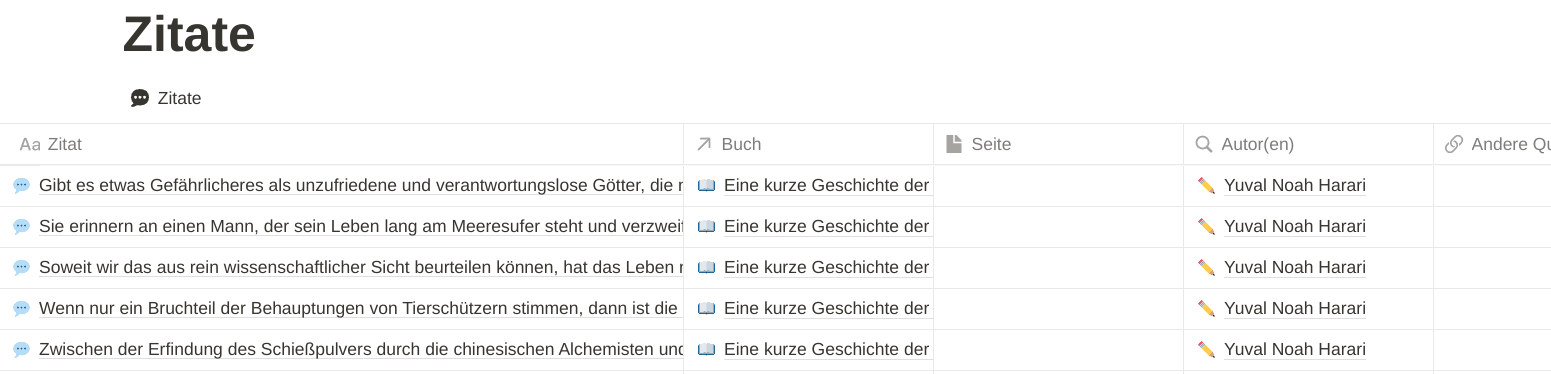
In each of these quotes there is my opinion written in the page.

And then there's the book database that has dedicated book pages to it which look like this and reference the quotes coming from that page:
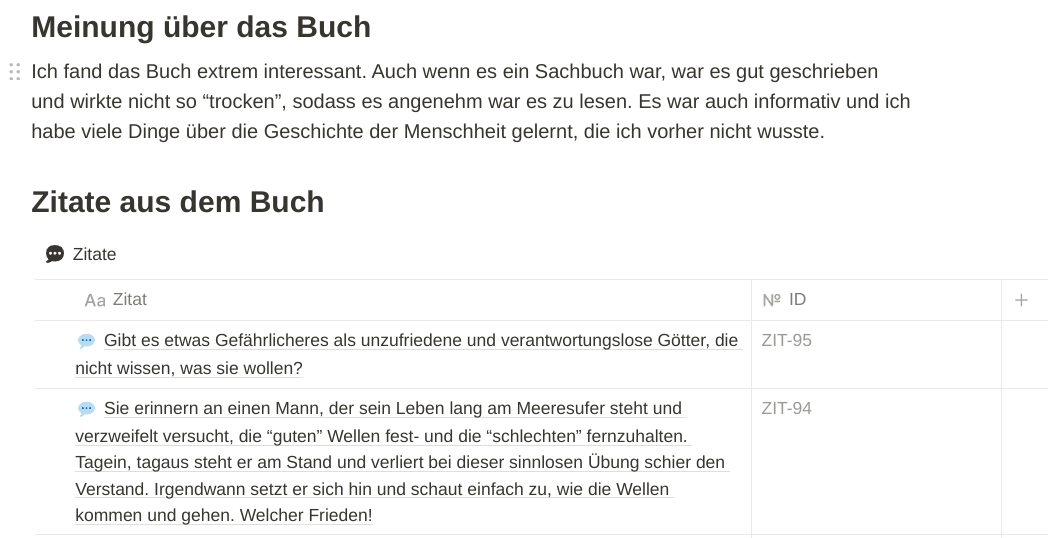
Those are generated automatically when creating a book since I use a template for that but I know that Logseq supports templates, too so that should be fine.

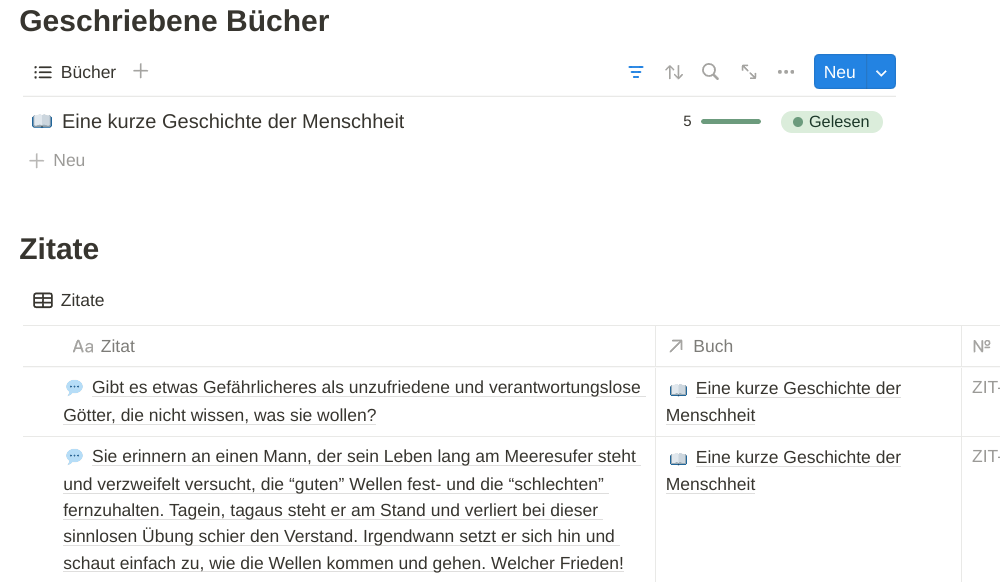
For looking up quotes by the author due to how databases in Notion work I could just filter for it in the quotes database. However I also do the same with the quotes in the author's page that I am doing in the book's page. Thus when I open up the page of an author I can instantly see all their books, their current status (if I have read them or not etc.) and all their quotes that I have stored:
So yeah I am trying to find some kind of structure since ages now within Logseq to be able to replicate something like that, solving my only issue that keeps me from switching. Maybe there is some way with queries but I haven't found one. I also don't want to rely on custom CSS since I want to have something that is natively working without eventually failing in the future for some reason.

23


Essential tools for retaining sanity and productivity between contracts:
- sunsama daily planning
- trello + #GTD method
- @logseq for notes & journalling

Trello+GTD info here: https://timwise.co.uk/2020/09/15/effective-gtd-with-trello/

24
25


Hi all, I've been getting into logseq over the past month, and it's what I've always wanted for many reasons.

For my work instance, I would really like to have it just pop up with this in the morning 2024-04-15

  • [[project a]]
  • [[project b]]
  • [[project c]] etc...

But, I've looked at config.edn to find :default-templates {:journals "project a"}

Which works, but I can't figure out if it's possible to add multiple. I've tried spaces, commas, multiple lines, and it all kicks back errors. Anyone have any idea?

view more: next β€Ί