vortexal

joined 5 years ago
[–] vortexal@lemmy.ml 1 points 9 hours ago* (last edited 9 hours ago)

I don't remember exactly what I said but I did rewrite my post a little bit ago, it probably wont change your question though. Basically, what I meant was that I wanted to be able to run the most games from each device. Not as in hold the most games at a time, but more so hold a bigger game than it previously could while also being able to potentially load all games faster just in general. It just so happens that compression is capable of both in the right context, and in a way, it would also prolong the longevity of the devices as well, even if that's not my main intention.

I know that BTRFS can do this as it's specified here and that works for me. But I was also told that F2FS could do this as well and I was linked to here. BTRFS is fine for most of my devices but there's one device in particular that doesn't have much space left when it's formatted for BTRFS and therefor I'd like to get the compression in F2FS working if possible. Although, if I did get the compression in F2FS working correctly (assuming I wasn't lied to), that's probably what I'm going to end up using for most of my devices since most of them are flash storage devices.

[–] vortexal@lemmy.ml 1 points 11 hours ago (2 children)

I'm not sure what the differences are between them but what I'm looking for, BTRFS calls "transparent file compression". I want the files to be compressed when added to the device but still fully accessible as if they aren't. As I stated in my post, BTRFS supports this and I was able to set it up. I was told by multiple users that F2FS also supports this but if it does, it's not working for me.

[–] vortexal@lemmy.ml 1 points 12 hours ago

I've gotten BTRFS to work and I'm going to use that for most of my devices. I'm not sure if I'm going to use ZFS though, the documentation that I was given for how to use it seems to be written from the perspective of someone who already knows how the it works and not from the perspective of someone who doesn't, so I'm very confused by it.

I'd like to get F2FS working on one of my devices though, but the commands needed to enable compression don't seem to be working for me and I'm not getting any error messages so I have no idea how to fix it.

[–] vortexal@lemmy.ml 1 points 12 hours ago (2 children)

Is it read-only, or does it write the files at some point?

[–] vortexal@lemmy.ml 1 points 12 hours ago (1 children)

I apparently already have it installed but mkfs still thinks that zfs isn't available. Am I supposed to use something else?

[–] vortexal@lemmy.ml 1 points 12 hours ago (2 children)

I don't need it for my OS, I have a full 512 GB hard drive for my Linux Mint installation. I need this for specifically running games on old storage devices that hold less than 32 GB and have terrible read and write speeds.

[–] vortexal@lemmy.ml 1 points 12 hours ago (1 children)

I used a folder full of smaller files and it still isn't compressing them. I've tried everything I can find or was told to do with f2fs but I cannot for the life of me, get files to compress. Btrfs works and files are compressing but it takes up so much space on the sd card.

[–] vortexal@lemmy.ml 1 points 12 hours ago

Nope, I just reformatted sd card back to f2fs, mounted it the way both you and the documentation specified, and files are still not being compressed.

[–] vortexal@lemmy.ml 1 points 13 hours ago (1 children)

No I did read it, I did the commands like it said but files weren't being compressed. I can try it again though, if it turns out I did still do something wrong.

Also, I tried formatting the sd card to btrfs without using gparted and it did work, and files are being compressed. Only problem is is that btrfs is using about 2/3 of the cd card, so I hope I can get f2fs working on it.

[–] vortexal@lemmy.ml 1 points 13 hours ago (3 children)

I read the page you linked to but I have no idea what I'm supposed to do with it. If it's talking about using the "mount" command, I've already used that and even though I specifically enabled zstd as the compression method, files aren't being compressed. I know this because I'm using a file that's slightly larger than the free space but it's still giving errors about not having enough space.

[–] vortexal@lemmy.ml 2 points 13 hours ago* (last edited 13 hours ago) (4 children)

I actually figure out the problem, I was actually supposed to just enable compression and then use the command when mounting. Only problem is, it's not compressing the files even though I mounted it with zstd enabled. I know this because I’m using a file that’s slightly larger than the free space but it’s still giving errors about not having enough space.

[–] vortexal@lemmy.ml 2 points 14 hours ago

I figured out what I did wrong but now I'm getting a different error message. It's saying "Error: Wrong features compress_algorithm=zstd" even though the page I was given says it should be possible. Any ideas on what I should do to fix that?


*Edit: I have figured out how to use BTRFS and enable what it calls "transparent file compression", and I'm going to use that on most of my old storage devices. The only problem I'm having is that I want to use F2FS on my oldest storage device, as BTRFS takes up too much space on the device and I was told by multiple users that F2FS also supports transparent file compression, but I can't get files to compress and I'm not getting any error messages to try and fix it. Based on what the documentation says, I'm supposed to do something like this:

sudo mkfs.f2fs -f -O extra_attr,inode_checksum,sb_checksum,compression /dev/mmcblk0p1
sudo mount -o compress_algorithm=zstd,compress_extension=* /dev/mmcblk0p1 '/home/j/mountpoint/128mb'
chattr -R +c '/home/j/mountpoint/128mb'

The device will mount like this but files aren't compressing when added, nor are they compressed if using the last command after they've been moved.*

I'm rewriting the old portion for clarification:

In Windows, there's a file/folder option called "Compress contents to save disk space". What it does is it compresses the files, as the name suggests, but leaves them accessible as though they aren't. This doesn't really have much of a benefit on newer storage devices but on older storage devices, in addition to saving space, it allows files to potentially read faster.

As I have some old storage devices that I want to run games from, I think this will be a great option to have if I could find something similar for Linux. I tried looking online myself but search engines are terrible and I couldn't find anything though them. So, I decided to post about this here, to see if anyone knows of anything I could try.


If you're not aware of what preload is, it's a command line application that allows you to add files to ram, so they can be accessed faster by the applications that need them.

It seems to work well for what I'm using it for, which is to run games from slower storage devices, but there doesn't seem to be any documentation for a proper way to remove the files once they've been added to ram. What I've been doing is to just use htop to terminate the preload command, but I feel like this is not intended at all. Is there a better way to remove these files?

I should mention that while trying to search for a solution myself, I did see gopreload mentioned a few times. I would try this out myself, but there's no proper installation instructions, at least not any I could find that work in Linux Mint.


As a sort of follow up to the post I made on my alt account, would I need to do to anything to Grub to continue using Linux Mint after removing Windows or would I still be able to boot into Linux Mint without having to do anything? As stated in the previous post, Windows is installed onto an SSD and I want run games from that SSD but I'd need to reformat the SSD in order to use it.

Edit: I don't need help with this anymore but because it seems like there is some confusion, I'm including the fact that I have Linux installed onto an external hard drive and Windows was installed onto the SSD which is in the laptop. I've already remove Windows from the SSD and reformatted it to ext4 so I can run games from it.


There's a game that, while I will admit that I don't really have an interest in playing, isn't working properly because it's trying to default to a GPU driver that isn't even loaded ( and possibly not even installed). The game is called Zbridge and it's standalone app is only distributed through Flathub. For some reason, it's trying to default to using "iris" even though the only GPU driver that's loaded is "i915". I have confirmed this with this:

j@j-Latitude-E7470:~$ lspci -k -s 2
00:02.0 VGA compatible controller: Intel Corporation Skylake GT2 [HD Graphics 520] (rev 07)
	DeviceName:  Onboard IGD
	Subsystem: Dell Latitude E7470
	Kernel driver in use: i915
	Kernel modules: i915

But the game, on top of giving some other errors I've found to be trivial, still tries to load iris by default for some reason:

j@j-Latitude-E7470:~$ flatpak run club.zbridge.zbridge
[2:1229/172053.425891:ERROR:bus.cc(407)] Failed to connect to the bus: Failed to connect to socket /run/dbus/system_bus_socket: No such file or directory
Gtk-Message: 17:20:55.221: Failed to load module "xapp-gtk3-module"
[2:1229/172056.788306:ERROR:bus.cc(407)] Failed to connect to the bus: Failed to connect to socket /run/dbus/system_bus_socket: No such file or directory
[2:1229/172056.788423:ERROR:bus.cc(407)] Failed to connect to the bus: Failed to connect to socket /run/dbus/system_bus_socket: No such file or directory
MESA: error: Failed to query drm device.
glx: failed to create dri3 screen
failed to load driver: iris
[41:1229/172103.010356:ERROR:viz_main_impl.cc(196)] Exiting GPU process due to errors during initialization
MESA: error: Failed to query drm device.
[2:1229/172118.159439:ERROR:gpu_process_host.cc(989)] GPU process exited unexpectedly: exit_code=512
MESA: error: Failed to query drm device.
[2:1229/172133.299896:ERROR:gpu_process_host.cc(989)] GPU process exited unexpectedly: exit_code=512
MESA: error: Failed to query drm device.
[2:1229/172148.425964:ERROR:gpu_process_host.cc(989)] GPU process exited unexpectedly: exit_code=512
MESA: error: Failed to query drm device.
[2:1229/172203.465700:ERROR:gpu_process_host.cc(989)] GPU process exited unexpectedly: exit_code=512
MESA: error: Failed to query drm device.
[2:1229/172218.491001:ERROR:gpu_process_host.cc(989)] GPU process exited unexpectedly: exit_code=512
MESA: error: Failed to query drm device.
[2:1229/172233.517237:ERROR:gpu_process_host.cc(989)] GPU process exited unexpectedly: exit_code=512
[2:1229/172233.517295:FATAL:gpu_data_manager_impl_private.cc(448)] GPU process isn't usable. Goodbye.

I have found a temporary solution by running export MESA_LOADER_DRIVER_OVERRIDE=i915 but as far as I can tell, I shouldn't have to do this because it should just be defaulting to the driver that's already loaded. If this is an issue with the app itself, I am going to submit a bug report but I want to make sure this issue isn't on my end before submitting one.


There is a mod for the DSi/3DS called "Twilight Menu" and it allows DS games to use the DSi's better clock speeds. Given that overclocking is a common feature for emulators, I was wondering if there were any DS emulators with this feature. I have seen discussions on other websites about this topic and how it would be possible but none of the emulators are listed as having an overclocking feature. All of the documentation and discussions about this seem to be at least a few years old and I know a lot can happen in a few years.


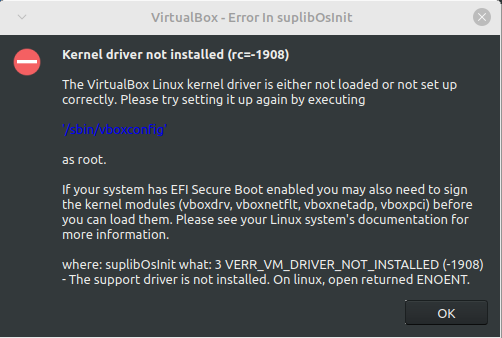
I tried looking into this myself but I couldn't really find much about this error. The only solutions I could find didn't work for me. The first one was to use mokutil but at the point where I was supposed to run sudo mokutil --import MOK.der it gives me the error message "Failed to get file status, MOK.der" even though I did everything it told me to do. The other one was to disable secure boot and then run sudo '/sbin/vboxconfig' but even though it looked like it worked, I'm still getting the error message. I have re-enabled secure boot, so you don't have to worry about that.

Is there something else I can try or does VirtualBox not work in Linux Mint for some reason?

view more: next ›