varsock

joined 2 years ago
MODERATOR OF
[–] varsock@programming.dev 1 points 2 years ago

Had a distinguished collegue (from the Bell Lab days) say to me recently:

"IDEs take up a lot of RAM on my machine. Vim takes up a lot of squishy RAM in my head. I need squishy RAM to hold info relevant to problem solving, not options available in my tool chain."

[–] varsock@programming.dev 0 points 2 years ago

nothing wrong with being self taught, you could follow these basics topics before poking holes in firewall.

  1. VLANS: learn how to separate your LAN into networks with different security requirements. For wireless, try to make a "main" and "IoT" network so that IoT network that can't talk to your "main" network but "main" can reach IoT devices. For wired, try to have a Management network, and a "Dirty network" etc.
  2. Firewalls and Routing: You will need to be able to route between your VLANS and set firewall rules to allow certain traffic. Best practice is block everything and allow only what you need.
  3. NMAP: learn how to do NMAP scans of your network to discover hosts and their open ports/services. This is a similar approach that "hackers" and script kiddies use on the public internet to find vulnerae and open services. Being able to probe your own network is crutial in understanding how others might approach in penetrating it.
  4. Wireguard VPN: Learn to access your network remotely by setting up a wireguard VPN. Wireguard is preferred because it is "stealthy" and will not respond to unsolicited attempted to probe your network. Start small by using wireguard to access between VLANs so you don't run the risk of using the internet.
  5. NGINX and Reverse Proxy: If necessary, learn to expose your services or blog or website by only exposing nginx and proxying to your services. Many guides on securing NGINX exist. Try not to expose anything, but sometimes necessary if you want others to reach your website/blog/hosting etc.

That's a rough outline that you can use to guide yourself and achieve milestones with hands on experience. In your pursuit you'll run into certificates and domain name hosting and stuff. But all this is on the web so let your curiosity (and paranoia) drive! Have fun!!
 

Unit tests are meant to verify the functionality of isolated units of code. When dealing with code whose output depends on the system or system configuration, what are approaches to write effective unit tests? I feel this problem plagues lower level systems languages more so I am asking it here.

I solve this by writing "unit tests" that I then manually compare to the output of my terminal's utilities. It is the quickest way to verify units work as expected but it is obviously not automated.

Making a container or a VM to run integration tests seems like the next easiest way, not sure if there are other cost effective ways.

Scenario

Say I have a function called

get_ip_by_ifname(const char *if_name, struct in_addr *ipaddr)

Inputs:

  • string of interface name
  • pointer to variable where the returned IP address will be

Returns:

  • -1 if interface does not exist,
  • 0 if interface exists but has no IPv4 IP
  • 1+ if interface exists and has at least 1 ip addr (some interfaces have multiple addresses, only 1st is written to ipaddr buffer)
Test Cases and their dependencies
  1. Interface doesn't exist
    • easy to test, use uncommon interface name
  2. Interface exists has no ipv4 ip address
    • requires the underlying system to have a unique interface name which I need to hard code and compare to in my unit test
  3. interface exists, has 1 ipv4 ip address
    • requires underlying system to have the uniquely named interface with exactly 1 uniquely defined ip address. Both of which I need to hard code into my test
  4. interface exists, has 1+ ipv4 ip addresses
    • similar to item 3.

The way I might test something like this works is write a test that logs each case's output to the terminal than run ip -c a in another terminal and compare the info in the 2 outputs. I verify it works as expected manually with very minimal setup (just assigned multiple IP addresses to one of my interfaces).

I would like to test this in an automated fashion. Is there any way that wont be a time sink?


If you didn't get a choice to work remote, how come?


I'm still getting the hang of Lemmy and federated services.

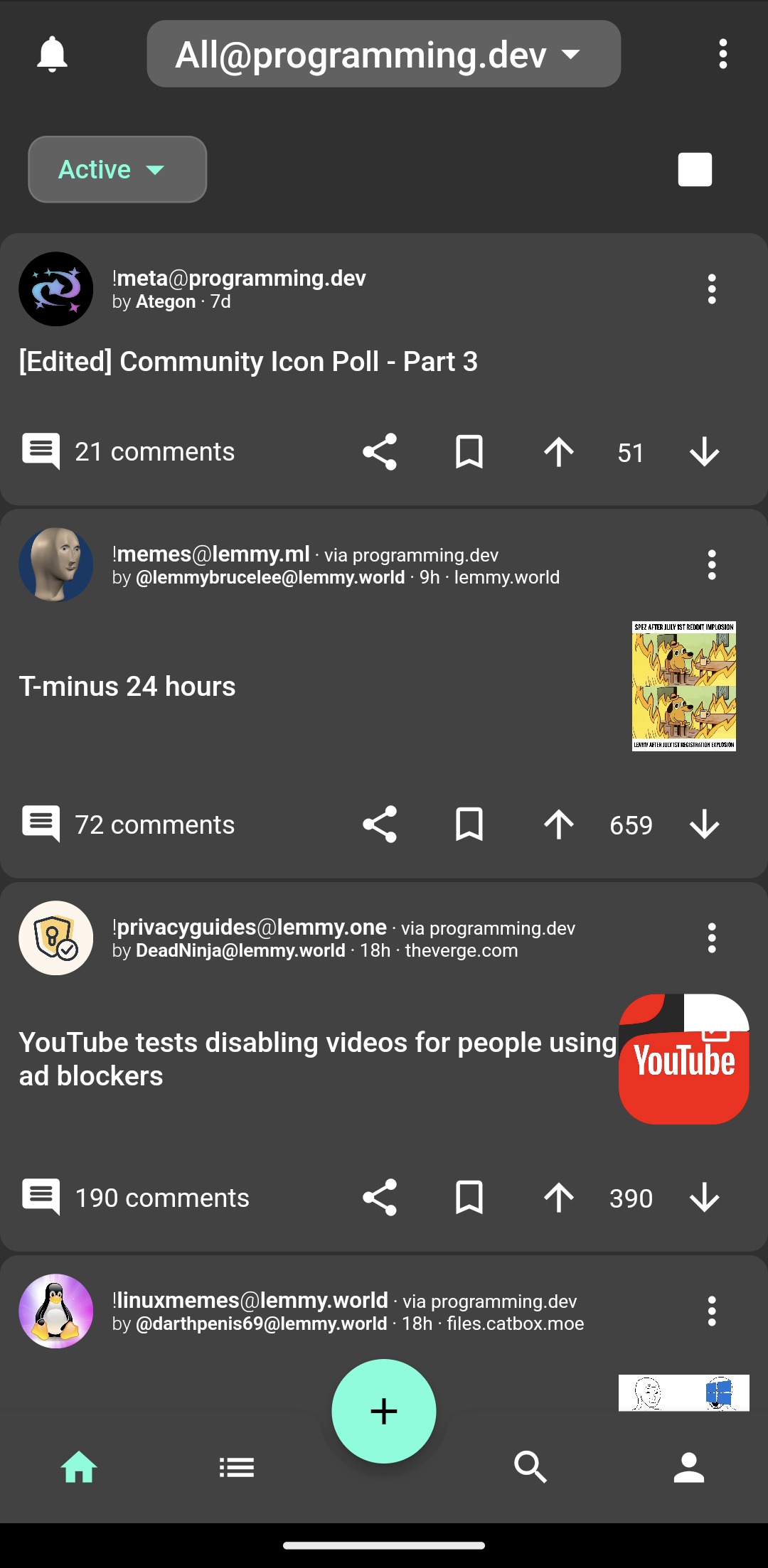
I'm browsing the programming.dev instandce in the Liftoff app and I can choose to view:

  1. my subscribed communities on the server (currently none)
  2. Local communities on the server
  3. All (?)

I know All is not "all communities on Lemmy" but what perplexes me is I can see posts from another community that is hosted on a different server and it appears because it is "via programming.dev".

At first I thought it was because a user registered on " programming.dev " posted on another instance but I opened my eyes and saw the user's origin is no way related.

Any ideas?

EDIT:

After reading all the comments I’m pretty sure “via programming.dev” should read in the context of the post as !community@instance is known via programming.dev instance. I guess it makes it explicit which “all” I am browsing if I pick up browsing where I left off and forget I am not in the “all local”.

At this point I have only seen this on the Liftoff App for Lemmy but still trying other. Must be in the metadata and Liftoff decided to display it.