pelya

joined 2 years ago
[–] pelya@lemmy.world 56 points 2 days ago (4 children)

I can tell it's some 32-bit millisecond counter without even opening the article. 49 days period is too specific.

And since I did not hear anything about MacOS network stack catastrophically breaking on any servers, the impact should be small.


Because I express my creativity through shitcode, I named my development hardware appropriately.

It's actially xn--og8h8z because /etc/hostname is allowed to contain only ASCII Latin characters, numbers, and dash, but converting emojis to Punycode using command idn πŸŒˆπŸ’© does the job.

I can log into my Raspberry using command ssh user@πŸŒˆπŸ’© however Bash login shell still shows untranslated Punycode hostname instead of rainbow poop symbols, so the support is not yet fully there, and avahi-resolve-address shows hex codes of UTF-8 emojis.

I'm using Debian 13 btw.

[–] pelya@lemmy.world 3 points 1 week ago

1GB model is $45. And if you need a Linux microcontroller, Raspberry Pi Zero with 0.5 GB RAM is $15.

Honestly, 16 GB RAM in a Raspberry Pi is stupid. What are you using it for? If you want AI, you buy NVidia Jetson, Raspberry Pi won't cut it with 4-core CPU. If you want a regular PC for office, you buy a regular PC with low-end Intel or AMD CPU for the same price. If you want a video server to plug into your TV, 1 GB RAM will be enough, and there are cheaper moddable media boxes out there. If you want a controller for your industrial equipment, you'll be barely using half-gigabyte of RAM for your industrial spaghetti code, so you probably bought the most expensive model for your corporate writeoff money just because you could. No, it will not be more reliable and won't work any faster. But you can run Quake 3 on your CNC lathe, which makes it totally worth the price (Quake 3 runs fine on 512 MB RAM, you could have bought Pi Zero ).

[–] pelya@lemmy.world 4 points 1 week ago (1 children)

One additinal trick is to compress your files before writing them to disk, using some kind of fast lightweight compression like parallel gzip (pigz command) or lzop. When parsing them, you will have smaller disk reads but higher CPU usage, which will give speed advantage if you have server-class CPU with lots of cache.

[–] pelya@lemmy.world 5 points 1 week ago

The biggest online store in my country has 4GB flash drives permanently on sale for $3.

[–] pelya@lemmy.world 0 points 1 week ago

Lightnovel will be fully translated in a year or two.

Although from volume 7 onwards the focus is less on Tanya and more on failing logistics of the Empire.

[–] pelya@lemmy.world 25 points 1 week ago (8 children)

A Debian live image fits into 4GB flash drive. If you search stuff for sale you can probably find them cheap, and 4GB is practically the smallest size you can buy.

[–] pelya@lemmy.world 10 points 2 weeks ago (1 children)

They still make an acceptable FTP server for backing up your huge tarballs.

Github is more involved, you need to create a release and then attach files to it. With sf.net you jist do a FTP upload.

[–] pelya@lemmy.world 3 points 2 weeks ago

If you are using KDE

[–] pelya@lemmy.world 4 points 2 weeks ago

But it's on a dedicated server you have already paid for, which also hosts your own Minecraft game server with active players (mission-critical process which can never be allowed to stop).

[–] pelya@lemmy.world 6 points 2 weeks ago

Is this a blazer hoodie?

[–] pelya@lemmy.world 3 points 3 weeks ago* (last edited 3 weeks ago)
0
Frontpage is broken (lemmy.world)
submitted 2 months ago* (last edited 2 months ago) by pelya@lemmy.world to c/lemmyconnect@lemmy.ca
 

When I open Lemmy Connect, I see this. No frontpage posts are loading, however I can open my profile and read my own posts.

I am posting this from a mobile web browser like a savage. Please help!


Components:

  • ESP32-S3-Zero with RGB LED. I've selected it over more energy efficient ESP32-C6 because bigger chip looks better, and it's placed symmetrically.
  • two CR1220 3V batteries.
  • copper wire from Ethernet cable (single-strand obviously).
  • lead-free solder (it's a ring, don't wear lead on your fingers).
  • hot glue gun, because I could not make a battery holder using just wire.
  • a piece of small diameter heat-shrink tube for copper wire.
  • a jewellery file (optional, only needed if you actually going to wear the thing).

Instructions:

  • flash the firmware first, because batteries will obstruct the USB port.
  • it is recommended to file off all sharp edges on the board before you start soldering, it will be harder to smoothen the edges afterwards without scratching the copper wire.
  • smoothen your wire, wrap it around some finger-size object like a tube of flux, cut the wire spiral into rings.
  • solder wire rings into one side of the board, use every hole except for 5V and GND, and TX/RX on the other side.
  • put the board onto your finger, measure and cut the other side of the wire rings to match your finger size, solder wire rings to the board.
  • Glue two batteries together in sequence, then glue them to the top of the USB connector. Watch out for polarity - CR1220 has positive charge on the body and negative charge on the contact plate, you need to put the negative electrode onto the USB connector.
  • wrap a stripped copper wire around another wire with isolation on it.
  • bend both wires so that the stripped wire will go into 5V hole, and the isolated wire will go into GND and RX holes. The isolated wire is only needed as a mechanical support, because you should not solder another end of 5V wire to the TX or RX hole, or you risk frying the chip.
  • add a piece of heat-shrink tube to the stripped wire. You need to make contact with the battery at the top and prevent the wire from contacting the battery at the bottom. You can try to leave a bit of isolation on the wire, but it's easier to use the tube.
  • solder wires to the board.
  • do not to make a common mistake of connecting 3V3 and GND together, or GND and 5V, like I did. 3V3 wire goes under the board onto the finger, GND wire goes above the board to hold the batteries.
  • keep wire ends from sticking out of the mounting holes when soldering, they are going to scratch you when you wear the ring. You can file them off afterwards, but it's easier to not make them stick out in the first place.

Firmware: https://github.com/pelya/esp32-led-cycle-colors

The only thing it does is cycle LED with random colors. It shuts off power by pressing BOOT button or after 5 minutes. To turn it back on, press RESET button. There's no WiFi, Bluetooth, or LCD screen, but at least the LED is bright.

I did not measure how long will these two batteries last. When they are empty, I'll need to rip off hot glue blobs from the board, which would be pretty easy since I only put hot glue onto metallic surfaces.

And it's absolutely not waterproof, hopefully the finger grease will keep to the underside of the board and won't short the battery.

Full video: https://youtube.com/shorts/QZi4RBir2cE


For those who want to try it at home:

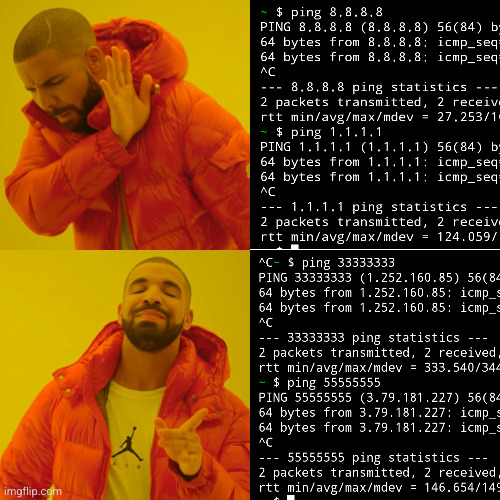
ping 33333333
ping 55555555

I am sorry, two random Internet users in Korea and Germany, your IP addresses are simply special.


I don't need any fancy tiling window managers. One fullscreen window per desktop, and 12 virtual desktops, that was my workflow for 10 years. Then I incorporated KDE activities into my workflow, which are exactly like virtual desktops but switched with Meta-Tab not with Ctrl-F1 - Ctrl-F12. Wonderful!

And then, Plasma devs broke it. Switching activities now puts my foreground fullscreen window (one per desktop) into background, and switches keyboard focus to the desktop. Give me back my keyboard shortcuts, and you could also rename Plasma back to KDE while you're at it, thank you very much.

At least there is a bug opened, but it's doubtful that Plasma devs will fix it before Debian 13 release. I can't even find motivation to update my OS anymore.


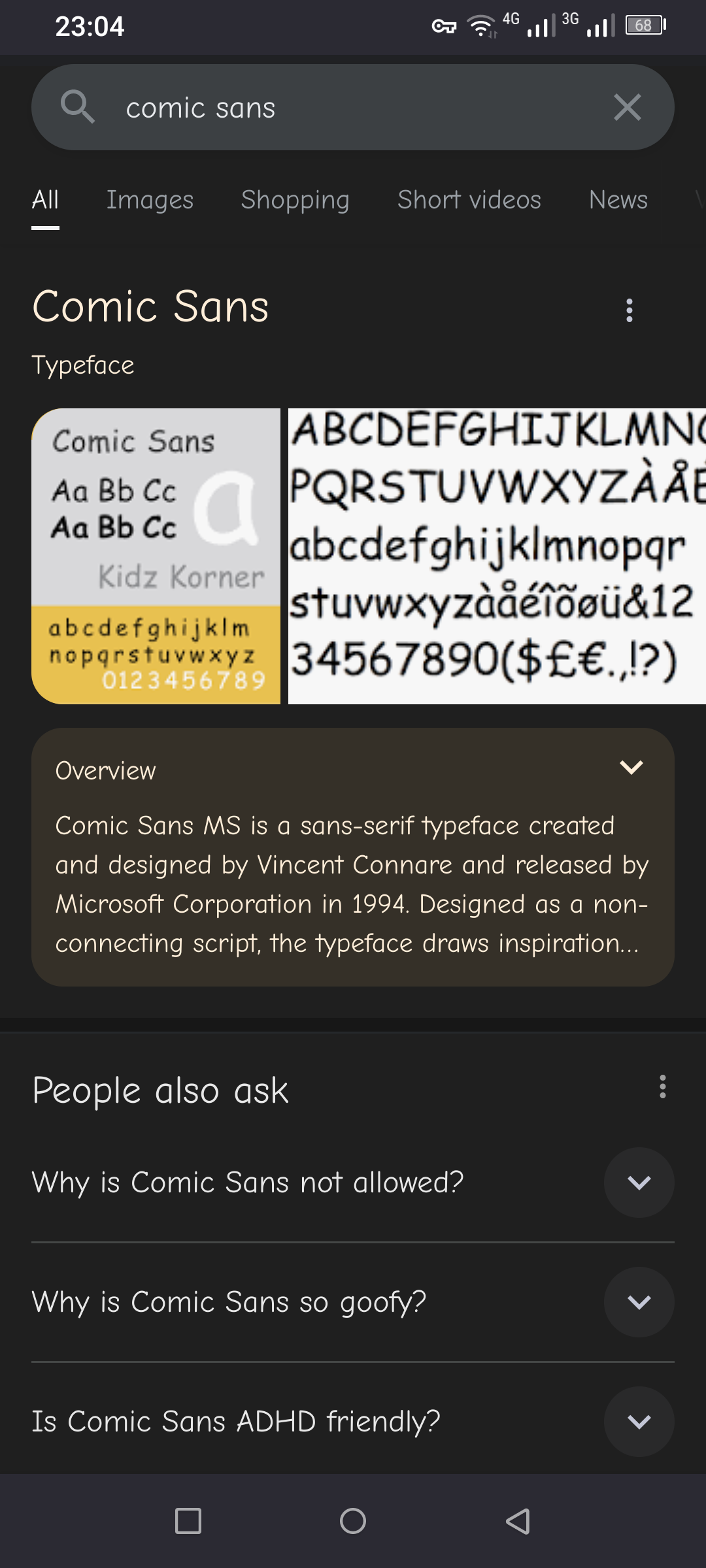
Also works for searches 'Times new roman' and 'Courier new font', but not for 'Lucida console font' or 'Dejavu sans font'.

1
submitted 2 years ago* (last edited 2 years ago) by pelya@lemmy.world to c/imaginaryfairies@lemmings.world


I often want to copy some phrase from a post to search it on the web. Long-pressing post text minimizes this post into a single line, which is not very useful IMO, I would rather have text selection cursor like in a web browser.


Some studios are still releasing premium games in 2023. Undead Horde 2 is a dungeon crawler with no ads or IAP, and it costs $10.

It features 3D blocky graphics, although less blocky than Undead Horde 1. The combat is moderately paced and depends more on upgrades than on button mashing, most of the time your minions do all the fighting. There are no puzzles, just some fetch quests to progress the story.


I've unlocked all weapons in Vampire Survivors, and I'm too bored to grind the remaining 14 unlocks.

Please recommend me some proper, $10 up-front games.

1
submitted 2 years ago* (last edited 2 years ago) by pelya@lemmy.world to c/androidgamers@lemmy.world
 

I've encountered many, many mobile games where the character needs to perform five different actions, so the developer adds five separate buttons to the screen. Of course you will mis-tap them and die in the middle of a boss fight.

The best touch controls are achieved when the dev designs the game around touchscreen, not attempts to adapt touch controls for some existing game.

For platformers there are two movement buttons on the left, and three buttons on the right part of the screen - jump, attack, and alternate attack or some action like dodge. Any more buttons make the game hard to play. There is also a common mistake of making buttons the size of a thumbtack. Ideally the buttons should be as big as a 5 Euro coin, that would be a third or even a half of screen width for most phones.

My recommendations are SuperTux and Swordigo.

For twin-stick ahooters there are two joysticks, and maybe one or two extra action buttons above the right joystick, but not anything more.

The best examples are Space Marshals and Crimsonland.

Top-view RPGs and dungeon crawlers also tend to use twin stick controls. The gameplay tends to be more relaxed, because you can slways grind few more levels and don't bother dodging enemy attacks.

Shoot-em-up is another type of game that works really well with the touchscreen. Your aircraft follows your finger no matter where you touch the screen, it's simpe and it works well. There is a wide variety of quality shmups on Play Store, try OpenTyrian for some classic DOS gameplay.

Honorable mention to swipe controls. You can swipe up/down/left/right without aiming for a specific button and even without looking at the screen, ao it's impossible to mis-tap the wrong button. The downside is that swiping is slower than taps, so the gameplay tends to be slower. Reaper is a good example.

First person shooters are okay for casual gaming, but playing any competitive Counter Strike clone like Critical Strike or Critical Force will earn you a friction burn on your finger, because you are swiping the screen non-stop to aim.

I'm not reviewing strategy games here, they can have 10-layer menus and dialogs and still be playable.

Some racing games support gyroscope as a replacement for the steering wheel, it works rather well.

And of course there are infinite runner games. I don't want to call the whole infinite runner category trash, there are some good runner games like SmashHit or Vektor or Alto's Odyssey, but if it's three lanes infinite runner, you will watch ads each 30 seconds, and the gameplay is only fun for the first 30 seconds.

Flappy bird. Best touch controls ever, but the game itself is garbage.

There is a specific class of mobile gamers who are using gamepads. The gamepad is great for sure, you have a separate button for each finger, however the gamepad is more often than not bigger than the phone, so you are losing convenience and need clothing with huge pockets.

view more: next β€Ί