AndrewZabar

joined 2 years ago
[–] AndrewZabar@lemmy.world 5 points 3 days ago

True! Kinda nudging up against the fourth wall.

[–] AndrewZabar@lemmy.world 2 points 3 days ago

I don’t know why that’s funny.

[–] AndrewZabar@lemmy.world 1 points 4 days ago

Most are not really in need of any updates I would think. Aside from some, I’d venture to guess these are standalone systems running machinery. If they’re linked up then it’s with something else that’s not really vulnerable such as Lantastic or Novell maybe? Or I could be talking out of my ass entirely. But these are not systems that they need to worry about the modern threats of cyberspace.

[–] AndrewZabar@lemmy.world 3 points 4 days ago

More like great great great grandpa, realistically. I think it’s absolutely commendable that anyone has maintained compatibility with it for this long. Expected? Hell no. Deserved? Arguable on either side. But mighty damn admirable that the effort was made.

The speed of tech in many sectors tends to just blast away and leave everything behind and say screw it, keep up of fuck off. The classic desktop architecture seems to be where they’ve held off of that mentality the longest and with most integrity.

[–] AndrewZabar@lemmy.world 10 points 4 days ago (2 children)

I don’t even know what to make of this, I just know, it’s pure Larson. LOL.

[–] AndrewZabar@lemmy.world 3 points 4 days ago

Or what they want you to think they want you to think they think. Good luck sleeping tonight. Lol. ;-)

[–] AndrewZabar@lemmy.world 1 points 1 week ago

I have /e on a Galaxy Note 4. It's just like another Lineage or Cyanogen brew. 

[–] AndrewZabar@lemmy.world 1 points 2 weeks ago (1 children)

I briefly tried FUTO a long time ago but it nowhere approached what I needed.

[–] AndrewZabar@lemmy.world 1 points 2 weeks ago

Well, I don’t use swipe, regardless which keyboard I’m using or even which device I’m using. I use about twenty different devices depending what I’m doing. Don’t ask lol. The frank reality is nothing whatsoever beats the iPhone when it comes to knowing what you meant to type. Even though the iPhone has recently had some really weird problems with autocorrect, I have sometimes been so shaky (Tourette’s) and I’ve typed some of the most incoherent drivel, and yet my iPhone got everything 100% corrected to what I intended to type. It’s just frankly astonishing.

But on Android my goal was to avoid Google products when possible. That’s why I went with Heliboard. FOSS, very customizable, backup and restore all settings (MAJOR help when adding to a new device). There are truly an impressive and elegantly functional features, anticipating a wide variety of needs.
BUT I have to erase and retype well more than half of my input. And that’s not including any shaking just for the record.

Meanwhile, gboard does about 85% as good a job as iPhone. I mean, I’ve got shit to get done, ya know? So, for now I am using gboard most of the time and I’ll change back to Heli once in awhile to see if it’s any better after there’s been an update.

[–] AndrewZabar@lemmy.world 21 points 2 weeks ago (15 children)

I really like Heliboard but Jesus does it suck at autocorrect and detecting what key I meant to hit. Gboard is a thousand times more accurate in these respects and so I default to Heliboard but I’ll occasionally switch to gboard if I have a lot to type and Heli is just wasting my time.

[–] AndrewZabar@lemmy.world 2 points 2 weeks ago (2 children)

Is that actually your name? As in, גדליה? Juuuuust curious.


Hello,

I've got a few directories that contain images that I don't want cluttering up my gallery wall in the software Aves Libre. I placed a .nomedia file within the directories. I recall in the past this has worked insofar as the software no longer displayed those images. But it's not working right now, and those images are all being shown.

Any idea how to resolve?


Hey all, I've got a few apps I rely on daily, such as Total Commander, CX File Explorer and Material Files. Regarding my current needs, none suffice 🙁

The closest I guess would be Material Files, but it will only show a grid of two columns or just a list. I'd like to have the kind of flexibility of a typical desktop file browser like Explorer. Or on iOS FileBrowser by Stratospherix. That app is amazing but they don't make it for Android.

I've tried so many. On older devices I can use Asus File Explorer which comes stock on their phones, but I only have a version that's a little older, and it won't do SMB on my Androis 13 device. It works on older ones.

I've also tried out Astro and Amaze, they both have good and bad aspects but neither provides what I want.

Anyway, verbose post I know, but if you have any recommendations I would really appreciate it.


The entry "Mercari Support" has no reason to be there. How can I remove it from the share sheet?


I'm looking for software (very preferably FOSS) that can achieve the following challenge:

I want to position numerous android devices and then using one separate device, view an array of all those devices' camera views, independently control at least minimally such as PTZ the frame and take pictures and videos - and take synced photos and videos commanding them all concurrently. The more features the better. And while I prefer a FOSS app for basic functionality, I would not be opposed to a moderate onetime price (no subs) for something that's fairly sophisticated.

Hoping I've made my needs clear, but let me know if not.

Thanks.


Hey all,

I have a tablet that I’ve been working on and in order to setup OS I need to plugin a usb hub to the usb port, using an adapter to microUSB, ok, and then plugin either a keyboard and mouse or a combo unit (in my case, the wireless receiver device of a mini keyboard/touchpad device), and finally, the flash drive with the OS install on it.

To put it simply, it’s really a pain in the ass anytime I want to do some testing. It works, but it is a clutter and nuisance.

Is there any software that will allow me to plug in a USB cord from my laptop (Linux) and the other end into the USB port of the tablet, and use the laptop to control the tablet?

Thanks.


Hi all,

I'm wondering if there's anything out there that's decent for using voice command and natural language queries to help me - preferably one that can run on Android, but Linux would do also. Basically a FOSS version of Siri, but maybe more effective in terms of natural language. Siri is actually quite good at what it does, but what it does is very limited. It's mostly limiter to a robust set of voice activated commands than an actual assistant with natural language flexibility.

If nothing's available I figure I could use an Android device with a custom ROM and use one of the ones that aren't FOSS, and just keep that device free of any personal info.

Please advise, thanks.


Hey all,

This is probably a very easy one for folks here. It’s been quite some time since I’ve done anything professionally but I was for a long time. Basically, for a while, my systems have experienced intermittent issue that for approximately 30 seconds, can’t get any WAN activity. I can still communicate with other systems within my network. - this is a home situation. The only thing that changed sort of around when this started was I configured my two access points as a mesh - pseudo, since they’re not actually mesh technically. Like, I just made same SSIDs, but different channels. This way I could get around and my devices would hop. And it’s worked nicely. Only issue has been occasionally a device tries to hang on desperately which I know is like the most common problem, but I am gonna play with signal strength if the APs support modifying that. 

Anyway, I’m getting off topic. But yeah, that was the only thing that changed but I really think it’s just a coincidence. It’s definitely not the wifi itself because the problem occurred on a wired machine as well. 

My setup is I have the cable device in bridge mode and I have a Sonicwall as my router. I also have a site-to-site VPN with another Sonicwall at a remote location for a variety of purposes. That setup has been on and stable for like 15 years almost, and it’s fine. 

So, really my first idea is I want to run software that can continually test the connection for like 12 hours, and log when the connection goes down and for how long. Obviously I thought of just running a ping, but I wanted to know if there’s anything that will try varying destinations over time, and track the results so I can analyze for more than just how long and when. Also I don’t know if some servers might misconstrue a persistent ping for many hours as a possible DDoS bot and knock me off, so I figured varying the destination has the added benefit of making sure the test is as reliable as possible. 

If I’m gonna figure out what’s wrong, and if it’s the cable device I want to be able to just tell level 2 support my results so they’ll just swap it out quickly. 

Anyway, sorry for long post but I imagine they come much longer here sometimes. If anyone has ideas as far as having seen this kind of thing, and also if there’s any FOSS software I could run to test and analyze. I prefer something easy please :-). I’d like to run the tests on two systems concurrently to see how they compare. I’ve got a windows 7 machine and a Linux machine. The Linux is on WiFi and the Win is wired. 

Also if this doesn’t belong here, I apologize; it looked kosher according to the sidebar. 

Thanks folks.

P.S. oooh also, if there’s an app for Android that can join the test as well, I’d love that. I have piles of Android devices so I would like to see how they fair, as well.


In keeping with Dan’s pattern from the beginning of subverting anticipations - as in, Brita and Jeff kissing for his assignment, Jeff and Annie kissing for the debate - I think it would be perfect for the movie to establish Jeff and Annie are already married. Maybe they started dating a few years after the finalé.

What do y'all think?


She’s already wrapped S2 of Ted, and clearly she likes working with Seth, so since Lysella stayed on board in the end, wouldn’t it be awesome if she became a recurring character or even a cast member?

1
submitted 1 year ago* (last edited 1 year ago) by AndrewZabar@lemmy.world to c/samsung@lemmy.world
 

I have an A7 Lite and I’m just getting sick of the lag and sluggishness. I had done a lot of research prior to buying it, and was led to believe it could be optimized enough to run really nicely.

Well it turns out that any rare successful ROM replacement procedures are long gone with no live file links and not a single coherent procedure instruction. So despite it being theoretically doable, there isn’t a solid document with accompanying files available. I have spent many months looking for something that isn't obsolete, incomplete or missing accompanying files.

So… what I need is something around that size +/- a little. So like 8"-11" range. I want a long lasting battery and a decent enough CPU, RAM, GPU arrangement to handle most basic tasks such as videos, photoshop and the occasional game - without any stuttering or hanging due to latency.

Ideally, I’d really like to be able to do a custom ROM if I should so desire. This isn’t urgent but in my experience with a dozen different test cases, a slimmer ROM make a crazy improvement in performance (seriously, it's astonishing how much faster most devices perform with a slimmed ROM) . However, given I’d likely wind up going with a Samsung I’d want the S-Pen to work nicely. I really don’t like how bloated One-UI is, but it would seem I’d be stuck with it unless there are ROMs that integrate their S-Pen utilities. I actually quite like them.

So good performance but don’t need the best or even close to the best. Just not the bargain basement slug that is the Mediatek inside the A7 Lite. It’s honestly shameful.

Oh and just in case they’ve started to fuck around with this, I need a microSD slot.

Sorry for being so verbose but I wanted to be as clear about what I wanna avoid as what I am looking for.

Edit: some grammar and clarifications.


cross-posted from: https://lemmy.world/post/20065081

Hey folks,

So, some of the instruction steps I am not expert already. Once I do this kind of thing once or twice I usually never need help again. However, this would be the first one I do in a few years.

Anyway... Moto X device, replace OS with Eclipse ROM. The instructions have a few steps.

So, first of all, I have already gone into developer mode. The OEM unlock that is often there is not, so I need to know how to do that via ADB. I could probably look that up. The next thing is it says I have to already be on 4.4.4 Android build, and I cannot find that level of specificity in the About. I will post the page.

I have downloaded the appropriate rom file. Then it says wipe data but don't do a complete reset. Okay I will do that.

Install the ROM. Okay, how?

Reboot. I can handle that.

So, I guess I need to unlock bootloader via ADB, I need to determine and ensure the current KitKat is up to 4.4.4 Need to install the new ROM

If someone could help me with these, I would appreciate it greatly. Thanks!
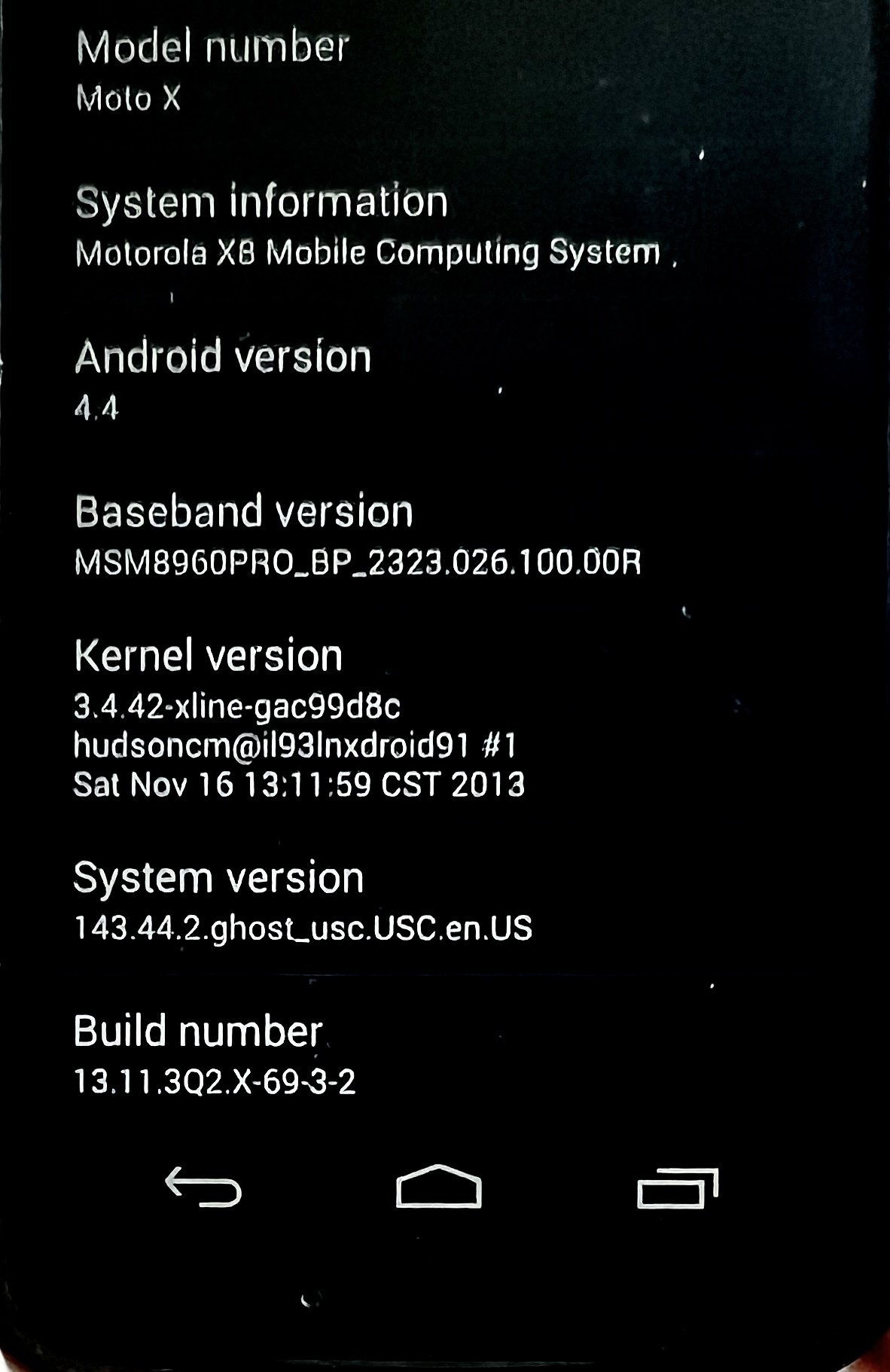
About


They’re both so competitive here but their safety training still kicks in lol.

view more: next ›