4Robato

joined 1 year ago
[–] 4Robato@lemmy.world 0 points 4 days ago (1 children)

Test it myself too and it seems more smoth there but if you move slowly it also happens but it's a lot harder to notice indeed!

[–] 4Robato@lemmy.world 0 points 4 days ago

Yeah yesterday I tried using a live installation in Gnome and same issue. Seems some deeper thing going on!

[–] 4Robato@lemmy.world 0 points 4 days ago (2 children)

yeah that's not the complain, this happens to all drawing apps. This is some Linux rendering/composer thing going on. That behavior is not normal and it does't happen on apple and in Windows I couldn't test yet but I'm sure it doesn't happen there either.

[–] 4Robato@lemmy.world 0 points 4 days ago

I've tested on different mouse, the touchpad and the steam deck. All do the same behavior.

[–] 4Robato@lemmy.world 0 points 4 days ago (4 children)

Exactly. I've updated the post with more details.

[–] 4Robato@lemmy.world 0 points 4 days ago* (last edited 4 days ago)

I've tested with touchpad and even on different computers with Linux all behave the same. Even on the Steam Deck.

[–] 4Robato@lemmy.world 0 points 4 days ago (2 children)

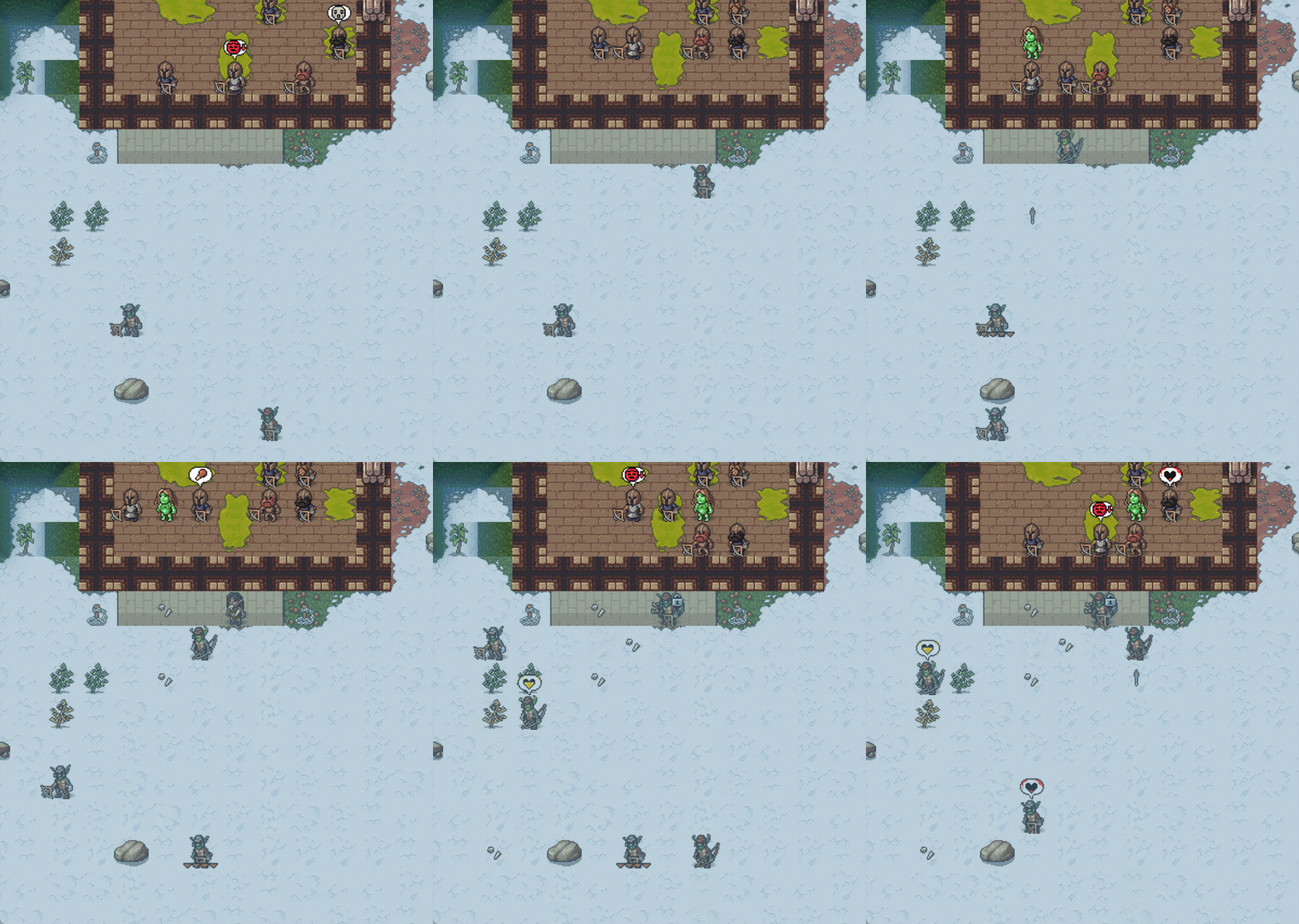
When zoomed out straight lines look like a staircase. I've updated the post with more details.

[–] 4Robato@lemmy.world 0 points 4 days ago* (last edited 4 days ago)

A mouse but same with touchpad. I've updated the post with more details.


Hello!

Sorry I’m posting this here since I don’t think is specifically related to KDE but since I use KDE and is where I found it the first time I figured some of you might be able to help!

I found a bug that seems too affect many apps and I’m not sure where to report it. Let me explain the issue and hope some of you know where to report that!

So the other day I reported the bug on Krita that you can see on the video but later on saw that this seems to happen to many apps in Linux! So I entered a bit into a rabbit hole and tried many things. This same thing happens to GIMP, KolourPaint, etc. and it seems to be independent on the distro or the Desktop environment!

I’ve checked on Fedora, CachyOS and SteamOS (with Wayland and with X11) and also tried KDE and Gnome. All of them had this issue and then tried Krita on a macbook and didn’t seem to have the issue (correction: seems it's speed dependent. If you move the mouse too fast it doesn't do it else it does). And some of them where different computers too.

Does any of you know where this kind of things should be reported? This seems to be very fundamental and I have no idea where this should be reported. Any iedeas?

Edit: Since there seems to be some confusion here's the bug report:

SUMMARY Drawing a line with the brush creates a zig-zag pattern based on the zoom level

STEPS TO REPRODUCE

  1. Select the Freehand Brush Tool (B)
  2. Set size to 1 px (happens in all sizes but 1 px is very clear)
  3. Zoom out with the wheel
  4. Draw a diagonal line
  5. Zoom in with the mouse wheel
  6. Draw a diagonal line

OBSERVED RESULT The line drawn when zooming out has a zig-zag pattern to it (like a stair) while the zoom in line has less or none (depending on the zoom level).

EXPECTED RESULT Both lines should be a smooth diagonals instead of a zig-zag pattern.

SOFTWARE/OS VERSIONS Operating System: Fedora Linux 43 KDE Plasma Version: 6.6.3 KDE Frameworks Version: 6.24.0 Qt Version: 6.10.2 Kernel Version: 6.19.10-200.fc43.x86_64 (64-bit) Graphics Platform: Wayland

Hardare used to draw: Logitech Gaming Mouse G502 I've also tested with the touchpad and my brother's computer with different hardware and mouse. This also happens there and even on the Steam Deck so it's definetely not a hardware issue.

Link to the bug report I first did: https://bugs.kde.org/show_bug.cgi?id=518636

Edit 2: For all the people that say that the mouse is able to capture the dust or table irregularities (which is absurd) here is an example where you can clearly see the square patern: https://i.imgur.com/sEDyCIC.mp4

Does anyone know where this should be reported?
[–] 4Robato@lemmy.world 15 points 3 weeks ago (4 children)

From wiki:

Multi-speed Europe or two-speed Europe (called also variable geometry Europe or core Europe depending on the form it would take in practice) is the idea that different parts of the European Union should integrate at different levels and pace depending on the political situation in each individual country. Indeed, multi-speed Europe is currently a reality, with only a subset of EU countries being members of the eurozone and of the Schengen area. Like other forms of differentiated integration such as à la carte and variable geometry, "multi-speed Europe" arguably aims to salvage the "widening and deepening of the European Union" in the face of political opposition.

Source: https://en.wikipedia.org/wiki/Multi-speed_Europe?wprov=sfla1

[–] 4Robato@lemmy.world 16 points 2 months ago

I live in Spain and I didn't knew that but it's surprising taking into account all that has happened in Valencia.

They point to X and maybe it's time for them to put the account in a less toxic and open environment if its having a bad effect.

[–] 4Robato@lemmy.world 54 points 3 months ago (8 children)
 

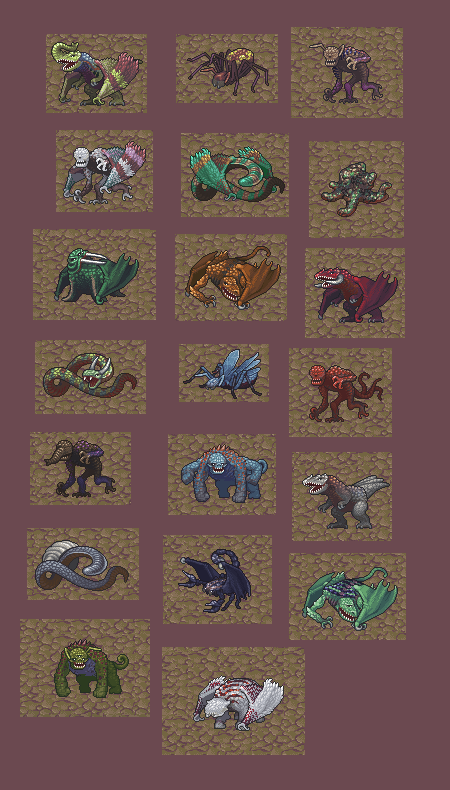
Hello! Here's a new update, focusing on ranged weapons and colorful beasts.

We've reworked ranged weapons and archer behavior in preparation for the siege update.

Ranged weapons can now be nocked/loaded, which takes the bulk of the time, and this can be done before firing ('n' in adventure mode.) This allows archers to be a bit safer, since they won't be paralyzed for a long while after firing a shot. The firing force of bows is affected by strength and skill up to a point, whereas crossbows are slower to load but don't require skill and attributes to get their full force. Crossbows are also easier to aim. Loading speeds of all weapons can be improved with skill.

Ranged projectiles (shot or thrown) can be aimed at specific body parts. It's now also harder to hit targets that are farther away. Adventurers, fortress defenders, and enemies all have access to aiming.

In the fortress, your defenders will try to use nearby fortifications, stay away from the enemy, and not use their crossbows as clubs unless very desperate. Enemy archers will also use fortifications if they can get close. Fortress archers will try to reload from the squad ammo pool rather than engage in melee combat.

We've also brought back the ammo and supply management menus and worked out some old issues with them so they should function more smoothly.

The squad's ammo reserves can be set by selecting a single squad, going to their equipment, and selecting the ammo button. Multiple ammo pools can be set by material, amount, and whether they are used for combat or training (or both.) This allows you to eventually separate out metal bolts for combat and wood/bone bolts for training if you choose. Squads can store ammo in chests in a barracks if the barracks is set to hold that squad's equipment to give you some control over where squad bolts end up. Hunters also have an ammo pool you can set under Labor / Standing Orders / Other.

https://clan.fastly.steamstatic.com/images//34693670/d47f0afa3b6b21d367e8f1b94885a90217c11e9a.gif

Here's a gif with some archers firing back and forth and making use of fortifications.

You can also set a squad's food and drink settings from Equip / Supplies. This allows you to set how many rations are carried in their backpack and whether their flask gets alcohol, water, or nothing.

Forgotten beast and titan graphics have been updated. In new worlds, they will now be generated with colors and multiple decorations.

https://clan.fastly.steamstatic.com/images//34693670/655eedc973b945266e9246d9f710db7c2a3a9421.png

Also, dwarves that die will lose their room assignments properly and a few crashes and other issues have been fixed.

Have fun!

Tarn

Patch Notes for 51.12

Ranged weapon update

  • Stopped ranged soldiers from aggressively entering melee combat when out of ammo.
  • Made ranged units step away from close enemies and try to use any nearby fortifications.
  • Ranged attackers can aim at specific body parts.
  • Added loading and nocking states and actions for ranged weapons.
  • Made firing take much less time than loading.
  • Differentiated shooting and post-shot recovery times.
  • Added weapon-specific attribute and skill effects for aiming and delays.
  • Can set ammunition, food, and drink assignments for squads.
  • Fixed various issues with extra ammo being kept in quivers and ammo not being picked up.

New graphics

  • Added colorful forgotten beasts and titans.

General updates

  • Dwarves that meet with misfortune lose their room assignments properly.
  • Changed how item deletion works to fix some army crashes.
  • Stopped crash from unspecified inorganic dusts.
  • Stopped keyboard cursor from skipping large distances when scroll distance is larger than 1.
  • Made modded night trolls appear even when no night trolls are generated.
  • Made NO_PHYS_ATT_GAIN/RUST add/remove syndromes work properly.
  • Stopped requiring music and sound definitions to load saves (makes classic saves compatible again).
1
submitted 9 months ago* (last edited 9 months ago) by 4Robato@lemmy.world to c/boardgames@sopuli.xyz
 

Hello everyone!

I made an app that allows you to create custom trackers (you can change the values of everything and even if they add, subtract, multiply or divide) the idea was to make it versatile (though it has a very ugly UI).

There's also the option to make notes for every tracker and the last thing I added was the ability to save! So you can even use it to save your games for playing later on.

In the beginning I just wanted to make a simple tracker without thinking too much for others to use but then I kept adding ideas and now hopefully is useful to someone else too.

If you have any feedback let me know and I'll see what I can do. I've made some apps but I'm not an expert!


Hello!

So I installed an addon and saw that it made a license, readme and so on on the main folder. At the moment I didn't had those files there since I'm still very early on the game but shouldn't this files be inside the addon folder instead of the whole project?

The addon is as simple as check for the TODO on the comments but I want to do this properly. Where should I move this files of the addon? Or my License would substitute the one there if it's stronger?

Thanks!

1
submitted 1 year ago* (last edited 1 year ago) by 4Robato@lemmy.world to c/dwarffortress@lemmy.ml
 

You can also follow the news in Mastodon following: https://rss-parrot.net/u/www.bay12games.com.dwarves.index.html :)


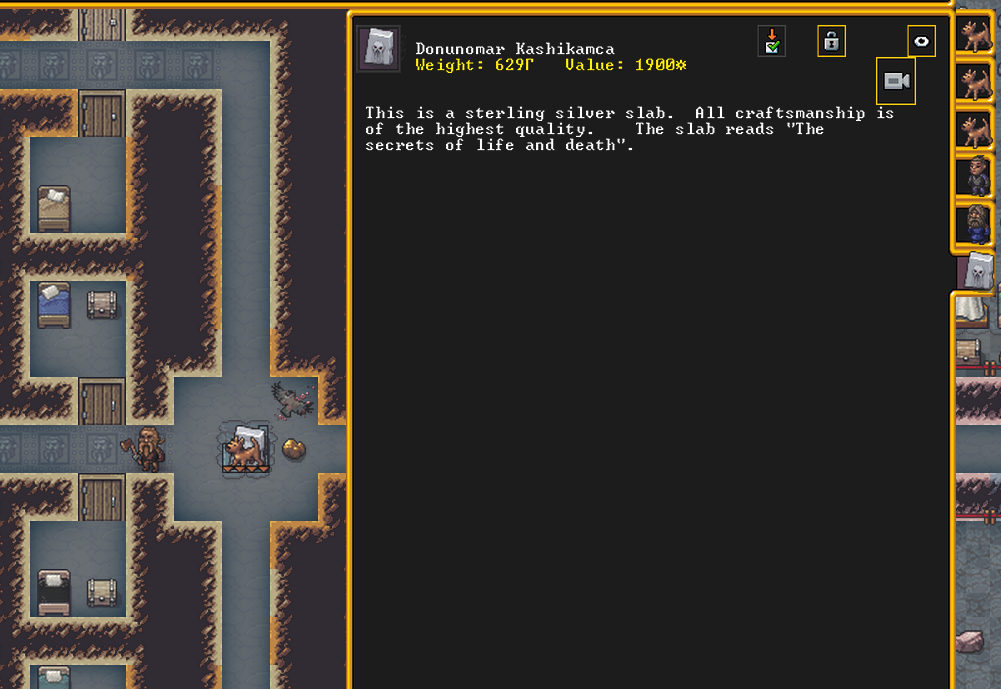
I was looking through my fort and suddenly I saw this huge slab on the stairs and it reminded me of Han Solo hahah

I don't recall any dwarf creating this and just saw it's on written content so I guess it's smaller than it seems!


Tarn Adams have shown some demo in the past about the myth generator he was working on (and hopefully we will see something about it once adventure mode is finalized!) and the other day I saw the video and thought it was awesome! :)

view more: next ›