Have you tried bookmarking things instead of leaving them open as tabs?
this post was submitted on 17 Jun 2024
0 points (NaN% liked)
Firefox
22769 readers
8 users here now
/c/firefox
A place to discuss the news and latest developments on the open-source browser Firefox.
Rules
1. Adhere to the instance rules
2. Be kind to one another
3. Communicate in a civil manner
Reporting
If you would like to bring an issue to the moderators attention, please use the "Create Report" feature on the offending comment or post and it will be reviewed as time allows.
founded 6 years ago
MODERATORS
Yes, I find that it identical to closing a tab. I never go in the bookmarks manager after. It is very clunky to use, it adds extra steps compared to keeping the tab open. At that point, it's usually easier to use google to find it again, since at least google can search text inside the page, not just the title. I do occasionally dump my thousands of tabs into the bookmarks managers, in a single unusable folder. It hasn't yet happenned that one of these tabs was retreived. But I hope in the future that I could dump all these tabs into another piece of software that will fetch all the tab's body data and allow me to search it all with a local LLM based search like "using my bookmarks, create one browser window with all URLs on the topic of the 7 megahertz maser" We're close but not there yet.
1000 tabs? What for?
A small subset of the stuff I'm trying to do.
Is this your goal?

Cause I gotta say, I don't think abusing your browser is your best bet.
I would settle for just taking over my own computer !
You're not likely going to get any real help since you're insisting on using the browser in an extreme and unconventional way. Your little world is just one browser/OS crash from losing all of those tabs.
What is amazing to me is how some people will come out of the woodwork to tell a person when they think they're using their browser "wrong". Just let them be if you have nothing to contribute.
If someone is trying to achieve a goal through (what they might not know are) impossible means, "letting them be" isn't going to help them.
Although it might not seem very helpful (and indeed there are better ways of helping) pointing out the flaws in the approach is contributing more than "letting them be". Doesn't cost a thing to be civil about it though.
What OP is trying to do isn't impossible it's actually very interesting. There are lots of people who use tab workflows instead of bookmarks. And I think everybody would benefit from better in-browser search. Just because bookmarks is how it was done 30 years ago doesn't mean we can't try new things.
Unless you bring a solution to the table, taking the position that it isn't impossible is just cheap contrarianism on your part. Sure we can try new things, but if it doesn't work and everyone is commenting the approach isn't helping, then maybe take the hint. Or not, and keep swimming against the stream (in which - seeing OP's other comments - they seem to be more interested than actually solving the problem)
You dream to small Bookmarks suck and are cumbersome They sucked in 1996 and they still suck today ! Bookmarks have apparently been a crutch to make the browser more usable. Like for instance, instead of discarding a whole tab, keep a text index of the html body and make that searchable. But no, it's an all of nothing thing, either 2gb of youtube javascript per tab, or we only keep URL and tab title.
Also, you don't actually need to bring a solution to the table just to say "this thing is not working right" You don't have to be a mechanic to say "the car is broken" You don't have to be a doctor to say "this person is sick"
Clearly my message just need to be said over and over until it gets implemented. It is obvious where browsers are going. A total web awareness platform that remembers everything you've ever seen. There will be infinite tabs and a local llm will know it all 7 ways from sunday "Firefox, write a song about the 500 first tabs I've seen in June 2017, in the style of a broadway musical"
load more comments
(1 replies)
I came in here knowing exactly what the comments would look like, and I'm still disappointed. "Just don't use so many tabs" is not an answer. If you don't have anything constructive to say, just move on instead of getting uppity about...not using browsers very heavily or understanding other use cases.
Yeah, thousands of tabs seems extreme. But "you should dedicate a larger amount of time and effort all day, every day to make the computer's job easier" is a bad take. That's obviously worse than OP's existing workflow.
Sorry OP, I don't have a real answer either. You might find Arc Browser's tab system to suit you better, but since it's chromium-based I suspect performance might be worse.
Edit: out of curiosity, how much memory does your PC have, and how much is Firefox using during these freezes? I wonder how much of the delay is caused by swapping.
I am going to keep beating that drum until firefox gets better It's already improving, I used to struggle at 700 tabs now I almost make it to 2000. Of course it is mostly artifice as most tabs get fully discarded and what I want is all tab texts in live memory and the ability to search all tab text. Maybe even text search in all pictures in all tabs using object recognition, but clearly we're not anywhere near that yet !
I have no direct solution to you exact problem but your usage of tabs sounds like a nightmare.
A while back I found Omnivore which works like a charm if you want to "freeze" the contents of a website to read them later. You can also self host it if you like.
I took it a step further because I love Obsidian as personal knowledge management and I want to have everything in one place. There's a plugin to sync all your saved pages from Omnivore to Obsidian. In the template for it I then have my marked highlights, the links to the version in Omnivore and the original URL and also the whole content. So I have all of that in markdown which is really nice to work with.
Maybe that's a solution you too could be happy with.
Thanks, never heard of Omnivore
"Distraction free. Privacy focused. Open source"
They do hit the right notes. I was going to try QOwnNotes but I'll put that on my list.
You have 64GB RAM and that's still not enough for your browser. Wow.
I've come away from this with only more questions. What does your Downloads folder/Filesystem look like? Do you have notebooks or any real world allocation of information? What's that like? What kinds of things do you keep in a junk drawer?
Absolutely fascinating.
I do not waste time sorting, emails, downloads and bookmarks
For my linux ISOs, which I have approx 60 terabyte of, I use dedicated sorting software and it does a really good job of keeping it all organized. I also make liberal use of symlinks and hardlinks to keep the original alive while also keeping things organized.
As for notes, I have notepad++ with an endless series of titled untitled text files of everything I ever want to remembered. Shared accross computers using a local git server
On my phone I have google keep which has a list of notes that has long since become far too long to scroll to the bottom off of. I am in the process of degoogling and I want to switch to a selfhosted file centric markdown note taking web app, not decided on which but this video is probably going to be one of them.
I don't have a junk drawer, my stuff is sorted into bins, here is a glimpse of that
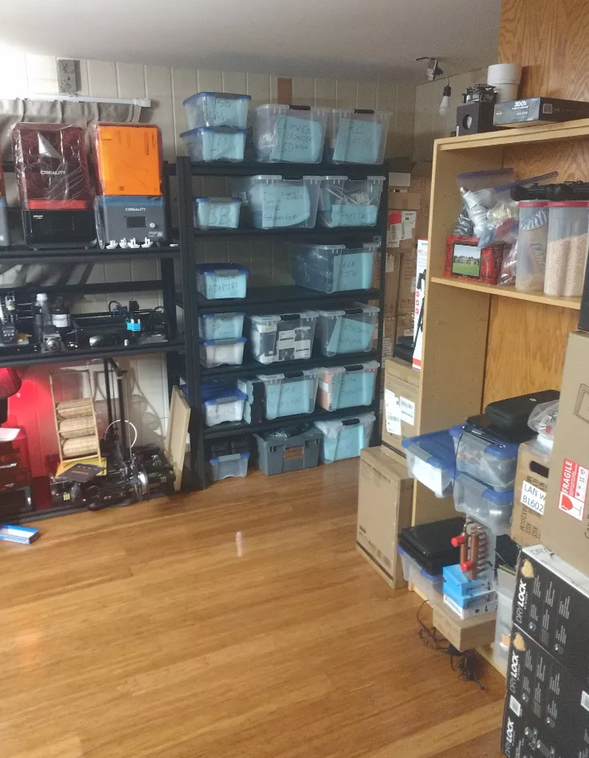
Those ISOs must go back YEARS! Same with the files! What sorting software helps keep track of all that?
Notepad++ surely has some type of global search feature to help find the thought you saved for later, right? I'm utterly impressed with how much stuff you seem to have around, yet can still find and make sense of it. I would have long since buried myself under it all and given up.
load more comments
(1 replies)
Why do you need 60TB of Linux Isos? Or do you mean "Linux Isos ;)"
Yes the ;) variety
I've read this entire thread like three times and watched all the videos you've posted, and I still don't understand your workflow at all.
If searching bookmarks/history is harder than using Google to just find the thing you want to get back to, why do you need to keep the things you want to get back to open rather than just using Google to find the page again later? Or when you want to get back to something you (think you?) have left open, do you find it just by scrolling through all your tabs until a title/favicon looks like what you're looking for?
Your last paragraph makes it seem like maybe you want to keep the tabs open so if the page/content gets deleted off of the server, you don't lose it. Is that correct? I'd imagine that doesn't always accomplish that, though, right? (Particularly for something like YouTube.) If that's a significant part of why you keep the tabs open, though, maybe that bit at least is a good question for a data hoarder community.
I haven't been able to find any "discard all tabs" addon for Firefox by Googling. And I can't guess what exactly it does. (Does it save tab states to disk and suspend - but also leave open - all tabs or something?) Are you sure that's the name of the addon you're using?
why do you need to keep the things you want to get back to open rather than just using Google to find the page again later?
If it's already in memory, that's one few step to reach it.
My tab manager can't search google
do you find it just by scrolling through all your tabs until a title/favicon looks like what you’re looking for?
I search my live memory with Tab Manager Plus
Sadly, it can't search tab body text, only tab titles.
if the page/content gets deleted off of the server, you don’t lose it. Is that correct?
My software should not discard data without my permission. When it runs out of RAM it should dump to disk cache, not delete. But browser have the builtin assumption that the web remembers everything, which is false. I also think bookmarks should save all tab data, all text, all images, all code, all video, and the code should remain as functional as possible. That's a long way off, currently the only way to do that is freeze the tab with its browser and operating system inside a virtual machine live snapshot.
I haven’t been able to find any “discard all tabs
I believe this one can do, discard selected tabs, but not discard all tabs
https://addons.mozilla.org/en-GB/firefox/addon/discard/
Discard is the action where all tab content is deleted, keeping only URL, title and favicon
I haven't found discard all tabs either.
I would like "stop all tabs" to work
https://addons.mozilla.org/en-US/firefox/addon/stop-all-button/
But it will only work after firefox has cleared the clog, it currently freezes with the rest of the browser.
Oh, hmm, interesting. I would simply not bother trying to clean up your tabs (it's what I do, 6476 baby!).
Perhaps consider also getting more RAM. 128 is good, 256 is better. Thanks to ddr5, ddr4 isn't all that expensive now (and 5000 series can't use ddr5 anyways).
I got some old HP G8 DL380 servers with 384GB ram in each, I am investigating running firefox in a VM on them and then somehow making only the firefox window appear on my PC. That would be awesome. I would have practically unlimited ram !
geez, just press Ctrl+W when you're done with a tab, or if the tab is older than a couple hours
I don't understand why some are so attached to tabs. Search your history if you need it again.
load more comments
(5 replies)
I'm not going to tell you that you're managing your information wrong. I would physically die if I had ever more than 20 tabs (my ADHD couldn't handle it).
But I think you might be using the wrong tool. A browser (like Firefox) is not really designed as an information manager. It's primary purpose is navigating and visualizing web pages. So when you talk about "a few megabytes of text and images" thats not what your browser sees. Your browser handles more than just the text and images. It also handles fetching and prefetching, a browser history for every tab, a JS context and much much more.
What you want is some kind of personalized archiving system that processes websites into machine processable (ie searchable) structures. Firefox is not that. Maybe data hoarder communities will have the answers you seek.
Well so far, it would be too much friction and extra labour to export each tab to external software.
I'm not even sure what software other than a browser would display live web pages in a more organized manner than firefox ?
I'm pretty sure I just hit a bug that's causing firefox to wake up too many tabs and not handle tab discarding correctly. Firefox does seem like the best tool still even if it's not working right.
What I would like instead is a browser that treats tabs more like virtual machines that you can roll back, suspend to disk and resume. Little package of data that get frozen in time and are externally searchable.
Anyway, here's my setup
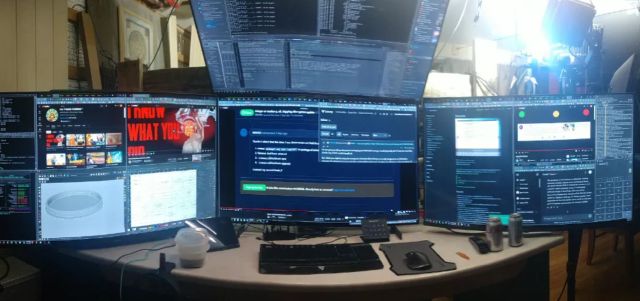
If you need quick access to this many pages I suggest organizing bookmarks. As this is what they are meant for. Tabs are meant for active pages you are working with. So anytime you get that many tabs with any browser its gonna run like shit.
I find organizing bookmarks incredibly tedious. I have bookmarks folder with thousands of tabs in and it's just easier to use google again to re-find the information than to pick them out of bookmarks. Also tabs just keep the title and URL so you can't even search the text inside. So, organizing a library of tabs is like a much worse version of google without previews. I also use the session manager addon but again, when you open thousands of tabs, it clogs up the memory almost instantly. It's taking multiple gigabytes of ram, just to display a few kilobytes of text ! I wish the browser would just render the page as a static searchable text and image and then ditch all the javascript garbage.
You can also tag your bookmarks and search for those.
I would prefer not to save and tags tabs 500 times per day. It's easier to let them accumulate and handle them all in memory.
500 tab save and tag per day is too much labour, I would spend half my day just fiddling and sorting bookmarks !
load more comments
(1 replies)
The solution is to see a psychotherapist because dude is there something strange happening in your brain and it really needs fixing.
Yes, it's a disease called "having a lot of shit going on and not wanted to spend my afternoon sorting tabs" It is cured by "throwing all tabs in the bin and starting over" because today's computer are so incredibly weak they can't handle a few megabytes of text anymore.
Okay I know people are being rude. You have to understand its not just text. Your browser sends a request to a server for a webpage and it downloads that webpage, all media included. Its not just text. The only solution here is disabling all of your addons and going one by one until the merge all works. Or finding a work flow that doesn't involve the goal of reaching 20k tabs. Browser are not designed to search through tabs. Firefox has bookmark tags and keywords to search or instantly open a link. But tabs are not meant to be this repository of where you've been.
I mean, look at how much data a youtube tab actually download, versus how much it occupies in memory. I think the strict memory isolation between tabs, so that one tab crash doesn't take down the entire browser, has become uneconomical. I think combining some tab memory. Especially tabs of the same websites, especially their libraries, would greatly reduce the memory consumption and probably overall speed. I rarely ever get crashes until I bust both my ram and swap. I would sacrifice some tab isolation to get some memory back.
Your solution is a database or information management system.
I've researching that and it seems the bottleneck is going to be transfering the tab inner information to secondary storage software. This is often a multi step process and also imperfect. With many website expressly frustrating this attempt by deleting and reloading data which is out of sight.
For instance trying to archive a facebook thread. As you scroll down the thread, it loads tge text ahead, but it also delete a few pages behind.
I'm not sure tab data can be expected to translate reliably to another store systen. It might have to stay in the browser.
Best I could figure so far is a rolling video screenshot, but that makes the data huge and difficult and imprecise to search as you now have to OCR evety frame to make it searchable again.
I think the machine built to handle hundreds of trillions of operation per second should be better at handling a few gigabytes of text and images.
I terminate Firefox and reopen it any time it's chewing up my RAM, but I usually don't have more than 500 tabs open at any one time. My tabs persist when Firefox starts again, but tabs don't fully load until I click on them again. This saves my memory from getting chewed up immediately, and can usually go a week or so before I need to do it again.
What? Even 500 tabs? I don't understand this. I get about 10 open and I can't read what they are. Please share a pic of what it has to look like with that many tabs open because I totally do not get this? I feel like this would be akin to asking "I can't see out of my car windshield because I have completely covered it with sticky notes. How can I get to where I need to go?" This is not how browsers were designed to work.
Here is a quick scroll through my "tab manager plus" view, zoomed out hopefully this doesn't contain doxxing information
Thanks for sharing. That was wild... You probably have more tabs than I have bookmarks.
Just buying one little dodad on ali express has me opening 500-1000 tabs, for just one search ! I really wish the computer could keep up with me !
...
I needed to buy 15x CH9121 and that was the difference between 15$ each to 4.5$ each.
view more: next ›