OpenRGB

532 readers
1 users here now

The former official Lemmy community for the OpenRGB project. Moved to https://lemmy.today/c/OpenRGB

Official website: https://openrgb.org/

GitLab: https://gitlab.com/CalcProgrammer1/OpenRGB

founded 4 years ago
MODERATORS
1


I've decided to move the official home of OpenRGB on Lemmy to a different instance. I started on lemmy.ml because it was hosted by the Lemmy developers, but this instance has a certain (rather negative) reputation across the greater Threadiverse. I also prefer the mlmym (old Reddit style) instance and lemmy.today has this (https://old.lemmy.today/c/OpenRGB).

I will be over there on my lemmy.today account. Please join this new community to continue our OpenRGB presence on Lemmy!

Edit: !OpenRGB@lemmy.today

2
1
submitted 4 months ago* (last edited 4 months ago) by CalcProgrammer1@lemmy.ml to c/openrgb@lemmy.ml


I was hesitant to update the Flatpak build to a release candidate, but 1.0rc2 is the build we're recommending on openrgb.org and a bunch of distros have packaged it. To be fair, if there were more digits between 0.9 and 1.0 these rcs would've been proper releases. With a lot of users having success with 1.0rc2 on other platforms, 1.0 still being a ways out do to some backend reworks and cleanups, and 0.9 being ancient now, I've gone ahead and updated the Flatpak release to 1.0rc2. You will still have to setup udev rules outside of Flatpak, as that is a limitation of Flatpak itself.

3


I've tagged the second Release Candidate build for OpenRGB 1.0. This build has quite a few user interface improvements over the previous 1.0rc1 release candidate build as well as some new device support and bug fixes. However, the main reason for this release candidate is that Microsoft has started flagging the WinRing0 driver we use for low-level IO (SMBus, Super-IO, etc) as vulnerable and Windows Defender is now tampering with OpenRGB installations, deleting this driver and breaking access to RAM and motherboard RGB controls. We have been working to replace WinRing0 with a new driver called PawnIO (https://pawnio.eu/) which is more secure as it keeps all of the SMBus controller accessing code kernel-side in signed Pawn modules. Now that we've resolved all of the bugs with PawnIO, I've decided to make a release candidate both to sunset the old WinRing0 support as well as introduce the new PawnIO support. For this reason there are two 1.0rc2 versions for Windows - 1.0rc2wr0 (with WinRing0) and 1.0rc2 (with PawnIO). PawnIO has two major caveats compared to WinRing0 which is why I wanted to publish a final WinRing0 build - it doesn't support 32-bit and it requires Administrator access all the time. If you have a use case where you need a 32-bit OpenRGB build that can access SMBus, you're stuck with WinRing0. Going forward, the OpenRGB Windows Installer gives you the option to install OpenRGB as a system service, which gets around the Administrator requirement by running the OpenRGB backend as a service. The GUI can then be used as a normal user, it just connects to the service using the SDK protocol instead of connecting directly to hardware. However, there are some UI inconveniences that running as a service still has (settings changes only affect the local copy, not the service, so configuring manually added devices, disabling devices, etc. requires manual config tweaking for the service's copy of the settings files).

I still want to do one major rework before 1.0 final. This will focus on some plugin API changes and SDK protocol changes to hopefully make using OpenRGB in client/server mode a better experience.

I have also tagged 1.0rc2 builds for the OpenRGB plugins. These rc2 builds of the plugins will work with OpenRGB 1.0rc1 and 1.0rc2.

4


Found OpenRGB after migrating to Linux and it works great for managing the LED colours on my Logitech G910, but there is one case where the profile doesn't get applied: I usually don't shut my computer down put only put it into hibernation/suspend to disk. When I turn it back on, the keyboard uses its default layout (glaring blue on all keys) and I have to open ORGB, rescan devices and then load the profile to get back to my usual layout. I know that this is a rather special use case, but maybe someone among you knows how this can be fixed (or automated).

In case it matters, I'm running Fedora 43 KDE and use OpenRGB 0.9.

5
1
submitted 5 months ago* (last edited 5 months ago) by tb_@lemmy.world to c/openrgb@lemmy.ml


~~Despite the website listing the Aerox 5 as a supported device, the application appears to be missing it. Even though it does show the Aerox 3 and 9. Any idea why this might be?~~

~~I am on Bazzite, and used Gear Lever to install the appimage of OpenRGB.~~

Nevermind, it turns out the version the Bazzite Portal Setup installs (ujust install-openrgb) is outdated. Downloading the AppImage from the OpenRGB website itself fixed it.

Further edit: it doesn't seem like it is able to truly save the colours to the wireless mouse, as it resets after it goes into stand-by. Maybe there's some method to continuously run it; but, unless I'm missing something, it doesn't seem the wireless variants are properly supported. Through RivalCFG I was able to turn the default lighting off (sudo rivalcfg -d off), rather than the rainbow it is by default.

6


I just updated to the latest git last night, and my QMK-flashed GMMK3 keyboard is no longer seen. I still have it defined in OpenRGB QMK Protocol (and the keyboard was available with the git version I was using from about 15 days ago).

I'm on Arch & nothing has "really" changed in this install in a while. I do have Win 11 and another install of Arch available on this system. OpenRGB shows the keyboard in both of those installs (not using the git version in the other Arch install, and version 9 from a while ago in the Win11 install). All 3 installs are set up in the same way.

I can provide screenshots & log info as needed. (The keyboard is seen in Hardware ID in the current git version)

Any info would be helpful.

7


OpenRGB 1.0rc1 is the first release candidate build before the upcoming official 1.0 release. This build should be considered stable, but we're looking to track down any major last-minute bugs before release. The plugin API has been updated, so if you're upgrading from 0.9 you will need to upgrade your plugins to the latest pipeline versions.

Builds for 1.0rc1 have been posted on https://openrgb.org/ as well.

8


AMDGPU driver maintainer Alex Deucher posted patches for enabling the OEM I2C interface on AMD GPUs on Linux. This interface is necessary for OpenRGB to be able to communicate with and control RGB devices on the graphics card PCB and to this point has only been available to Windows users of OpenRGB. No changes should be necessary to OpenRGB itself, once you install an updated kernel with these changes then your supported AMD GPU should be detected! I have tested Alex's development branch and was able to control my ASUS TUF RX7800XT and Sapphire Nitro+ RX580 lighting.

9


@openrgb I have a 'nos c650w' keyboard that openrgb sees as a 'Keychron Gaming Keyboard 1' it works to a degree, but using the Visual Map plugin a bunch of the keys are missing (j, m, <>, Space, Cursors and other keys) so the keymap isnt compatible. it also has LED strips up the sides. im guessing 4 or 5 LEDs in each strip. a whole chunk of keys on the visual map shape are tied to nothing also.

10


Hi all. Not sure what to make of this issue. OpenRGB (installed from AUR) detects all my other devices just fine, but not the Addressable RGB controller.

The weird thing is, I have the Razer Extras plugin installed, and when I press the button to reload the controller, my fans flash, so the controller is getting detected but for some reason OpenRGB itself doesn't pick it up. It's definitely detected by lsusb as well

When I run *openrgb --list-devices -vv everything else looks fine until

[Razer Chroma Addressable RGB Controller] is enabled [ResourceManager] Calling detection progress callbacks. [ResourceManager] Calling detection progress callbacks.

and then it goes right on to the libusb HID devices section.

Is there something I'm missing, or perhaps a dependency I didn't install?

11
1
submitted 1 year ago* (last edited 1 year ago) by Zilliax@lemmy.ml to c/openrgb@lemmy.ml


Can you please add support for this device?

12


I have been trying to figure out if i should get a better controller than the onboard controller on my ASRock motherboard.

The only problem is that it doesn't seem to support enough LEDs (or more than 5V/3A which is cutting it close) or direct mode.

I have been looking at the Razer Controller but the supported devices page and old Reddit posts seem to be torn on how good the support is in OpenRGB.

I mostly just need to get a working direct control since the direct control mode currently makes my ASRock motherboard unbootable (temporarily).

Any suggestions are welcome :)

13


I'm trying to get my mouse mat to connect but it just doesn't show up. Is it possible to add things that don't normally have a program to control them? It's just a button on the pad.

14


After I installed the software earlier today my mouse lost the ability to right click, middle click or side click. I disabled the device in the compatiblity section on my computer and functionality was restored, but if there's a fix I'd like to know.

15


I have added support for system-wide plugin installations in Linux for the upcoming 1.0 release. The plugin files can be installed system-wide to the /usr/lib/openrgb/plugins path, which allows them to be provided by distribution packages rather than manually downloading them.

I have created AUR packages for the following plugins and they have been picked up by the Chaotic AUR repository if you want binary builds.

  • openrgb-plugin-e131-receiver-git
  • openrgb-plugin-effects-git
  • openrgb-plugin-hardware-sync-git
  • openrgb-plugin-visual-map-git

I plan to update the rest of the plugins on https://gitlab.com/OpenRGBDevelopers and get them into the AUR as well before 1.0 releases. Until that happens, you will need to use the openrgb-git AUR package to utilize these new plugin packages. The current 0.9 release in the main repository does not support system-wide plugin installation.

16


Hi. OpenRGB detects my ENE DRAM correctly when run as Administrator. However, the DRAM is not detected when I launch the program without admin rights.

My OS: Windows 11 (this problem did not occur when I used Windows 10 a few weeks ago). Motherboard: Gigabyte B550 AORUS PRO AC ATX AM4 Motherboard Memory: G.Skill Trident Z RGB 16 GB (2 x 8 GB) DDR4-3600 CL18 Memory

Is there anything I can do so that OpenRGB detects my DRAM without admin rights?

17


I made a 3D printed, Arduino-powered desk fan based around a 120mm Corsair QL120 ARGB fan after seeing Noctua's desk fan. I wanted something similar but with RGB. It is based around CorsairLightingProtocol so it syncs with OpenRGB but also has a knob to adjust fan speed and LED brightness directly. I made a video showing it off but if you prefer to read about it, I have project documentation and files (code, assembly instructions, and 3D models) on GitLab here:

https://gitlab.com/CalcProgrammer1/OpenRGBDeskFan

The 3D models are also on Thingiverse:

https://www.thingiverse.com/thing:6655697

18


Hey all. I'm running OpenRGB Pipeline on Lenovo Legion 7 Gen 7 laptop. I have downloaded the 0.9 effects plugin and can run it successfully for effects. However if I run an effect through GIFPlayer the app just crashes after a random uptime. Typically in 5 minutes or sometimes less. I'm using gif files ~30kb for effects. Any idea on how to keep the app running?

19
1
submitted 2 years ago* (last edited 2 years ago) by Flaimbot@lemmy.ml to c/openrgb@lemmy.ml


after having some issues with my igpu (7800X3D), i decided to disable it in uefi.
i'm running win10 (22h2, 19045.4651).

as for the description what i was seeing:

  • i disabled the igpu in uefi
  • reboot
  • crash of OpenRGB upon starting up/scanning devices
  • i deleted %appdata%/OpenRGB
  • i ran the .exe as admin
  • as soon as the scan went over the gpu (gigabyte gtx1080 ti aorus master) the programm CTD'd again
  • disabling all detectors in OpenRGB.json allowed me to launch the app again
  • in the settings i was able to reenable the mobo detection without issues and passed rescanning the devices
  • in the settings reenabling all gigabyte device detections triggered the CTD upon rescanning again

at least it was able to log something to that point:

https://pastebin.com/fhnEddij

what i noticed in the logs is the following weird message:
for some reason my mobo (an ASUS TUF GAMING X670E-PLUS WIFI) is being identified under gigabyte:

7325 |Debug: [Gigabyte RGB Fusion 2 SMBus] FAILED - 'TUF GAMING X670E-PLUS WIFI' was not found in the JSON list. Do NOT enable if this is a USB based board.

to me it seems that disabling the igpu somehow has messed up the enumeration of the devices/ids/slots, which led to the mobo being somehow wrongfully pushed up to the gpu slot, or something along the lines.

edit: before any questions arise, i'm running version 0.8, but upgrading to version 0.9 yielded no change in behaviour, which is why i downgraded again.

20
1
submitted 2 years ago* (last edited 2 years ago) by archer@lemmy.ml to c/openrgb@lemmy.ml


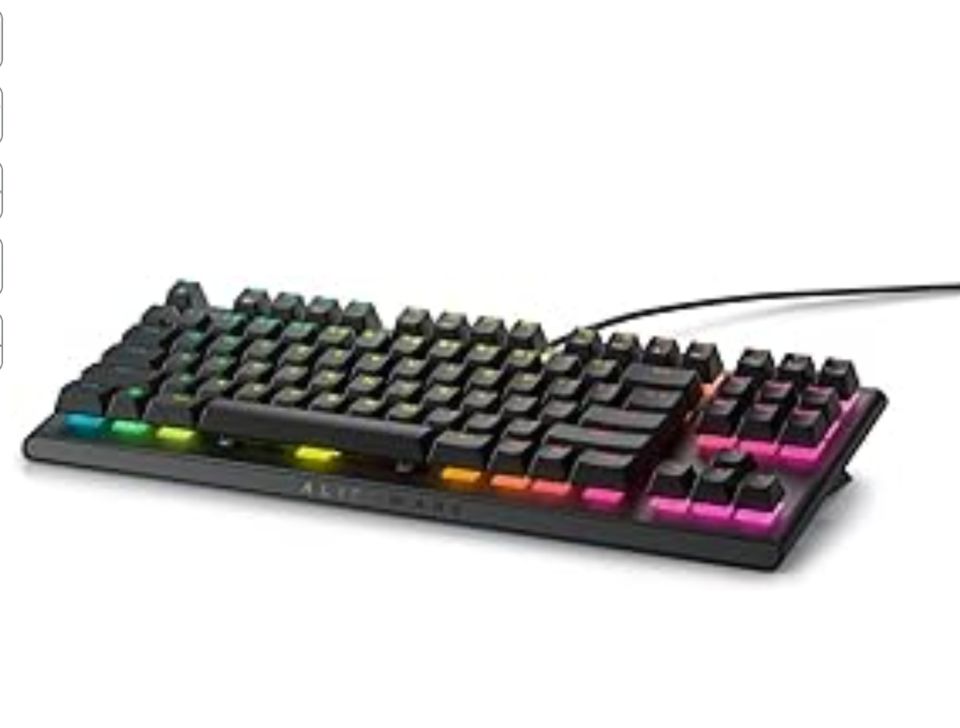
Besides the size difference, which one would you choose for OpenRGB on Arch Linux? Had a Keychron K8 Pro that I didn't get to work. Now it died, so have to replace it. Price wise they're 50 for the Alienware (new) and 75 for the Razer (open box, as new). Please help me decide. Thanks!

Update if anyone finds this thread later: I went with the Razer BlackWidow V3 and also got a Basilisk V3 to match it and they work very well with OpenRGB, I would definitely recommend them! I’m slightly annoyed by the green switches on the keyboard (sound and the feeling when typing) but that’s of course unrelated.
21


I am using Linux Arch (more specificaly, Garuda) and I wanted to use the effects plugin, but since the site and github only show versions for debian, I tried with the 3 (bulleyem bookworm and buster) by going into the settings > plugins and install the decompreesed file, but then nothing happened, it didn't add it. I also tried going into usr/share and making the directory openrgb/plugins and put it there, but it didn't work either. Has anyone had this problem and fixed it?

22


I've got a B550 GIGABYTE Aorus Elite AX V2 Motherboard. My OS is Ubuntu 22.04, OpenRGB is 0.9 installed from deb. lsusb output:

Bus 001 Device 004: ID 048d:5702 Integrated Technology Express, Inc. ITE Device

Looking at the Fusion 2 USB detector, it should be picked up by OpenRGB. Latest udev rules are installed and my mouse is picked up, but nothing else.

23
1
submitted 2 years ago* (last edited 2 years ago) by buuzi@lemmy.ml to c/openrgb@lemmy.ml


Description

The Corsair M65 ULTRA RGB wired has been added to the master branch with MR !2367 and I tried to switch the (fine) lights off. There are differences in behavior for the first and subsequent starts:

  • start via ./openrgb after compiling and applying udev rules: colors of all three zones can be changed
    • I switched all colors to black and quit the program
  • start via ./openrgb after reboot: colors freeze and can't be changed
    • this time I accidently left ckb-next-daemon running which might have interfered
    • unplugging the mouse seems to reset everything - the button to save the settings is disabled
  • start via ./openrgb -v again: colors freeze
    • logs say mouse can be detected, nothing suspicious
    • back/forward buttons on the left side are now disabled until mouse get unplugged (most likely didn't notice the first time)
  • start via ./openrgb -vv: mouse goes black (because thats my chosen color in the gui) and colors can be changed!
    • logs contain an error, as shown below
    • unplugging and restarting with ./openrgb -v lets colors freeze again

In summary:

  • I'd like to be able to change colors (to black)
  • I'd like to be able to persist chosen colors across reboots
  • Mouse buttons shouldn't be disabled after starting ./openrgb

Logs

Logs for ./openrgb -vv

[Corsair M65 RGB Ultra Wired] is enabled
[ResourceManager] Calling detection progress callbacks.
[Corsair CORSAIR M65 RGB ULTRA Gaming Mouse] GetAddress 12 - 00 02 - 00 9E 1B 00   00 00 00 00
[Corsair CORSAIR M65 RGB ULTRA Gaming Mouse] Setting write CMD to 08 for wired mode for PID 1B9E
[Corsair CORSAIR M65 RGB ULTRA Gaming Mouse] Packet length set to 65
[Corsair CORSAIR M65 RGB ULTRA Gaming Mouse] Lighting Endpoint set to 01
[Corsair CORSAIR M65 RGB ULTRA Gaming Mouse] GetAddress 41 - 00 02 - 05 00 00 00   00 00 00 00
[Corsair CORSAIR M65 RGB ULTRA Gaming Mouse] An error occurred! Get Address 41 failed - 5 Unsupported
[Corsair CORSAIR M65 RGB ULTRA Gaming Mouse] Creating a linear zone: Logo with 1 LEDs
[Corsair CORSAIR M65 RGB ULTRA Gaming Mouse] Creating a linear zone: Scroll Wheel with 1 LEDs
[Corsair CORSAIR M65 RGB ULTRA Gaming Mouse] Creating a linear zone: Indicator with 1 LEDs
[Corsair M65 RGB Ultra Wired] Registering RGB controller


Versions

OS: Debian 12 bookworm
Kernel: x86_64 Linux 6.7.12+bpo-amd64
OpenRGB: commit 853f12e9c10d148fe4c71f6aed9c32af4dd3e32f
24


Hi,

Just wanted to point out that the chat bot on help.openrgb.org still has a link to the readonly reddit sub instead of here.

25


Hello, I just bought a new laptop it’s an Asus Zenbook Pro flip 15.

The install went very well with only a few minor issues that I was able to fix within a few minutes. Unfortunately, the one thing that’s been difficult to fix is I would like to be able to change the RGB colors of the keyboard.

I have tried all the fixes I could find online, I tried OpenRGB, supergfxctl, Asusctl, and several other fixes mentioned online.

When I run OpenRGB I get this error:

"One or more I2C/SMBus interfaces failed to initialize. RGB DRAM modules and some motherboards' onboard RGB lighting will not be available without I2C/SMBus. On Linux, this is usually because the i2c-dev module is not loaded. You must load the i2c-dev module along with the correct i2c driver for your motherboard. This is usually i2c-piix4 for AMD systems and i2c-i801 for Intel systems. See help.openrgb.org for additional troubleshooting steps if you keep seeing this message."

Unfortunately nothing I have tried has worked. It’s obviously not a huge issue but it’s the only thing that’s not working flawlessly. Any help would be greatly appreciated! Thank you!

Pastebin of my setup is attached.

view more: next ›