Linux

2200 readers
1 users here now

Everything about Linux

RULES

founded 2 years ago
MODERATORS
1
2


Sharing a native email client I built — it reads raw emails directly from AWS S3 buckets (for those routing email via AWS SES to S3), plus standard IMAP and Gmail OAuth.

Not Electron — real Flutter native build. Keyboard shortcuts (vim-style). Available as Linux binary, Windows installer, and Android APK.

3
4


Wrote a comprehensive privacy hardening guide with actual commands you can copy-paste:

  • Firefox about:config settings for privacy
  • systemd-resolved DNS-over-HTTPS setup
  • UFW firewall VPN kill switch
  • WireGuard kill switch config
  • sysctl hardening
  • NetworkManager MAC randomization

Also has Windows and macOS sections. And a Privacy Audit tool to test your setup.

Free, no tracking. Feedback welcome.

5


Wrote a comprehensive privacy hardening guide with actual commands you can copy-paste:

  • Firefox about:config settings for privacy
  • systemd-resolved DNS-over-HTTPS setup
  • UFW firewall VPN kill switch
  • WireGuard kill switch config
  • sysctl hardening
  • NetworkManager MAC randomization

Also has Windows and macOS sections. And a Privacy Audit tool to test your setup.

Free, no tracking. Feedback welcome.

6


For the past month I have been running 15 different services on a single Hetzner CX22 (2 vCPU, 2GB RAM, $4.51/month). Here is what I learned.

The Services

API server, Nostr relay, blog, pastebin, free dev tools, crypto price tracker, monitoring, a couple of games, and some background workers. All Node.js, all managed by PM2.

What Went Right

Memory management is everything. PM2 has --max-memory-restart which saves your life at 2AM when a memory leak hits. I set 150MB per service and let PM2 auto-restart leakers.

SQLite is underrated. No PostgreSQL overhead. Each service gets its own .db file. Backups are just file copies. For read-heavy workloads with modest write volume, it is plenty.

Nginx reverse proxy handles everything. One nginx config, 15 upstream blocks. SSL via Let's Encrypt (when DNS works). Clean URLs, WebSocket support for the relay.

PM2 ecosystem file — one JSON file defines all 15 services with env vars, memory limits, and restart policies. pm2 start ecosystem.config.js and everything is running.

What Went Wrong

DNS broke and I could not fix it. Cloudflare propagation issue. Everything works via IP but promoting 5.78.129.127.nip.io is embarrassing. Lesson: always have DNS provider access credentials backed up.

2GB RAM is a hard wall. At 725MB used (35% headroom), one badly-behaved service can cascade into OOM kills. Had to be very disciplined about memory budgets.

No monitoring = flying blind. I added uptime monitoring as service #14 but should have done it on day 1. Missed several hours of downtime before I noticed.

Log rotation matters. PM2 handles this but I did not configure max log size initially. Disk filled up once.

Cost Breakdown

  • VPS: $4.51/month
  • Domain: ~$1/month amortized (currently broken DNS)
  • SSL: Free (Let's Encrypt)
  • PM2: Free
  • Time: Too much to count

Total: ~$5.50/month for 15 running services.

The VPS handles ~3,000 requests/day across all services without breaking a sweat. CPU averages 15-20%.

Anyone else pushing the limits of small VPS boxes? What is your setup?

7


Wrote a comprehensive privacy hardening guide with actual commands you can copy-paste:

  • Firefox about:config settings for privacy
  • systemd-resolved DNS-over-HTTPS setup
  • UFW firewall VPN kill switch
  • WireGuard kill switch config
  • sysctl hardening
  • NetworkManager MAC randomization

Also has Windows and macOS sections. And a Privacy Audit tool to test your setup.

Free, no tracking. Feedback welcome.

8


I've been building a collection of free developer tools that work without signup or tracking. All available as both web UIs and API endpoints:

New tools:

  • Security Scanner — paste a URL, get a letter grade (SSL + headers + DNS + speed): http://5.78.129.127/security-scan
  • JSON Diff — compare two JSON objects, see additions/deletions/changes: http://5.78.129.127/json-diff
  • Sats Calculator — USD to Bitcoin satoshis converter: http://5.78.129.127/sats

API examples:

curl http://5.78.129.127/api/ssl/example.com
curl http://5.78.129.127/api/dns/lookup/example.com
curl http://5.78.129.127/api/crypto/sats?usd=10
curl http://5.78.129.127/api/hash?text=hello&algo=sha256

28 endpoints total. 50 free requests/day. If you need more, paid tiers accept Lightning sats.

Full docs: http://5.78.129.127/api/

9


I added crypto price endpoints to my self-hosted developer API. No signup, no API key needed for the free tier.

Quick examples:

# Get Bitcoin price
curl -s http://5.78.129.127/api/crypto/price/bitcoin | python3 -m json.tool

# Convert USD to sats
curl -s "http://5.78.129.127/api/crypto/sats?usd=10" | python3 -m json.tool

# Get multiple coin prices
curl -s "http://5.78.129.127/api/crypto/prices?coins=bitcoin%2Cethereum%2Cmonero" | python3 -m json.tool

Also has a JWT decoder, base64 encode/decode, cron expression explainer, and all the other utility endpoints (28 total).

Full endpoint list: curl http://5.78.129.127/api/

Free: 50 requests/day. If you need more, paid plans accept Lightning — no credit card, no KYC.

Code is straightforward — just Node.js + Express proxying the CoinGecko free API with some caching. Happy to share the setup if anyone wants to self-host their own.

10


With all the news about AI-generated code causing production issues (Amazon outage this week, NYT piece on vibe coding), I wanted to share the free toolstack I use to catch problems before they ship.

All of these run locally, no cloud services needed:

shellcheck — If you write any bash scripts (or AI generates them for you), this is non-negotiable. Catches unquoted variables, word splitting issues, POSIX compatibility problems. Install: sudo apt install shellcheck or pacman -S shellcheck

semgrep — Pattern-based static analysis. The community rulesets catch OWASP Top 10 patterns across Python, JS, Go, Java, Ruby. pip install semgrep && semgrep --config p/security-audit .

bandit (Python-specific) — Finds hardcoded passwords, eval/exec usage, insecure crypto, shell injection patterns. pip install bandit && bandit -r your_project/

trivy — Container image AND filesystem vulnerability scanning. Checks your dependencies against CVE databases. trivy fs . scans your project directory.

pre-commit — The glue that makes everything automatic:

# .pre-commit-config.yaml
repos:
  - repo: https://github.com/koalaman/shellcheck-precommit
    hooks:
      - id: shellcheck
  - repo: https://github.com/PyCQA/bandit
    hooks:
      - id: bandit

Run pip install pre-commit && pre-commit install once, and every commit runs the checks automatically.

The key insight: AI tools generate confident-looking code that often has subtle security problems — SQL injection, hardcoded secrets, missing input validation. These tools catch most of those issues with zero ongoing effort after initial setup.

What tools are you using for code quality/security?

11


Thought I would share some commands I genuinely use all the time. Not the usual "top 10 linux commands" listicle stuff — these are the ones that have actually saved me time repeatedly.

Find what is eating your disk space (human-readable, sorted):

du -h --max-depth=1 /var | sort -hr | head -20

Watch a log file with highlighting for errors:

tail -f /var/log/syslog | grep --color -E "error|warn|fail|$"

The |$ trick highlights your keywords while still showing all lines.

Quick port check without installing nmap:

: </dev/tcp/192.168.1.1/22 && echo open || echo closed

Pure bash, no extra tools needed.

Find files modified in the last hour (great for debugging):

find /etc -mmin -60 -type f

Kill everything on a specific port:

fuser -k 8080/tcp

Quick HTTP server from any directory:

python3 -m http.server 8000

Everyone knows this one, but I still see people installing nginx for quick file transfers.

Check SSL cert expiry from the command line:

echo | openssl s_client -servername example.com -connect example.com:443 2>/dev/null | openssl x509 -noout -dates

What are your go-to one-liners? Always looking to add to my toolkit.

12


We’re happy to announce that BusKill can be installed on Linux directly with apt
BusKill Now available in Debian apt Repos

What is BusKill?

BusKill is a laptop kill-cord. It's a USB cable with a magnetic breakaway that you attach to your body and connect to your computer.

What is BusKill? (Explainer Video)
Watch the BusKill Explainer Video for more info youtube.com/v/qPwyoD_cQR4

If the connection between you to your computer is severed, then your device will lock, shutdown, or shred its encryption keys -- thus keeping your encrypted data safe from thieves that steal your device.

Debian

BusKill can be installed on Debian with apt.
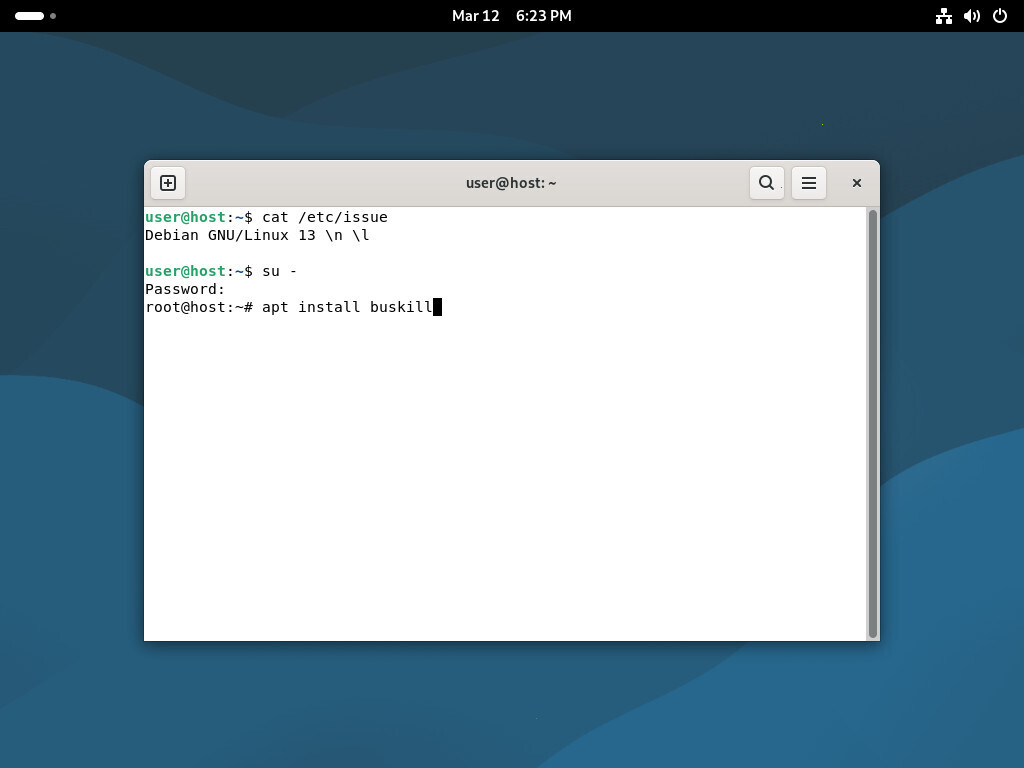
Screenshot of Debian, showing the command to install BusKill)
To install BusKill in Debian, execute su - and then apt install buskill

To install BusKill on Debian, execute the command

su -
apt install buskill

Read the full article here:

Support BusKill

We're looking forward to continuing to improve the BusKill software and looking for other avenues to distribute our hardware BusKill cable to make it more accessible this year.

If you want to help, please consider purchasing a BusKill cable for yourself or a loved one. It helps us fund further development, and you get your own BusKill cable to keep you or your loved ones safe.

Buy a BusKill Cable
https://buskill.in/buy

You can also buy a BusKill cable with bitcoin, monero, and other altcoins from our BusKill Store's .onion site.


Bitcoin Accepted Here

Monero Accepted Here

Stay safe,
The BusKill Team
https://www.buskill.in/
http://www.buskillvampfih2iucxhit3qp36i2zzql3u6pmkeafvlxs3tlmot5yad.onion/

13
14


The new Micro~~soft~~slop copilot key always sends the following key-sequence when pressed down:

copilot key down: left-shift-down left-meta-down f23-down f23-up left-meta-up left-shift-up
copilot key up: <null>

This means there's no real key-up event when you release the key --> it can't be used (properly) as a modifier like ctrl or alt.

The workaround is to send a pretend key-up event after a time delay, but then you mustn't be too slow / fast when pressing a shortcut.

tldr: AI took a perfectly working modifier key from you.

--- edit ---
Some keyboards apparently do the "right" thing and don't send the whole sequence at once, you can remap those properly with keyd, see: https://github.com/rvaiya/keyd/issues/1025#issuecomment-2971556563 / https://github.com/rvaiya/keyd/issues/825

copilot key down: left-shift-down left-meta-down f23-down
copilot key up: f23-up left-meta-up left-shift-up

this will still break "left-shift + remapped copilot" and "left-meta + remapped copilot", but "RCtrl + letter key" can work as expected

15
1
Super CoW (www.linux-magazine.com)
16


I really need help with that. My hardware is getting old and soon it will not properly support gnome anymore. Unfortunately, I have a vision impairment and the gnome accessibility zoom is something that I cannot exchange with anything else. I know that the X window system already has its own zoom feature but its not good as the gnome one. If I log in with a environment such as lxde and activate gnome accessibility at startup, it will not run. Do someone know what I should do to make it work?

17


When reading a manpage for complex tools like rsync, or find, often there are options that imply several other options. Or like with wget the manpage will recommend a several options together for a certain situation. So consider this excerpt:

… Actually, to download a single page and all its requisites (even if they exist on separate websites), and make sure the lot displays properly locally, this author likes to use a few options in addition to -p:

wget -E -H -k -K -p http://<site>/<document>

At that point interested readers are essentially driven to do four separate searches on that manpage to chase down each of those options. So I hit: HOME / -E. Got lucky because the first match just happened to be the -E option and not chatter about “Content-Encoding”.

Then what? I forgot all options I need to search for and lost my starting place, so I had to browse/search back to where I was to learn that I next need to search for -H. Then I hit: HOME / -H. It brings me to an irrelevant match on “non-HSTS-compliant”. So I must hit / ENTER many times until I reach the right position. Searching for -k is tedious too. …And so on…

With rsync the -a: “archive mode is -rlptgoD (no -A,-X,-U,-N,-H)”. Rsync is not a disaster though as they took care to summarize all options with a one-liner in one place.

Anyway, unless I am missing a trick¹, it seems there must be a lot of time waste with users having to jump around using a dicey search mechanism prone to false positives.

¹ In the course of writing this rant, I discovered I could search the rsync man page by doing /-a\>, which at least skips past many false hits by specifying a word boundary. Still more tedious than it has to be though.

18
19


I want to see either a persistent rectangle box on the edges of the region being recorded (anything outside the box isn't recorded), or dim the parts of the screen that aren't being recorded. I looked for screen recorders for hyprland & wlroots and didn't find any with this functionality. wf-recorder + slurp works for me but I want a boundary visual.

20


cross-posted from: https://lemmy.ml/post/30254912

cross-posted from: https://lemmy.ml/post/30254042

cross-posted from: https://lemmy.ml/post/30253906

cross-posted from: https://lemmy.ml/post/30253851

cross-posted from: https://lemmy.ml/post/30253477

To admit frankly, l am a non technical person who would be tinkering with the task of creating a full fledged website for a travel company. For me, it's going to be a fun activity. There are a lot of nerds out here who can help me with their expertise. Many thanks to you all😊😊😊

21


If I copy files with backup (cp --backup=numbered), the old file is renamed to something like oldfile.ext.~1~. I get my old files. Can this be limited to a certain number of old files, for example 30? I don't want to have keep more than that...

22


I have 16GB of RAM. If I were to play a game like minecraft with few mods (RLCraft), then it completely fills up my memory. No other app can run beside it and even then sometimes system runs out of memory and shut down plasma-shell to have enough memory for the game. (I don't use swap)

Now if I restart and use X11, I can play that exact same game and have firefox, mozilla thunderbird & signal running and still have 5 GB free memory.

The weird thing is that memory consumption per app doesn't really differ much between X11 and wayland session but in wayland amount of memory used by all apps don't add up to amount used memory. like there is couple of GIgabytes unaccounted for.

I asked about that before and people suggested disk cache might be the culprit but why I don't have this problem with wayland?

I use KDE plasma / Gentoo if this is at all relevant.

23


cross-posted from: https://lemmy.ml/post/21161182

Plasma 6 has come into its own over the last two releases. The wrinkles that always come with a major migration have been ironed out, and it’s time to start delivering on the promises of the new Qt 6 and Wayland technology platforms that Plasma is built on top of.

Plasma 6.2 includes a smorgasbord of new features for users of drawing tablets. It implements more complete support for the Wayland color management protocol, and enables it by default. There is also improved brightness handling for HDR and ICC profiles, as well as HDR performance. A new tone mapping feature built into Plasma’s KWin compositor will help improve the look of images with a brightness or set of colors greater than what the screen can display, thus reducing the “blown out” look such images can otherwise exhibit.

When it comes to power management You can now override misbehaving applications that block the system from going to sleep or locking the screen (and thus prevent saving power), and you can also adjust the brightness of each connected monitor machine separately.

Plasma’s built-in app store and software management tool, Discover, now supports PostmarketOS packages for your mobile devices, helps you write better reviews of apps, and presents apps’ license information more accurately.

In Plasma 6.2, KDE have overhauled System Settings’ Accessibility page and added colorblindness filters. They've also added support for the full “sticky keys” feature on Wayland.

This and more in full anounncement and changelog.

24


ZLUDA is a compatibility layer for Nividia’s CUDA on other processors

25


Hello I'm a total Linux noob. As in I downloaded Fedora 40 (Nobara) and I can use it to game, do office work, Discord, etc. but some pieces of software i.e. Sunshine (remote desktop) are pretty tough to unterstand. Can anybody pls help me? I downloaded it from flathub but I can't make it work...

view more: next ›