Linux

17369 readers
92 users here now

Welcome to c/linux!

Welcome to our thriving Linux community! Whether you're a seasoned Linux enthusiast or just starting your journey, we're excited to have you here. Explore, learn, and collaborate with like-minded individuals who share a passion for open-source software and the endless possibilities it offers. Together, let's dive into the world of Linux and embrace the power of freedom, customization, and innovation. Enjoy your stay and feel free to join the vibrant discussions that await you!

Rules:

  1. Stay on topic: Posts and discussions should be related to Linux, open source software, and related technologies.

  2. Be respectful: Treat fellow community members with respect and courtesy.

  3. Quality over quantity: Share informative and thought-provoking content.

  4. No spam or self-promotion: Avoid excessive self-promotion or spamming.

  5. No NSFW adult content

  6. Follow general lemmy guidelines.

founded 2 years ago
MODERATORS
1


cross-posted from: https://discuss.tchncs.de/post/59327209

The winner (Person who sends best image for my private sticker printing) WILL RECEIVE a shoutout ("hey you have won!") (Also every participant receives access to my luanti server !!!!)

2


Up until the early 2000s I used to compile my own kernel, carefully selecting only the options that I needed.

Then I realised that I wasn't saving memory, because almost everything was a module anyway.

Is there any actual benefit to using a custom kernel on consumer hardware that's supported by the stock kernels?

3


Cybersecurity researchers have disclosed details of a Linux local privilege escalation (LPE) flaw that could allow an unprivileged local user to obtain root.

The high-severity vulnerability tracked as CVE-2026-31431 (CVSS score: 7.8) has been codenamed Copy Fail by Xint.io and Theori.

"An unprivileged local user can write four controlled bytes into the page cache of any readable file on a Linux system, and use that to gain root," the vulnerability research team at Xint.io and Theori said.

At its core, the vulnerability stems from a logic flaw in the Linux kernel's cryptographic subsystem, specifically within the algif_aead module. The issue was introduced in a source code commit made in August 2017.

Successful exploitation of the shortcoming could allow a simple 732-byte Python script to edit a setuid binary and obtain root on essentially all Linux distributions shipped since 2017, including Amazon Linux, RHEL, SUSE, and Ubuntu. The Python exploit involves four steps -

  • Open an AF_ALG socket and bind to authencesn(hmac(sha256),cbc(aes))
  • Construct the shellcode payload
  • Trigger the write operation to the kernel's cached copy of "/usr/bin/su"
  • Call execve("/usr/bin/su") to load the injected shellcode and run it as root

While the vulnerability is not remotely exploitable in isolation, a local unprivileged user can get root simply by corrupting the page cache of a setuid binary. The same primitive also has cross-container impacts as the page cache is shared across all processes on a system.

4


just if you’re confused why things aren’t working

there’s also

https://askubuntu.com/questions/1566282/ubuntu-infrastructure-not-responding-returning-503-or-other-errors

cross-posted from: https://aussie.zone/post/32186404

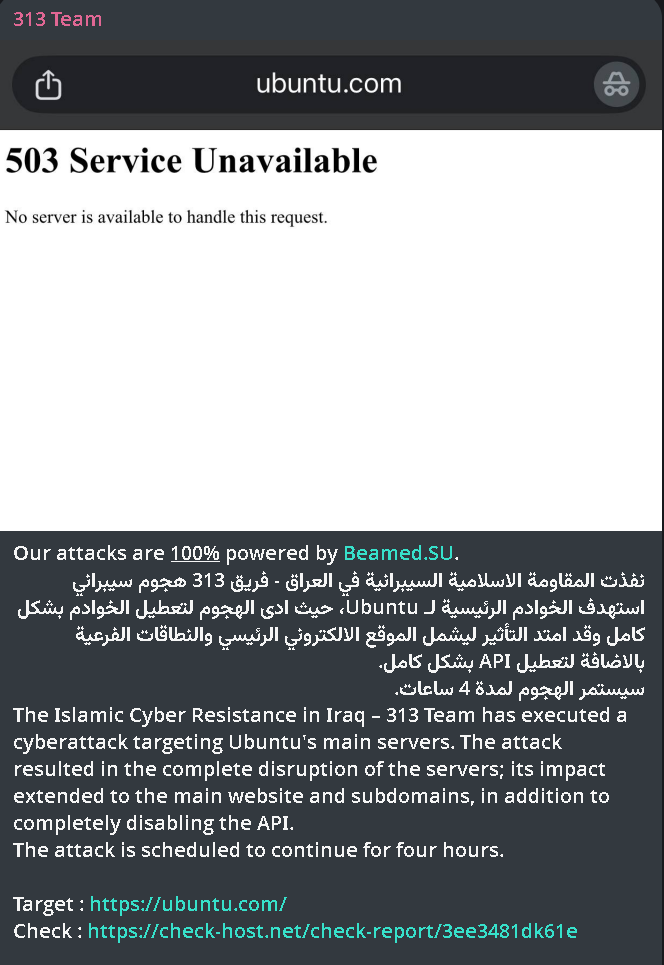
CRITICAL CYBER THREAT ALERT: MASSIVE ATTACK AGAINST OPEN SOURCE INFRASTRUCTURE – UBUNTU (CANONICAL) 🐧🚫🌐

A coordinated Distributed Denial of Service (DDoS) offensive targeting Ubuntu's main servers (ubuntu.com) has been detected. The hacktivist group known as "The Islamic Cyber ​​Resistance in Iraq – 313 Team" has claimed responsibility for the attack, resulting in a total disruption of the platform's web and technical services.

🏢 Affected Entity: Ubuntu / Canonical Ltd.

👤 Threat Actor: 313 Team (The Islamic Cyber ​​Resistance in Iraq).

📅 Detection Date: April 30, 2026.

⚠️ Status: (503 Service Unavailable)

5


FYI: It's often overlooked but the umbrella project of popular gaming distribution is Universal Blue and Bazzite is merely one of three flavors: https://universal-blue.org/#images

6


I have an older gaming PC that has an Nvidia GTX 1060. Until I updated it to Kubuntu 26.04 and Plasma 6.6 it was working perfectly. Not exactly a powerhouse, for sure, but decent enough to play games like Horizon Zero Dawn at medium settings.

Since I've upgraded, it's now in a situation where if the GPU is active, there's no display, or I can use software rendering to get into the desktop, but the GPU can't do anything. But not both. If I can get to the desktop and search journalctl for kwin_wayland_wrapper, I get an error along these lines:

kwin\_wayland\_wrapper\[2921]: kwin\_scene\_opengl: Error during eglInitialize  "EGL\_NOT\_INITIALIZED"

The Nvidia driver is 580.142, which I've tried to roll back to a previous one to test if that'll work, but apt tells me that 580 is literally the only driver available. I have also completely purged and reinstalled the driver, just in case it hadn't installed properly, but that didn't help.

Is it fair to say that my GPU is pretty much dead under the new drivers? And if so, will I have to reinstall, either with a previous version of Kubuntu, or more likely switch it across to Arch?

Sorry if there's any info I've not included, I've kinda been picking about the internet, trying to figure out what's gone wrong with it, and don't really know where to start.

7
8


This page gives an illustrated overview of two decades of development of SuperTuxKart, a journey from a very limited game to a sophisticated modern game with engaging gameplay and pleasant visuals.

9


Hello there, yesterday I embarked on a new to me Linux adventure (Bazzite for about 6 months) and I would like your thoughts on how I executed acquiring UE4.27 as well as your suggestions or experiences in doing this or something similar.

A friend of mine suggested that I check out UE since I was getting pretty proficient at Halo Infinite's forge mode which involves a lot of visual scripting and logic. So I went to check out where to download the engine and found out that the epic launcher is not available on Linux systems. Okay no problem I'm sure you can just download the engine by itself and just miss out on fab integration or something. Sure enough that is the case for getting the latest UE 5 something.

I am using a GTX 1080 founders but I figured I'd give it a go and maybe I can develop something that will work on my GPU infrastructure without ray tracing and whatever else is new. Nope, it crashes pretty soon after entering the editor. No matter, I can just just get the last version of the engine from a few years ago and should work better.

Turns out the only way to access older versions of UE is through Epic's Github page on old branches of the build. The only way to access those old branches is by linking your github account to your Epic account. Regrettably I do so as I was not able to find another way to get 4.27.

I then download the code and compile the app which takes almost 3 hours through Konsole. To launch the editor o have to go into the engine folder, the binaries folder, then the Linux folder, then navigate through hundreds of files to find "UE4Editor" executable to launch every time I want to launch the editor.

There has got to be an easier way right? I'm thankful that eventually I found a working method to try out the engine but boy oh boy did I receive some ridicule from friends (who while are technically savvy and work in IT themselves) who are on windows lol.

Please Linux wizards, give me your compile spells

TL:DR Ended up having to compile the app with Konsole after connecting GitHub and Epic games accounts.

10
11


After almost three years of 6.x series kernels, Linux 7.0 is finally here. That means it’s also time for another Asahi progress report!

12


I’ve been trying to get better at sitting down and actually starting my side projects. Most Pomodoro apps I found were either too heavy, too “smart”, or tried to sync everything to the cloud.

Since I already use the terminal a lot on Linux, I ended up writing a small Pomodoro timer that just does the basics and stays out of the way.

It’s simple: you enter the title, work time, break time, and number of intervals. When the session ends, it generates a small text report and asks you to write your own conclusion. I like having those notes to look back on, so I kept that part in.

Nothing fancy — just a minimal tool that fits into a lightweight workflow. Works on Linux & Windows, needs only Python.

GitHub: https://github.com/Mietkiewski/MPomidoro
Gumroad PWYW $0+: https://mietkiewski.gumroad.com/l/mpomidoro

13
14


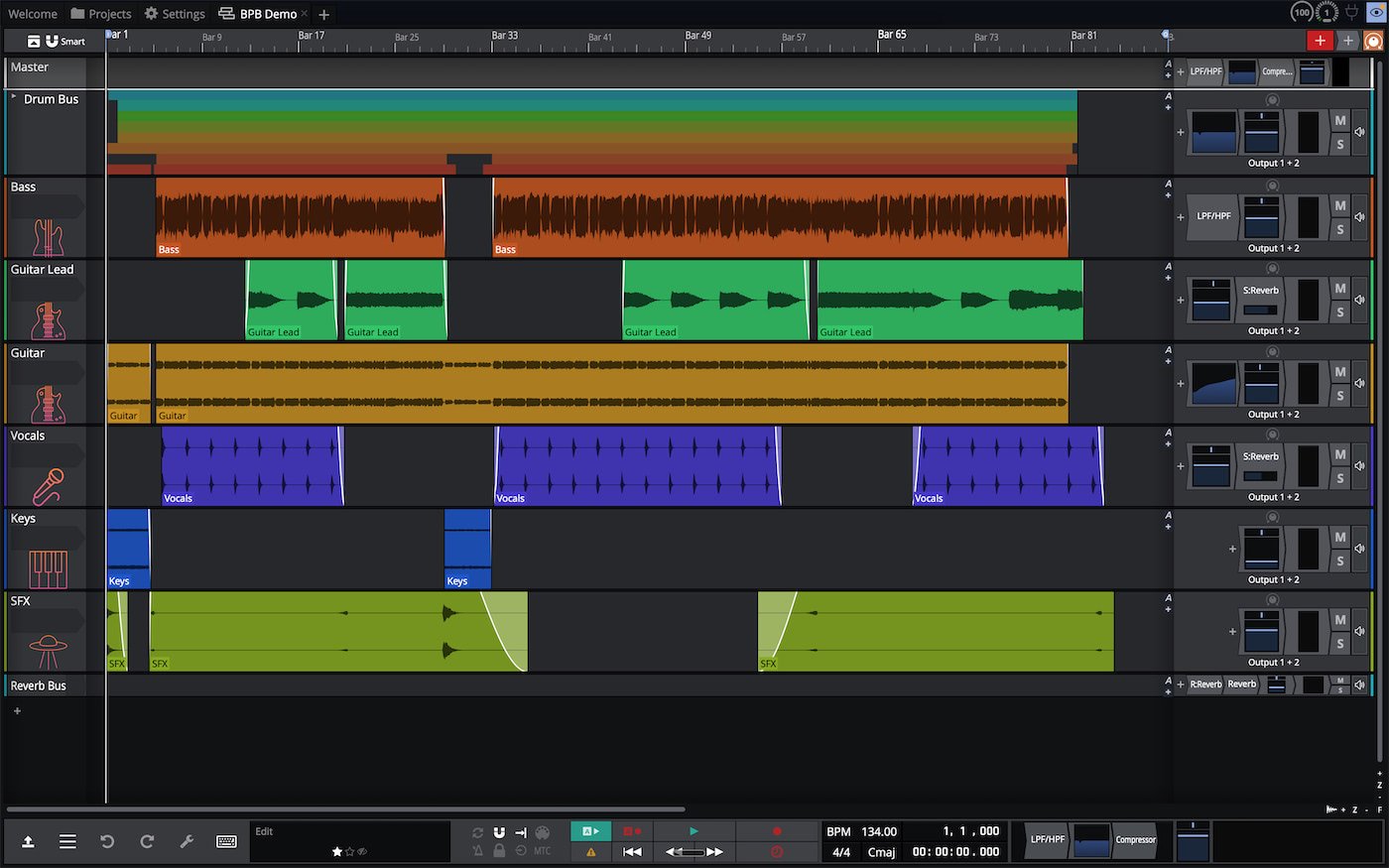
https://www.tracktion.com/products/waveform-free

A highly efficient audio engine, intuitive recording workflows and rapid mixing capabilities make Waveform Free the perfect choice for multi-track band recordings. 15 new audio FX are on hand for processing and support for VST, VST3 and AU opens the door to a world of 3rd party plugin possibilities.

  • No track limits.

  • It’s cross-platform.

  • Full plugin support. ( VST2, VST3, and AU (on Mac).

  • It works offline. (Unlike browser-based options)

Waveform’s interface takes some adjustment. It doesn’t follow the traditional “mixer on the bottom, timeline on top” layout that most DAWs use.

Give it a week, and it clicks. But those first few sessions will feel unfamiliar.

source

15


cross-posted from: https://lemmy.ml/post/46379162

The Kubuntu team is thrilled to announce the release of Kubuntu 26.04 LTS, codenamed “Resolute Raccoon”! As a community-driven flavour of Ubuntu, Kubuntu continues its mission to deliver the cutting-edge KDE software ecosystem on top of Ubuntu’s rock-solid foundation. This Long-Term Support release, aligned with Ubuntu’s two-year LTS cycle, brings together the freshest stable KDE software with the reliability and security users depend on for years to come.

Building on the Ubuntu 26.04 LTS base released today by Canonical, Kubuntu 26.04 introduces Plasma 6.6 as the flagship desktop environment, alongside Qt 6.10.2, KDE Frameworks 6.24.0, and the latest KDE Gear 25.12.3 application suite. We’ve also upgraded to Linux kernel 7.0 for enhanced hardware support and performance. Whether you’re a developer, creator, or everyday user, this release emphasises Wayland maturity, modern security, and seamless integration with the open source world.

Kubuntu 26.04 LTS will receive security updates and critical fixes through April 2029, making it an excellent choice for home users, schools, businesses, and anyone who values a dependable, beautiful desktop.

Kubuntu remains completely free to download, use, and share—empowering our global community to innovate without barriers.

Four Exciting New Features for Kubuntu Users

Here are four standout enhancements that Kubuntu 26.04 LTS brings to your desktop:

  • Text Recognition in Spectacle: Capture Text, Not Just Images Spectacle, KDE’s built-in screenshot tool, gains one of its most practical new capabilities in Plasma 6.6: built-in OCR text recognition. Capture any screenshot containing text—a document, a web page, an error dialog, a presentation slide—and Spectacle can analyse the image and convert the visible text into selectable, copyable content, right from within the app. No third-party tools required. Multi-language support means it works for users around the world, and the extracted text copies directly to your clipboard for immediate use. It’s the kind of small feature that quickly becomes indispensable.

  • A New On-Screen Keyboard for Touch, Accessibility, and Beyond: Plasma 6.6 introduces a fully integrated on-screen keyboard, making Kubuntu a much stronger choice for touchscreen devices, tablets, and users with accessibility needs. The keyboard supports multiple languages and layouts, adjusts its position intelligently to avoid covering input fields, and is easily accessible via the system tray or accessibility settings. It includes standard keys, function keys, and emoji support, and appears automatically when you tap a text input field on touch-enabled hardware. This addition reflects KDE’s ongoing commitment to making the desktop inclusive and usable for everyone.

  • Plasma Wayland - The Default, Fully Supported Session: The Plasma Wayland session is the default and fully supported session in Kubuntu 26.04 LTS, delivering improved security, smoother rendering, and better HiDPI display support. For users who need it for legacy hardware or specific workflows, the plasma-session-x11 package remains available in the Ubuntu archive— but it is not installed by default and is not supported by the Kubuntu team.

  • Extensive Theming and Configuration Improvements: Plasma 6.6 brings significant advances to theming and desktop configuration, giving users more expressive control over the look and feel of their environment than ever before. Custom global themes have been expanded, colour scheme handling has been refined throughout the shell and applications, and widget customisation options have been deepened across panels and the desktop. Whether you prefer a polished out-of-the-box experience or enjoy crafting every detail of your workspace, Resolute Raccoon gives you the tools to make Kubuntu truly your own.

What’s New Under the Hood

Beyond these highlights, Kubuntu 26.04 LTS inherits Ubuntu’s robust platform upgrades:

  • Linux Kernel 7.0: Updated from 6.8, the kernel now enables crash dumps by default on desktop installations, brings the new sched_ext scheduling system for hot-swappable eBPF-based schedulers, and retires the linux-lowlatency package in favour of a leaner lowlatency-kernel tuning approach on top of linux-generic.

  • KDE Applications 25.12.3: All KDE Gear applications have been updated to 25.12.3, a stable release, including Dolphin, Konsole, Okular, Kdenlive, and more.

  • Qt 6 Ecosystem: Qt 6.10.2 and KDE Frameworks 6.24.0 power the desktop. Qt5 (5.15.1cool1.gif and KDE Frameworks 5 (5.116.0) legacy packages remain in the archive for applications that have not yet completed their Qt6 port.

  • Firefox 150 and LibreOffice 26.2: Both core applications are updated, with Firefox delivered as a Snap from the Snap Store and LibreOffice included in the full installation.

  • sudo-rs by default: Ubuntu 26.04 LTS ships sudo-rs, a memory-safe Rust reimplementation of sudo, as the default sudo provider — improving security without changing everyday usage.

  • Rust-powered core utilities: The core OS utilities are now provided by rust-coreutils, bringing performance improvements and memory safety to fundamental command-line tools.

  • VA-API hardware video acceleration: AMD and Intel users now get hardware-accelerated video encoding and decoding by default via the Video Acceleration API — great for media playback and video work.

  • Updated developer toolchain: GCC 15.2, Python 3.14, Rust 1.93, Golang 1.26, LLVM 21, OpenJDK 25, and .NET 10 are all included and ready to use.

  • APT 3.2: The package manager gains a new dependency solver, OpenSSL-backed TLS, an automatic pager for commands like apt show and apt list and history and rollback commands like apt history-list or apt history-rollback, which were previously found only in separate apt-rollback tool.

This release marks another milestone in Kubuntu’s long journey as one of Ubuntu’s most beloved flavours. A huge thank you to our volunteer contributors, testers, bug reporters, and the upstream KDE and Ubuntu teams for making Resolute Raccoon a reality.

16


By Bertel King - Published Apr 22, 2026

From the moment GNOME 3 launched back in 2011, I felt like it was perfect for a touchscreen, and I’m happy to say that it absolutely is. I’d even go so far as to say that the GNOME interface is a better way to navigate a touchscreen than that of Android or iOS. I’ve said before that I would love to see an official GNOME-only OS, and this experience has only strengthened that desire.

Every aspect of GNOME is easy to tap with a finger. Opening the app drawer and swiping between workspaces feels completely natural with three-finger gestures. Windows are easy to drag around, maximize, or pin to the side. The virtual keyboard that pops up when I tap an input field is the only visual distinction from desktop GNOME. (...)

17
18
75
submitted 1 week ago* (last edited 1 week ago) by sureshot0@discuss.online to c/linux@lemmy.world


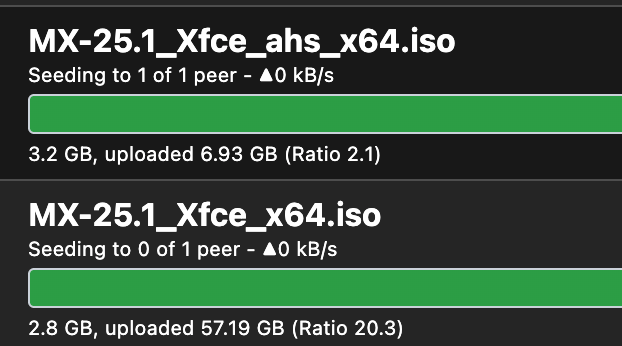
I like to have a few lightweight distros on hand because I enjoy restoring my old computers. I decided to seed these distros from the official torrents and became sort of addicted to doing it.

The most popular torrents seem to be MX Linux XFCE and Mint Ubuntu XFCE. MX Linux is at 20.2 in less than 10 days. I am wondering if there are any very small distros I haven't heard of.

Please a comment and tell me your favorite distro under 4g. I will go and try to find the torrent on their website.

edit:

19


Looking to purchase an old cheap macbook air 2018 just as a spare laptop but i understand it has T2 chip which may not go well. Just wondering if anyone here has already tried Linux in this macs and is it in a usable state?

20
21
22
23


A sample journey when trying to install software:

  • Try your distros repos, it’s either not there or an older version
  • Oh wait, you need to add their repo to your list and try again
  • Actually, they don’t have a repo, but you can install this deb/rpm from their site
  • Nevermind, it actually needs to be installed with pip to get the latest version
  • Or wait, it was actually a rust package and needs cargo
  • Well, this package is available as a snap
  • Screw it, I’ll just build it from source…. Except the dependencies I need take me through the entire journey again

It’s crazy with a large package like mesa. It uses meson, which requires it be installed via pip, and also needs rust which is best installed via a snap, but then there are dependencies it needs that require multiple paths…

On Windows: find the msi or exe and be done with it.

24


The introduction by the creator:

It's in https://distro.fedesito.me/ , It's a Pokedle inspired game, in which you try to choose the Linux distro based on it's characteristics/features.

If you want to add features/distros feel free to do a pull request, the project is opensource at my ShitHub (link in website).

EDIT: fixed some bugs and added instructions

Source: https://www.reddit.com/r/linux/comments/1sm1jhz/i_made_a_linux_distro_guessing_game/

25


From the press release [my emphasis]:

Require operating system developers like Apple and Google to verify users’ ages when setting up a new device, rather than relying on self-reported ages.

cross-posted from: https://beehaw.org/post/25834609

The U.S. has been quietly building up a set of state-level laws that push operating system providers into the age verification plague.

California's AB 1043, signed in October 2025, requires OS providers to collect age data at account setup and pipe it to apps through a real-time API. It kicks in on January 1, 2027.

Colorado is working on something nearly identical. SB26-051 (which we covered when it was still a proposal) passed the state Senate 28-7 on March 3, 2026, and is now waiting on a House vote to become law there too.

However, these are just state-level laws. A new federal bill, H.R.8250, introduced on April 13, 2026, by Rep. Josh Gottheimer, with Rep. Elise M. Stefanik signing on as cosponsor, has us intrigued.

view more: next ›