Linux Questions

3856 readers
1 users here now

Linux questions Rules (in addition of the Lemmy.zip rules)

Tips for giving and receiving help

Any rule violations will result in disciplinary actions

founded 2 years ago
MODERATORS
1


When you delete your posts on this sub, you are deleting a solution to a potential problem that someone may be having. It is inconsiderate and can result in a ban.

2
0
submitted 2 days ago* (last edited 2 days ago) by OliMoli2137@piefed.social to c/linuxquestions@lemmy.zip


So I've got a RasPi 3B+ and self hosting a bunch of bare Git repos (git init --bare). And I currently store my dots there. BUT I also have a public mirror on Codeberg. For now I just have two remotes set up and do `git push´ individually for each one. And I don't really envision a case where I start developing it on 2 different machines well. I don't know whether those 2 repos are in sync when I'm developing.

Now, is there a more robust way to keep those 2 mirrors in sync?

I was thinking of adding some kind of hook on the Pi, so that I push my changes to the Pi, and then the Pi pushes the same changes to Codeberg. so instead of my current workflow:

home computer -> Pi

home computer -> Codeberg

this happens:
home computer -> Pi -> Codeberg

Is that the right way of doing this?

Please let me know if you have any suggestions!

3


Hi, I'm relaying a problem my gf is having. She has an acer laptop with Intel + nvidia hardware and a ThinkPad Thunderbolt dock. Running arch with kde. Whenever she starts bevy engine, including its demos, the dock disconnects and reconnects, causing everything connected to it to also do the same.

The journal has some GL_FRAMEBUFFER_INCOMPLETE_ATTACHMENT errors but I also have some in my journal so I think they aren't specific to bevy.

I don't understand how a user program can cause such an issue. Even if bevy has a bug I don't think it should affect peripherals? Has anyone seen something like this?

4


cross-posted from: https://piefed.social/c/linux4noobs/p/1953356/my-pc-is-making-a-high-pitched-noise-like-coil-whine-only-under-linux

So I built a new PC a couple weeks ago. My old one broke one day (I think I helped it, but that's another story). I was happy to move from a stock Prism Wraith cooler that was LOUD and ANNOYING. I put a new AMD Ryzen 9 7900X in this box with a couple of new nvme drives (Samsung 9100 PRO and 990 PRO). The thing is silent under Windows 11. Silence at last!

Then I installed openSUSE Tumbleweed (from which I'm typing this) and as the post title says, something is making a high-pitched noise, like coil whine, when the system is mostly idle. I searched the web and the first suggestion is that Linux handles CPU power states (C-state) differently than Windows. Or, it could be the new disk(s), too. It's a fly in the ointment, I am very happy with the new PC, with how powerful and fast it is, I'm so far happy with openSUSE, but there HAD TO be SOMETHING to spoil the experience.

Has anybody had a similar problem? Any tips on how to troubleshoot it and not BREAK my computer?

5


Hi all, first time posting here.

Installed Fedora KDE Plasma half a year ago on a Thinkpad mostly used in the living room - for streaming / playing videos and minimal gaming. Having zero regrets. It is amazing how far we've come.

I have had very little issues with it, all being only slight annoyances. Nothing compared to win10 or needless to say the current abomination from Microslop... which doesn't want to run on this laptop anyway.

So, here is the first annoyance: when watching a video with VLC, fullscreen, sometimes Discover (the app store / updater thingy) will pop up full screen, says "refreshing..." or whatever, clearly wanting to inform me of some brand new updates.

Question is, how to make it not bother me when a video is being watched?

It is not a big deal, I just immediately close it, rewind a bit and that's it. But if there is some setting to tweak or some magic words to type, I am interested...

PS. I am so happy about this move to Linux. Thank you Microslop for pushing me over.

6


Heya,

I hope that title isn't too confusing. I recently set up a custom Arch install (Niri, Noctalia, SystemD) and noticed that a lot of WMs/DEs offer to control display brightness with ddcutil. Display control protocols (HDMI-CEC, DPMS, DDC/CI) are somewhat of a topic to me, though my current monitor only speaks ddcci.

I was now wondering why there isn't a daemon, or other centralized way to turn on/off the display when appropriate? Such as boot/shutdown/sleep/resume/power-saving. I can use the D6 feature in ddc to control the power-state. I can even rig a systemd-unit to somewhat do this automatically.

But there doesn't seem to be a comprehensive framework, where I can go "this command is off, this command is on" and it places the calls in the right places. Which is strange. I get that standby exists, but I don't want to leave it in standby for long periods.

Am I missing something?

Thanks.

7


Hi, I’m trying to get the hang of xinput. For a start I tried setting an option of a device to a value it already has.

I want to go for my Touchpad. From the following output I identified ELAN050A:00 04F3:31B1 Touchpad as the device name.

$ xinput --list
⎡ Virtual core pointer                    	id=2	[master pointer  (3)]
⎜   ↳ Virtual core XTEST pointer              	id=4	[slave  pointer  (2)]
⎜   ↳ ELAN050A:00 04F3:31B1 Mouse             	id=12	[slave  pointer  (2)]
⎜   ↳ ELAN050A:00 04F3:31B1 Touchpad          	id=13	[slave  pointer  (2)]
# more lines

Then I listed the available options:

$ xinput list-props "ELAN050A:00 04F3:31B1 Touchpad"
Device 'ELAN050A:00 04F3:31B1 Touchpad':
	Device Enabled (180):	1
	Coordinate Transformation Matrix (182):	1.000000, 0.000000, 0.000000, 0.000000, 1.000000, 0.000000, 0.000000, 0.000000, 1.000000
# Lots more …
	Synaptics Scrolling Distance (350):	-79, 79
# Lots more…

Then I tried setting the Scrolling Distance:

$ xinput set-prop\
"ELAN050A:00 04F3:31B1 Touchpad"\
"Synaptics Scrolling Distance"\
"-79, 79"
X Error of failed request:  BadMatch (invalid parameter attributes)
 Major opcode of failed request:  131 (XInputExtension)
 Minor opcode of failed request:  57 ()
 Serial number of failed request:  21
 Current serial number in output stream:  22

I also tried without the separating comma in the options list:

$ xinput set-prop\
"ELAN050A:00 04F3:31B1 Touchpad"\
"Synaptics Scrolling Distance"\
"-79 79"
X Error of failed request:  BadMatch (invalid parameter attributes)
  Major opcode of failed request:  131 (XInputExtension)
  Minor opcode of failed request:  57 ()
  Serial number of failed request:  21
  Current serial number in output stream:  22

What’s wrong with the parameter attributes? I’m on Linux Mint 21.3 and Kernel 5.15.0-173-generic.

8


Basically the title. I am looking to use a TUI file manager, but most seem to only support opening files in one external application based on mime-type.

What I need:
Select an image -> file manager shows a preview (unpixelated)
Open image -> it opens in my default image viewer
Open image with... -> file manager lets me select a program to open it

I need this cause I often want to open images in gimp, but I don't want it to be my default image viewer.

9


if i have libinput-gestures autostart normally then it conflicts with the compositor and then the compositer wont start. how can i make libinput wait 10 seconds?

10


using i3wm on fedora 43, decided to give beterlockscreen a try and it works great BUT, on inital login it shows the desktop then immediately locks the screen. effectively making me login twice. any suggestions?

11


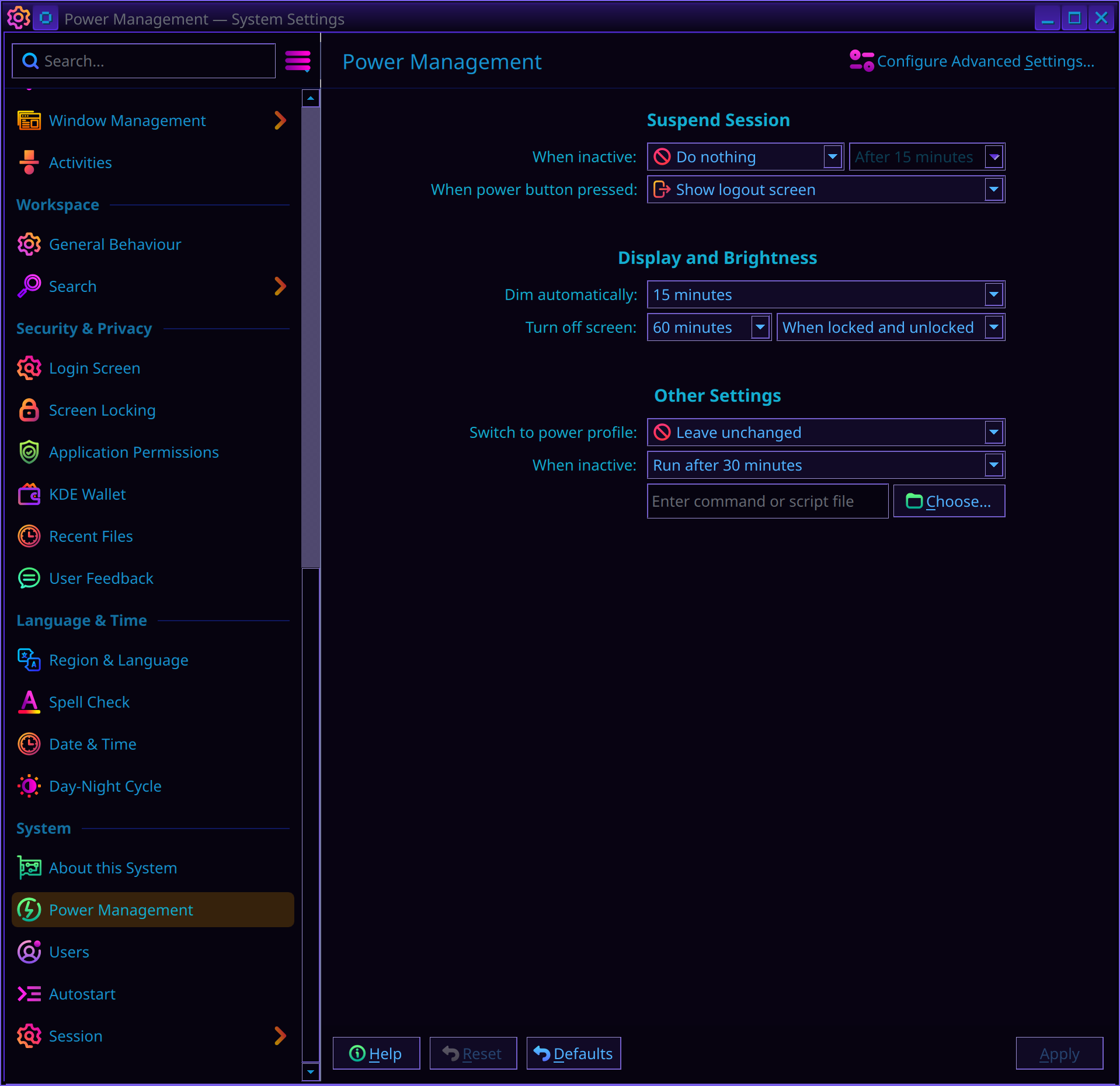
Ever since SDDM was dropped (though it could just be coincidence) in favor of plasma-login-manager on CachyOS when using KDE, Steam scaling breaks whenever my display turns off and on again. Not sure why.

It's fine starting Steam and it'll display correctly 200% as set in KDE settings for my 4K TV.

When we turn off the TV we often leave the PC on. When we turn the TV back on everything looks fine except Steam. Even if it's closed to the system tray. It'll be the only application wrongly using 100% scaling for some reason. edit: forgot to mention restarting Steam is annoying but restores 200% scaling until display turn off again.

Radeon 9070XT since display driver may matter?

Power Management too idk: https://media.piefed.social/posts/yb/bM/ybbM1Ks63dLQj2l.png

12


All of my important data is on btrfs drives. I intend to install my system on ZFS. Why, you may ask? Because I can. That's the fun of Linux after all. I intend to mount btrfs drives as well. I hear that ZFS can break fairly easily? Is this a bad idea?

Edit: I understand ZFS is out of tree but CachyOS maintains their own package and dkms so it shouldn't matter I would think?

13


I have plank start on lxqt desktop but i don't wan't it to start in my i3 desktop. For some reason it pushes the window up to the top half of the screen. So when i start i3, first thing i do is close plank. Is there a way to make it show on one DE vs the other?

14


I need to mount ISO files on launch of some really old games. I see I can create a script and then have lutris launch the script to mount and launch another script to unmount when I run the game however it requires root privileges to mount. I’ve tried adding the specific ISO files to fstab And changing the mount location to something in the users’s home folder, but it’s just not working. What am I missing?

15


The icon in the app selector and taskbar thing are both the proper chrome logo, but when I open the window it shows like this.

This is on KDE, on fedora.

(It's ungoogled chrome, don't suggest installing firefox to me.)

16


Hey,
So after hardening a system with brace and rebooting, the wifi interface is down and I struggle to get it back up.

Tried ip link set [wifi interface] up
But no success

I'm also not very good at wifi issues.

Maybe a module got deacticated? I dont know.
The script also says its for debian 12 not 13 and only really fedora is supported, but heyy.

Would be grateful if anybody could help.

Thank you

17


Often when downloading a game on steam my nvme drive gets pinned at 100% IO usage and my whole DE (gnome) can lock up at times. Is there a way to limit it so that this never happens?

18


If I keep an RDP connection open to my other computer for awhile, eventually the connection will drop. When I check the RDP Server button under Remote Desktop in the Settings, it says it's off. Turning it back on solves the problem, but I've had it randomly turn off several times.

Does anyone know what could be causing this?

19


So, I tried searching for pc hardware help, but apperently that community doesn't exist, or I'm too dumb to find it. In either event, I am posting this here to try to troubleshoot my pc. This is mostly a hardware post. Technically the hard drives do have linux, but the issue isn't with that I don't think.

Ok, so here's what happened. 12 year old computer, on all day every day for most of it's life. Lets call it a 98% uptime. Well about 2 weeks ago I decided to turn it off, change hard drives, and turn it back on.

I have like 10 small hard drives. Each with different a OS on them.

So when I turn the PC back on, the fans sounded like the were struggling. The dell logo flickered on the screen, and then the whole PC powered off.

Thats weird. Never saw it do that before. So I hit power again, this time, a loud audible POP noise from inside the PC. Like an explosion. I could smell burning. So I rushed in unplugging everything, pull the PC out of it's place, check for damage, but found no evidence of a fire.

So I removed the power supply. Then I started just removing the fans to clean them (been about a year), and then I removed the big heat sink fan over the processor. I don't think I ever removed that before.

So my PC sat like that, unused, no way to turn it on. I posted when it first happened, to get an idea of what happened, and I've been told a capacitor probably burst.

I was also told that it's possible the motherboard could have been blown out. I see no physical damage.

So Sunday I was at a thrift shop. I just happened to see a $10 power supply. My power supply was 300 watts. This one at the thrift shop was 220 watts. According to a calculator I found online, I use roughly 176 watts. So I figure I'm probably fine. Just as a precaution I didn't connect my dvd burner. Just using it as a band-aid fix until I can get a better one.

So, first time powering up since my power supply died, with the temporary 220 watt power supply, and the dell logo shows up......and thats it.

Never gets past that screen. I googled it, and I've tried the following.

I took out the ram that was inside during the explosion. Luckily I still had my old ram in a drawer. So now instead of 16gb, I have 8gb. That did not solve the issue.

I took out the hard drive with ZorinOS that was in during the explosion. I put in a hard drive with BazziteOS. This did not solve the issue.

I took out all ram and all hard drives. I knew it wouldn't boot, but I wanted to see what happened. No dell logo, totally blank screen. Power button was orange instead of white.

Put just the ram back in, no hard drive. I knew it wouldn't boot. I thought I might get past the dell logo, and get the screen that says something like "No boot drive" or whatever it says normally when it has no hard drive. It did NOT do that. It still just stayed on the dell logo.

So from here, my thoughts are one of two issues.

Either 220 watts really isn't enough, even as a temporary bandaid fix.

Or

Somehow the power supply exploding fried the bios?

Unrelated to all this, I don't have internet at all at home right now. That's a different unrelated issue that should be solved tomorrow, but in case it's not, I might not reply fast.

I'll post the computer model later. It's an inspirion 3XXX something.

Is there anything else I should try to help gather more information? Any ideas to temporarily get this thing up and running?

20


Been using AMD gpus for years due to their superb Linux support. Would like to play around with AI image generation completely offline so a Nvidia gpu is kinda must. Besides that I do some gaming as well.

Currently I have AMD RX 6750 XT and am considering replacing it with a RTX 5060 TI with 16 GB vram. How well does Nvidia gpus work in modern Linux systems. I'm running Tumbleweed with KDE plasma on X11.

Other hardware is Ryzen 7 7700X and an Asrock B650 PG Lightning motherboard.

Edit: Been using InvokeAI so far but cpu only is super slow.

21


I am trying to create some systemd units that are supposed to start scripts at certain intervals. With Cron, I used an expression like 0 3 */7 * * to start a job every 7 days at 3 a.m. That worked great. With OnCalendar, I have no idea how to implement "every 7 days". Or can I use OnUnitActiveSec here? Additional problem: The computer is not always on at the specified time. The job should therefore be repeated as soon as the computer is available again. I have set Persistent=true for this purpose. However, I suspect that OnUnitActiveSec is reset every time I restart the computer. Or does OnUnitActiveSec refer to the time when the unit was activated with systemctl enabled test.timer?

22


So, I've had the same computer for about 12 years now. Nothing special. A Dell Inspiron 3847. Bought it in 2014, and it's not a gaming PC by any means. No graphics card, just the onboard chip.

Last week, I had been playing Civ6 on it. It was going fine. Well....my game wasn't going fine. I was getting boxed in by both Germany and America. But the PC performance was going just fine.

I generally leave my PC on at all times, and have for the past 12 years. Well, I also have a second sata drive port that I disconnect and reconnect various drives.

After playing a game of Civ, I saved my game, exited to desktop, and wanted to connect my other hard drive as a second drive. So I turned the PC off, connected the drive, and turned the PC back on.

When I do this, normally I see the dell logo appear on screen almost right away. This time I didn't. The screen stayed black, the orange light on the power button looked like it was struggling to keep itself on, and then the whole thing went dead.

I said "That's weird. Never did that before." And so I pushed the power button again. This time, I hear an audible POP inside my computer, and immediately smell fire. So I INSTANTLY yanked my desktop out of the little wooden stand it sits in. No fire, but the whole thing smells like fire.

I disconnect all the cords, and open the side of my case up. I see no damage. I see no fire. After a while I figured out that something inside my power supply literally exploded. I don't know enough about the terms for what would have exploded, but something exploded. For the next 2-3 days, in that room you could still smell burnt plastic. It's a very distinctive smell. The only time I ever experienced that was 20 years ago when a Windows 98 computer actually DID catch fire. That's what I thought happened here. The motherboard of the Windows 98 computer caught fire, and burned the motherboard.

So flash forward to today, and the only thing I see is that my internals are very very dusty. Other than the dust, everything is in good condition.

So, right off the bat, I KNOW I need a new power supply. But I have questions first.

Was it just the age of the power supply that did it in? Or was it me playing Civ6 for 6 hours straight that overloaded it? Should my power supply be a straight replacement? Should I get a more powerful power supply? I also heard that some graphics cards need power from the power supply. Should I buy one of those, in case I want to upgrade later?

This is the power supply I was looking at

Would this be good?

I've never in my life bought a power supply. Usually when I shop for something, I compare multiple products, and make an informed decision.

In this case, I don't even know what I'm looking for in a "good" power supply. I don't know how to measure what's good and what's trash. Is $35 good on a power supply for a computer this old? Should I look for something else?

I've included a pic of the back of the power supply, just so everyone can see what I was originally using.

23


Hi all;

Question since I came across a weird issue on my mom's laptop (Acer Aspire) that I just installed Linux Mint on over the holiday break. She's in another state, so I'm debugging remotely.

Occasionally when booting up, she'll get to the GUI log in screen with the selection for individual users, she'll enter her password and press enter, and then it will just end up with a black screen with the regular Linux Mint cursor.

The weird thing is that after rebooting and going into GRUB, selecting Advanced (option #2), and clicking continue boot normally, it will go right back to the login screen and boot normally with no black screen. In fact the one video I found of this is the one that basically told me to do just that - go into advanced, continue normally.

My question is, what causes this; is this just a quirk of Acer? It doesn't happen on my two computers so it boggles my mind.

24


TL;DR: Is my statement below incorrect? Are there in fact meaningful efforts to improve accessibility on Linux? Are there distros that people have actually used practically that make an effort to be accessible?

I have used desktop Linux on and off since 2009, mostly flavors of Ubuntu with occasional detours into things like Arch or CentOS (RIP).

I currently have Mint installed on a separate drive but I can't fully break away from Windows because as a blind user the experience is not only unsatisfactory it has gotten worse in the years I've been using it. Orca hasn't improved at all, and the magnifier has actually lost functionality at some point, my guess is the move away from GNOME 2. Among other things you used to be able to assign arbitrary modifier keys to zoom in and out with the mouse wheel but this is no longer the case.

I have little faith that things will improve. Any given Linux distro isn't one product, it's a bunch of different projects. One group makes the kernel, another makes the shell, another the window manager, yet another makes the desktop environment, audio, bluetooth, graphics drivers etc. All these make the assumption that the user is able-bodied, and bolting accessibility on top of all these disparate systems after the fact is very difficult. It's no accident that MacOS and iOS are frequently cited as the most accessible platforms. Apple controls the entire stack from hardware to UI and even many of the apps and has the resources to devote to serving a comparatively tiny portion of their userbase.

25
1
submitted 2 months ago* (last edited 2 months ago) by LucyMcGoose@beehaw.org to c/linuxquestions@lemmy.zip


So, I made the switch to Linux Mint about 2 weeks ago, and have been having some issues, specifically with gaming and art programs.

The issues seem to be related to memory. I don't have the memory to open a large art file in either Krita or GIMP. My Coral Island game keeps crashing (OOM - kill process).

So, it would be easy to assume my computer just doesn't have the memory for these activities, except . . . they worked fine on Windows. I could open my art files in Photoshop and Coral Island ran like a dream for months.

It's disheartening because everywhere I look says the issue must be with my machine not having enough memory. But my machine could run everything just fine when using a different OS (with way more things installed).

Does anyone have any help or insight they might be able to provide? I have no interest in going back to Windows.

Thank you!

**SOLVED - increased the swap to 8 GB, which seems to have solved the issue for now. Thank you, everyone, for your help!

view more: next ›