Godot

7673 readers
2 users here now

Welcome to the programming.dev Godot community!

This is a place where you can discuss about anything relating to the Godot game engine. Feel free to ask questions, post tutorials, show off your godot game, etc.

Make sure to follow the Godot CoC while chatting

We have a matrix room that can be used for chatting with other members of the community here

Links

Other Communities

Rules

We have a four strike system in this community where you get warned the first time you break a rule, then given a week ban, then given a year ban, then a permanent ban. Certain actions may bypass this and go straight to permanent ban if severe enough and done with malicious intent

Wormhole

!roguelikedev@programming.dev

Credits

founded 3 years ago
MODERATORS
201


I'm trying to make a game situated during the Cold War in a style a bit like HOI4, but instead of fighting with divisions and doing stuff like encirclements, it's turn by turn like Pokemon, and there would be more of a focus on unrealistic scenarios over historical.

Is it possible to create a collisionshape2d using an image of a map of countries or provinces? Making all the polygons sounds painful.

202


Hi everybody. I think there's one more topic I haven't touched on yet, which also belongs in our series on raymarching technology. It's about creating arbitrary shapes using planes with various positions and rotations. So let's take a look at how we can compute the rendering of the so-called Platonic solids.

203


Hi everybody. It's still summer 2025, and to take a short break from further improvements to our raymarching shader, this time we'll create something really simple. We'll use the Voronoi algorithm, which we know from several previous tutorials, but we'll map it onto a sphere, so we’ll end up with something like a slightly strange planet or a dead star.

204
1
submitted 10 months ago* (last edited 10 months ago) by Eibriel@sopuli.xyz to c/godot@programming.dev


Most probably not a great idea, thanks to Godot I was able to go from idea to Steam page with trailer in 5 days.

I needed to do that very quickly for reasons, and Godot is amazing, to just throw something together, iterating really fast, and exporting in video format.

The integration with Blender is chef kiss

205


Hello, as the title says, I am very new to Godot. I just finished following the 2D Game Tutorial, and I have a question on this part: https://github.com/godotengine/godot-demo-projects/blob/bf4d1038d623c355f3b49e613a2c9b686eebb312/2d/dodge_the_creeps/main.gd#L44

Basically, I had the idea to play around and try to give the mob a curved path, so I tried mob. in Godot's script editor looking for the completion engine to find me things similar to .linear_velocity only to find nothing, and also that linear_velocity didn't even show up as an autocomplete suggestion. No errors or warnings, and the code runs fine.

Question 1: Why does linear_velocity not get suggested? How can I change that, so I can have the editor help me learn the language and APIs?


Question 2: Unrelated to the above. I like Vim motions. Any suggestions on either:

  • Installing a Godot plugin to get Vim bindings?
  • Setting up Godot to use Neovim as my external editor?
  • Just using Neovim externally to edit my GD scripts?

Just looking for thoughts on what people use and like.

206


I hope they got all the regressions now, this has been the longest beta period of any version yet. I really want 4.5 to release so I can upgrade my project already!

207
208
1
submitted 10 months ago* (last edited 10 months ago) by Levi@lemmy.ca to c/godot@programming.dev


Hi, I've been playing around with Godot to learn some game development skills, but I've run into a problem. I'm trying to display some 2d "cards" on the screen, and their texture is being generated by a shader. However, each card looks exactly the same, where I'd like some variation between the cards.

So I passed a seed value into my shader using:

instance uniform float seed;

And in my GDScript code:

func _ready() -> void:
    color_rect.material.set_shader_parameter("seed", randf() )

I've also tried:

func _ready() -> void:
    color_rect.set_instance_shader_parameter("seed", randf() )

Nothing breaks, but each of my cards are still identical, as if the seed value is the same for all three cards. From what I've read, the 'instance' keyword should let me pass a unique seed value for each object using the shader, right?

209


I am trying to Implement multiplayer into my relativly empty project but for some reason the player that joins doesnt get a camera assigned and cant walk/move their camera, I followid this tutorial: https://www.youtube.com/watch?v=G28bNlgICJg but it doesn’t seem to work properly. I am using a MultiplayerSpawner and MultiplayerSynchronizer

I put the code in this godot forums post: https://forum.godotengine.org/t/help-with-multiplayer-players-that-join-can-see-anything-or-walk/118322

Any help is Appreciated

210


Hi everyone! It looks like we’ll be spending a lot of summer with the raymarching series because I’m back with a new episode — the number nine already. This time, I’d like to take a look at calculating and rendering light reflections, which can be useful if we want to use reflective materials.

211


I'm using godot-rust bindings to provide some additional functionality to my codebase. I wrote methods associated with a struct that I would like to use in my game and made a few unit tests to ensure that they're working correctly. After godotifying my struct with attributes described in Hello World section of the godot-rust book I got a slew of errors, some of which are about initialization of the struct in test functions. After clearing them all and executing MyClass:new_alloc() at the beginning of a test function the compiler complains that Godot engine is not available. I hit a roadblock because I don't know how to execute tests in Godot environment. Changing #[test] to #[itest] makes the code compile but that's because it executes 0 tests; from what I see itest is meant for developing godot-rust anyway. What is the preferred way of unit testing godot-rust code?

212
1
submitted 10 months ago* (last edited 10 months ago) by mr_MADAFAKA@lemmy.ml to c/godot@programming.dev
213
214


Hi everybody. It's vacation season, so this week I'll fill the schedule with something simpler. I'll add a short video to our raymarching series about other basic 3D shapes and ways to modify them. Let’s do it.

215


I know roblox and godot are totally different styled engines but i cant choose. I heard roblox is good for starting out and learning,I heard godot is open source and great but may be a little harder for somebody starting out.

Im not sure how true what i heard it but how do i decide, what would you suggest and why so?

216


I'm working on a two player 3D game that involves both player character models facing toward one another most of the time.

I worked out that i can use translate_object_local(Vector3.MODEL_<side>) for movement around a point that a model faces toward (there's probably a better way to do that, but that's not what i'm focused on for now), but i'm struggling to make that focus point an object instead of just coordinates.

I've tried a few things inside func _physics_process(delta): look_at($Beacon.position.x, Vector3.UP, $Beacon.position.z) to rotate around the Y axis and face the object Beacon (CharacterBody3D placeholder for player 2) crashes with the error "Invalid access to property or key 'position' on a base object of type 'null instance'."

Putting var look_here = position in the script for the beacon and then look_at($"../Beacon".look_here) in TestChar (test character) makes the character rotate around the world origin.

Adding a Vector3 variable look_here_P1 to Beacon's script and then adding or subtracting to its X and Y positions with beacon's movement keys should make TestChar face a point that's in the same place as Beacon, but i don't know how to either make TestChar use that that variable from Beacon's script, or move the variable to TestChar and make Beacon update it now that it's in another script.

Making Beacon emit a signal every time it moves in a particular direction and then using those signals to update a Vector3 variable in TestChar's script doesn't seem to work, i think either it doesn't update the variable's position or look_at() in _physics_process doesn't check for a new target to look at.

Is there a simple way to make an object always look at another object? I'm sure there must be but i can't seem to figure it out. Thanks in advance.

217
218
219
220
221


Hello everybody! The effect I’ll be creating in this video originated as a combination of the algorithm used for rendering a 3D tunnel and several applications of so-called fractal Brownian motion, which I explored while working on some of my fractal shaders. And since I most likely didn’t explain anything clearly with that introduction, we’ll go through everything step by step.

222


I'm mostly concerned about if I'm understanding how Godot does things. I'm coming from Love2D and so messing a lot with the GUI has been a new workflow for me completely. Please disregard the absolute mess that my code is, I'm trying to get through things quickly and not necessarily cleanly. Also, I know I don't need to add 'pass' all the time, I just like the pink visual cue that my function is over, sorta like Lua lol.

extends Node2D

var rng:= RandomNumberGenerator.new()

onready var arrow_left: Node2D = $ArrowLeft
onready var arrow_up: Node2D = $ArrowUp
onready var arrow_right: Node2D = $ArrowRight
onready var score_label: Label = $Control/ScoreLabel
onready var health_label: Label = $Control/HealthLabel

var arrow:PackedScene = preload("res://Arrow.tscn")

var arrows: Array = []
var score: int = 0
var health: float = 100.0
var in_left: bool = false
var in_up: bool = false
var in_right: bool = false
var left_pos: float = 0.0
var up_pos: float = 0.0
var right_pos: float = 0.0
var current_left_arrow: Node2D = null
var current_up_arrow: Node2D = null
var current_right_arrow: Node2D = null


func _ready() -> void:
	rng.randomize()
	
	var window_width: float = get_viewport().size.x
	var window_height: float = get_viewport().size.y
	var left_arrow_pos: float = window_width * 0.3
	var up_arrow_pos: float = window_width * 0.5
	var right_arrow_pos: float = window_width * 0.7
	var arrows_height: float = window_height * 0.9
	
	left_pos = left_arrow_pos
	up_pos = up_arrow_pos
	right_pos = right_arrow_pos
	
	arrow_left.position.x = left_arrow_pos
	arrow_left.position.y = arrows_height
	arrow_up.position.x = up_arrow_pos
	arrow_up.position.y = arrows_height
	arrow_right.position.x = right_arrow_pos
	arrow_right.position.y = arrows_height
	pass


func _process(delta) -> void:
	score_label.text = "Score: " + str(score)
	health_label.text = "Health: " + str(health)

	if Input.is_action_just_pressed("left") and in_left and current_left_arrow:
		increase_score()
		arrows.erase(current_left_arrow)
		current_left_arrow.queue_free()
		current_left_arrow = null
		in_left = false

	if Input.is_action_just_pressed("up") and in_up and current_up_arrow:
		increase_score()
		arrows.erase(current_up_arrow)
		current_up_arrow.queue_free()
		current_up_arrow = null
		in_up = false

	if Input.is_action_just_pressed("right") and in_right and current_right_arrow:
		increase_score()
		arrows.erase(current_right_arrow)
		current_right_arrow.queue_free()
		current_right_arrow = null
		in_right = false

	for i in arrows.duplicate():  #supposedly safe iteration?
		i.position.y += 3
		if i.position.y > 540:
			health -= 10
			arrows.erase(i)
			i.queue_free()

	if health <= 0:
		get_tree().change_scene("res://GameOver.tscn")
	if score >= 5:
		get_tree().change_scene("res://ChoosePath.tscn")

	pass


func _on_CreateArrowTimer_timeout() -> void:

	var arrow_instance = arrow.instance()
	var arrow_pos = get_rand_arrow_pos()
	if arrow_pos == 1:
		arrow_instance.position.x = left_pos
	elif arrow_pos == 2:
		arrow_instance.position.x = up_pos
	elif arrow_pos == 3:
		arrow_instance.position.x = right_pos
	arrows.append(arrow_instance)
	arrow_instance.position = Vector2(arrow_instance.position.x, 0)
	add_child(arrow_instance)
	pass


func increase_score() -> void:
	score += 1
	pass


func _on_LeftArea2D_area_entered(area: Area2D) -> void:
	if area.is_in_group("arrow"):
		in_left = true
		current_left_arrow = area.get_parent()  #get the full arrow Node2D to use for deletion
	pass
func _on_LeftArea2D_area_exited(area: Area2D) -> void:
	if area.is_in_group("arrow"):
		in_left = false
		current_left_arrow = null
	pass

func _on_UpArea2D_area_entered(area: Area2D) -> void:
	if area.is_in_group("arrow"):
		in_up = true
		current_up_arrow = area.get_parent()
	pass
func _on_UpArea2D_area_exited(area: Area2D) -> void:
	if area.is_in_group("arrow"):
		in_up = false
		current_up_arrow = null
	pass
	
func _on_RightArea2D_area_entered(area: Area2D) -> void:
	if area.is_in_group("arrow"):
		in_right = true
		current_right_arrow = area.get_parent()
	pass
func _on_RightArea2D_area_exited(area: Area2D) -> void:
	if area.is_in_group("arrow"):
		in_right = false
		current_right_arrow = null
	pass


func get_rand_arrow_pos() -> int:
	return rng.randi_range(1,3)
	pass

I'm not sure if the way I'm doing number randomization is correct and if using duplicate() truly is the right way to remove things from the array. Is it truly deleting the node in the array? Lastly, why can't I seem to get the window size as a script-wide variable? It seems like I can only do so inside the ready function. Thanks!

edit: Code has been properly formatted, sorry!

edit2: From what I can tell this is the right way to remove objects by iterating over the array in reverse

	for a in arrows:
		a.position.y += 300 * delta

	for i in range(arrows.size() - 1, -1, -1):  #iterate safely by going backwards
		var a = arrows[i]
		if a.position.y > 540:
			health -= 10
			arrows.remove(i)
			a.queue_free()

I split up the movement code into its own for loop and then moved the deletion code into the reverse loop.
223


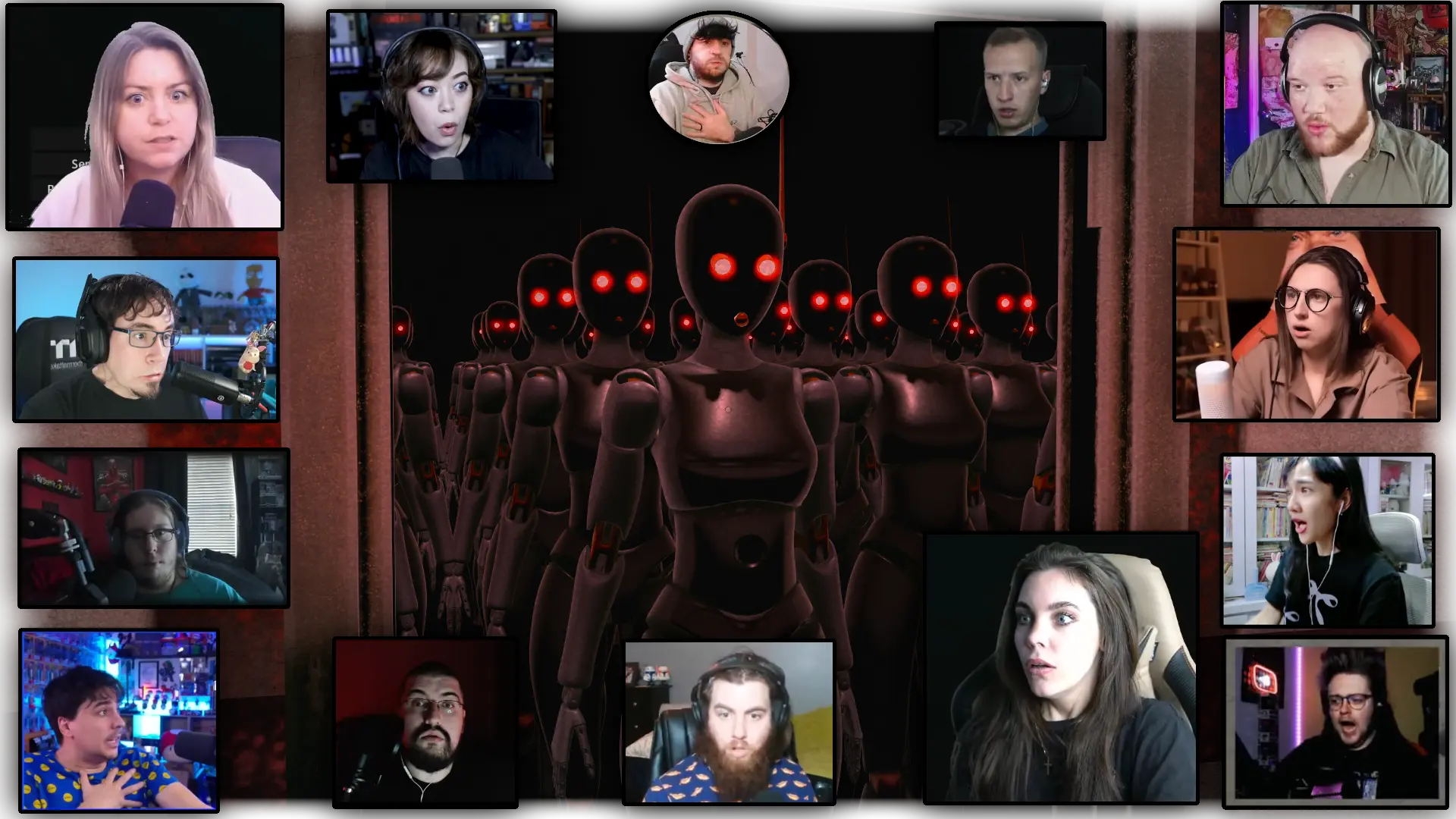
Watching streamers play your game can be nerve wracking, but also fun!

Just for fun I picked the best reactions for this image. Special thanks to the streamers!

My game is Robot Anomaly: https://store.steampowered.com/app/3583330/Robot_Anomaly/

224
225
view more: ‹ prev next ›